New to Telerik UI for WinForms? Start a free 30-day trial
Indicators
Updated on Aug 27, 2026
RadSparkline support the following indicators out of the box:
- High Point
- Low Point
- Negative Point
- First Point
- Last Point
The following image show how the indicator look with different kind of series.
Figure 1: Indicators
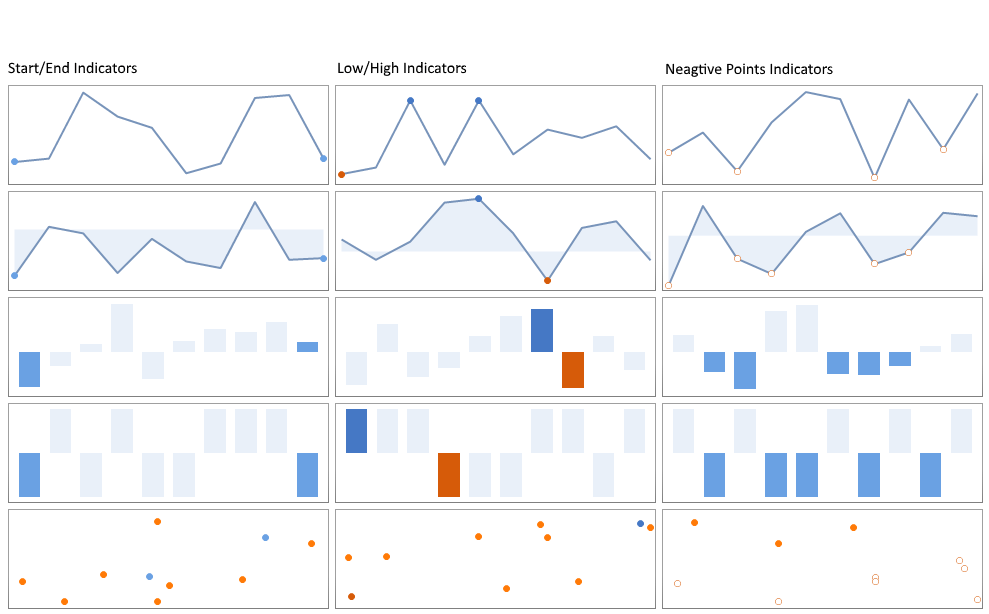
When the indicators are enabled the color of the respected point will be changed. You can customize the style of the indicators. The indicators properties are listed in the following article Series Overview.
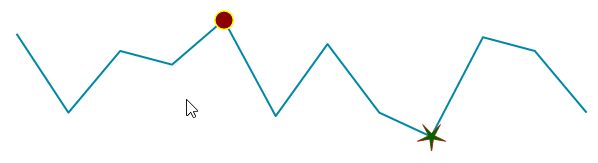
The below example shows how you can customize the indicators by setting some properties.
Customize Indicators Example
C#
public void StyleIndicators()
{
    SparkLineSeries series = new SparkLineSeries();
    series.ShowHighPointIndicator = true;
    series.ShowLowPointIndicator = true;
    series.HighPointBackColor = Color.DarkRed;
    series.HighPointBorderWidth = 3;
    series.HighPointBorderColor = Color.Yellow;
    series.HighPointSize = new SizeF(20, 20);
    series.LowPointShape = new StarShape(5, 5);
    series.LowPointBackColor = Color.DarkGreen;

    series.DataPoints.AddRange(GetPoints());
    radSparkline1.Series = series;
}
Figure 2: Show and Customize Indicators