New to Telerik UI for WinForms? Start a free 30-day trial
Strip Element Properties
Updated on Aug 27, 2026
You can use the following properties to change the behavior of the Strip View:
| Property | Description |
|---|---|
| ShowItemCloseButton | Shows/hides the tabs close button. |
| ShowItemPinButton | Shows/hides the pin button. This button allows you to pin some of the tabs. |
| StripButtons | Controls which strip button are currently visible. Detailed information is available here: Scrolling and Overflow (strip buttons) |
| ItemAlignment | Allows you to align the items.The possible values are: Near, Center, Far. |
| PreviewItem | You can use this property to set the preview item. This item is opened for preview on the far side of the regular items. 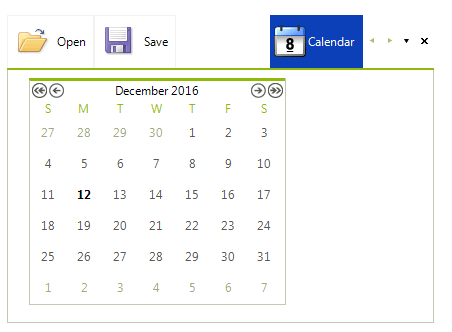 |
| StripAlignment | Allows you to align the entire strip. The possible values are: Bottom, Left, Top, Right. |
| NewItemVisibility | Gets or sets the visibility of the internal NewItem. |
| AnimatedStripScrolling | Determines whether strip scrolling will be animated. |
| StripScrollingAnimation | Gets or sets the easing type of the strip scroll animation. |
| ItemContainer | Gets the container that holds item layout and strip buttons panel. |
| ItemFitMode | Determines the fit mode to be applied when measuring child items. |
| MultiLineItemFitMode | Gets or sets the MultiLineItemFitMode. This mode determines how the multiline layout will behave when control is resizing. |
In order to be able to set the above properties you should cast the view element first:
Accessing the RadPageViewStripElement properties
C#
RadPageViewStripElement stripElement = (RadPageViewStripElement)this.radPageView1.ViewElement;
stripElement.StripButtons = StripViewButtons.All;