New to Telerik UI for WinForms? Start a free 30-day trial
Structure
Updated on Aug 27, 2026
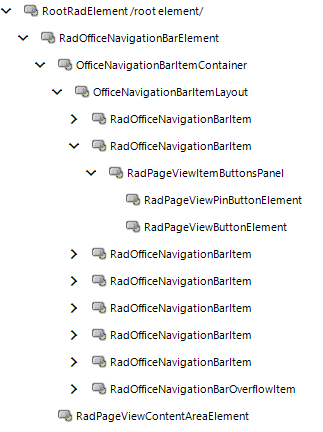
This article describes the inner structure and organization of the elements which build RadOfficeNavigationBar.
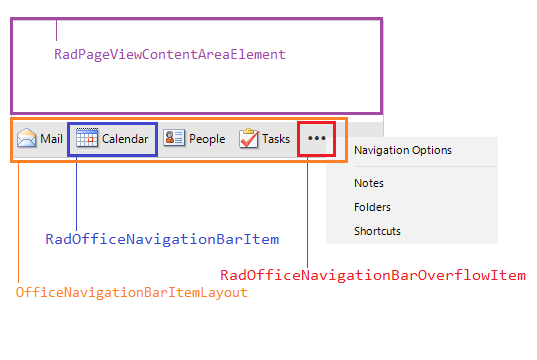
- RadOfficeNavigationBarElement - the main element in RadOfficeNavigationBar.
- OfficeNavigationBarItemContainer - holds the items and their content area.
-
OfficeNavigationBarItemLayout - represents the StripViewItemContainer that holds all the items.
- RadOfficeNavigationBarItem - represents a separate office item.
- RadOfficeNavigationBarOverflowItem - represents the options/ overflow button ("...") that allows the user navigate through the hidden items in the navigation bar. When you click the item, a RadContextMenuDropDown is shown.
-
RadPageViewContentAreaElement - represents the content area that is relevant to the currently selected office item.
-
- OfficeNavigationBarItemContainer - holds the items and their content area.
Elements Hierarchy