WinForms Inline AI Assistant Overview
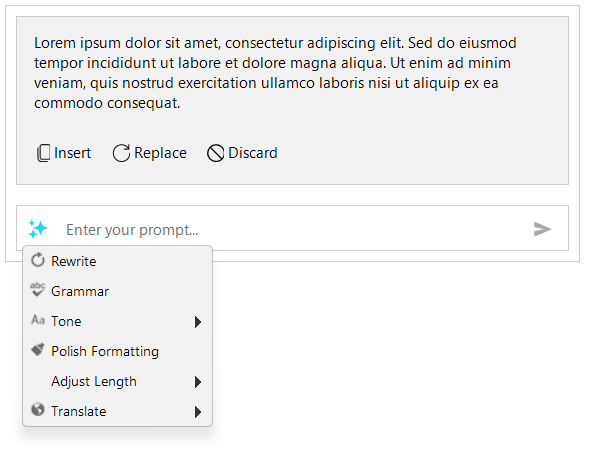
The Telerik UI for WinForms RadInlineAIAssistant component displays a prompt popup at the caret or selection of a text control. Users can enter a prompt or select an application-defined command, review the response, and insert it or use it to replace selected text without leaving the editor.
 Start Free Trial
RadInlineAIAssistant is a nonvisual component, not a text editor. It does not call an AI service itself. Your application handles the PromptRequest event, sends the required context to its chosen service, and supplies the response.
Key Features
- Contextual prompts: Open the popup at the caret or selection and access the selected text through the request event data.
- Predefined commands: Populate the commands dropdown with actions such as rewriting, correcting grammar, translating, or changing tone. Commands can be organized into groups.
- Complete and streamed responses: Supply a complete response or append chunks while the request is processing.
- Response actions: Insert the response at the caret, replace selected text, or discard the response and continue prompting. The interaction provider determines whether insertion and replacement are available.
- Request cancellation: Pass the request's cancellation token to your service. Request-specific response methods ignore updates from requests that are no longer active.
- Popup customization: Configure the prompt placeholder, popup width, response height, and theme. Use the events to control opening, closing, and response actions.
See Getting Started for a working example and Properties, Methods, and Events for the component API.
Supported Hosts
An interaction provider connects the assistant to a host. It supplies text and popup coordinates and applies the response to the host.
| Host | Setup |
|---|---|
Windows Forms TextBoxBase controls, including TextBox and RichTextBox | Call AttachTo(host) to create a built-in provider. |
RadTextBox and RadTextBoxControl | Call AttachTo(host) to create a built-in provider. |
RadRichTextEditor | Assign the editor's InlineAIAssistant property to attach the assistant and configure the editor-specific provider. |
AI Service Integration
The application chooses the AI service and decides which text to send. PromptRequest exposes the prompt, selected text, and lazily retrieved full host text. Accessing these values does not send them to a service automatically.
Use the event data's SetResponse method for a complete response, or AppendResponse followed by CompleteResponse for streaming. Handle service failures with FailResponse. The component manages the response display; it does not supply an AI model, credentials, or a built-in rewrite or translation service.