New to Telerik UI for WinForms? Start a free 30-day trial
Custom Context Menus
Updated on Aug 27, 2026
RadGridView provides a straightforward way to use custom context menus, instead of the default one. This context menu will appear every time the user right-clicks the RadGridView, regardless of the element of the control they click.
Figure 1: Custom Context Menu.
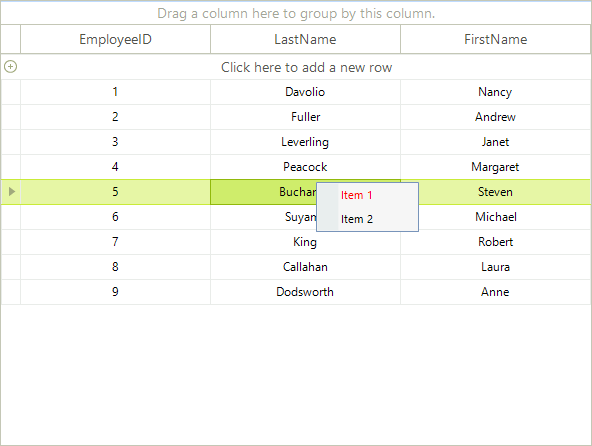
Start by creating the context menu, initializing its items, and subscribing for the events that you want to handle to achieve the desired behavior. Note: You will need Telerik.WinControls.UI namespace added to your "Using" (C#) or "Imports" (VB).
Setup the Context Menu
C#
private RadContextMenu contextMenu;
private void Form1_Load(object sender, EventArgs e)
{
    contextMenu = new RadContextMenu();
    RadMenuItem menuItem1 = new RadMenuItem("Item 1");
    menuItem1.ForeColor = Color.Red;
    menuItem1.Click += new EventHandler(menuItem1_Click);
    RadMenuItem menuItem2 = new RadMenuItem("Item 2");
    menuItem2.Click += new EventHandler(menuItem2_Click);
    contextMenu.Items.Add(menuItem1);
    contextMenu.Items.Add(menuItem2);
}

void menuItem2_Click(object sender, EventArgs e)
{

}

void menuItem1_Click(object sender, EventArgs e)
{

}Once the menu object has been initialized and populated with menu items, it is ready to be attached to the RadGridView. To do that, subscribe to the ContextMenuOpening event and set the context menu to be displayed:
ContextMenuOpening Event
C#
void radGridView1_ContextMenuOpening(object sender, ContextMenuOpeningEventArgs e)
{
    e.ContextMenu = contextMenu.DropDown;
}