New to Telerik UI for WinForms? Start a free 30-day trial
Rotation
Updated on Aug 27, 2026
RadDiagram gives you the ability to rotate shapes by dragging their Rotation Thumb or by changing their RotationAngle property.
Enable/Disable rotation
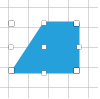
By default, the RadDiagram is enabled for rotation manipulation. In order to disable this functionality, you can set the IsRotationEnabled property to false.
C#
this.radDiagram1.IsRotationEnabled = false;
Rotation Angle
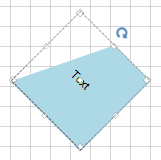
You can rotate shapes by using their RotationAngle property:
C#
RadDiagramShape sourceShape = new RadDiagramShape()
{
    Text = "Text",
    BackColor = System.Drawing.Color.LightBlue,
    ElementShape = new TabVsShape(),
};
sourceShape.RotationAngle = 45;