Commands
RadDiagram provides a powerful set of RoutedUICommands that help you work with your RadDiagram and its items easily and build better MVVM applications.
RadDiagram Commands
The static DiagramCommands class defines the following RoutedUICommands:
-
Align- Aligns the selected shapes.
-
Snap- Snaps the selected shapes.
-
Layout- Organizes the diagram automatically.
-
Copy- Copies selected diagram items.
-
Paste- Pastes selected diagram items.
-
Delete- Deletes selected diagram items.
-
Cut- Cut selected diagram items.
-
Duplicate- Duplicates selected item/s.
-
Undo- Undoes the last action.
-
Redo- Redoes the last action.
-
BringToFront- Brings to front selected diagram items.
-
BringForward- Brings forward selected diagram items.
-
SendToBack- Sends to back selected diagram items.
-
SendBackward- Sends backward selected diagram items.
-
Clear- Clears the diagram.
-
BeginEdit- Begins editing diagram item.
-
CommitEdit- Commits the edited changes.
-
CancelEdit- Cancels the edited changes.
-
SelectAll- Selects all shapes in the diagram.
-
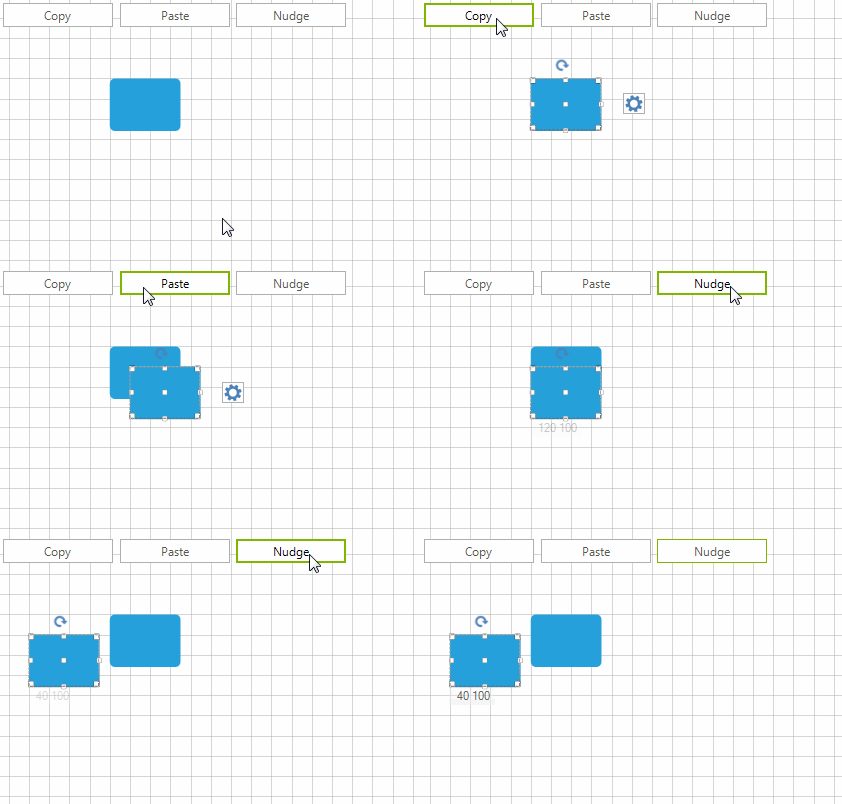
Nudge- Moves selected item/s in a specific direction. You can pass more specifics about the nudge operation through the CommandParameter. This parameter can be a single string representing the direction of the nudge:
-
Left
-
Right
-
Up
-
Down - it can also be a string in the form of "direction; amount", the 'direction' being a value from the above list of direction strings. The 'amount' options are:
-
Small - if the RadDiagram.IsSnapToGridEnabled property is set to true then this amount would mean that the nudge should happen once to the appointed direction using the SnapX/Y value as a step. The snap settings can be applied in the RadDiagram definition. If the RadDiagram.IsSnapToGridEnabled property is false, a "Small" amount indicates a step of 5 pixels;
-
Large - if the RadDiagram.IsSnapToGridEnabled property is set to true then this amount would mean that the nudge should happen once to the appointed direction using 5*SnapX/Y value as a step. The snap settings can be applied in the RadDiagram definition. If the RadDiagram.IsSnapToGridEnabled property is false, a "Large" amount indicates a step of 10 pixels;
-
any number - if you provide a number in the CommandParameter, this number would indicate the number of pixels to be used as a step for the Nudge command.
-
-
-
Group- Groups the selected items.
-
Ungroup- Ungroups the selected groups.
Using Diagram Commands
Below is shown a sample code snippet how you can use some of the Diagram Commands in an application by using the DiagramElement.TryExecuteCommand method:
private void radButton1_Click(object sender, EventArgs e)
{
    this.radDiagram1.DiagramElement.TryExecuteCommand(Telerik.WinControls.UI.Diagrams.DiagramCommands.Copy);
}

private void radButton2_Click(object sender, EventArgs e)
{
    this.radDiagram1.DiagramElement.TryExecuteCommand(Telerik.WinControls.UI.Diagrams.DiagramCommands.Paste);
}

private void radButton3_Click(object sender, EventArgs e)
{
    this.radDiagram1.DiagramElement.TryExecuteCommand(Telerik.WinControls.UI.Diagrams.DiagramCommands.Nudge, "Left");
}