New to Telerik UI for WinForms? Start a free 30-day trial
Design Time
Updated on Aug 27, 2026
To start using RadCalculator, just drag it from the toolbox and drop it onto the form.
Smart Tag
Select RadCalculator and click the small arrow on the top right position in order to open the Smart Tag.
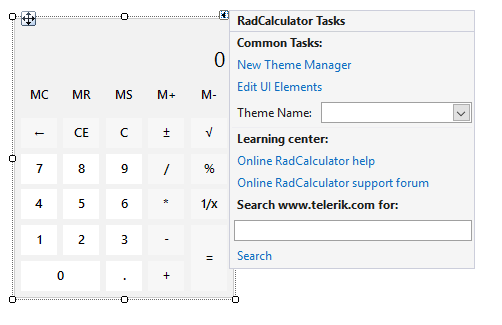
Common Tasks
-
New Theme Manager: Adds a new RadThemeManager component to the form.
-
Edit UI elements: Opens a dialog that displays the Element Hierarchy Editor. This editor lets you browse all the elements in the control.
-
Theme Name: Select a theme name from the drop down list of themes available in the application. Selecting a theme allows you to change all aspects of the control's visual style at one time.
Learning Center: Navigate to the Telerik help, code library projects or support forum.
Search: Search in the forum for a given string.