Telerik Reporting Menu Overview
The Visual Studio Report Designer for .NET is available as a preview starting with Telerik Reporting 2026 Q3 (20.2.26.1007).
The Telerik Reporting menu belongs to the installed Visual Studio extension used with the .NET Framework designer. In Visual Studio 2019 and later, open Extensions > Telerik > Reporting. Earlier versions expose Telerik > Reporting.
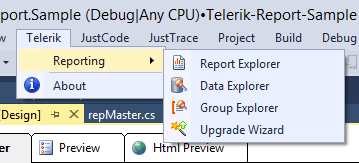
When the .NET Framework report designer is active, the menu provides the following commands:
- Report Explorer - allows you to see the structure of the report and to select any item in the report. This menu item is available only when you're in the context of the report designer.
- Data Explorer - provides an overview of the database fields that are available to your report. This menu item is available only when you're in the context of the report designer.
- Upgrade Wizard - guides you through the process of upgrading the projects and files of the current open solution to a newer version of Telerik Reporting. This menu item is always available in the Telerik Reporting Menu.
- Group Explorer - the Group Explorer is an aid to navigating report/table groups. The Group Explorer allows you to see the structure of the groups, to select them and change the respective Grouping, Sorting and Filtering. This menu item is available only when you're in the context of the report designer.
The Upgrade Wizard option is always available in the extension menu. The explorer options are available only when the .NET Framework report designer is active.
If only Upgrade Wizard is visible when a .NET Framework report designer is open, give the designer window focus.
The following image shows the full extension menu available for the .NET Framework designer:
Opening Explorers in the .NET Designer
The NuGet-based .NET designer provides separate explorer windows. Open them through the report context menu's View submenu, not through Extensions > Telerik > Reporting.
For the procedure and an animation, see Explorer Windows.
Updating .NET Projects
The extension's Upgrade Wizard does not upgrade .NET projects. Update all Telerik Reporting package references to the same version instead. For prerelease builds, follow Updating the Designer Package.