Table Group Dialog Overview
The Table Group dialog allows you to add and configure row and column groups for Table, Crosstab, and List items in the Web Report Designer.
You can invoke the Table Group dialog when adding a new group through the Table Context Menu.
Dialog Configuration Options
The Table Group dialog provides two main modes of operation, controlled by radio button selection.
Grouping Type
Define how data is organized within the group.
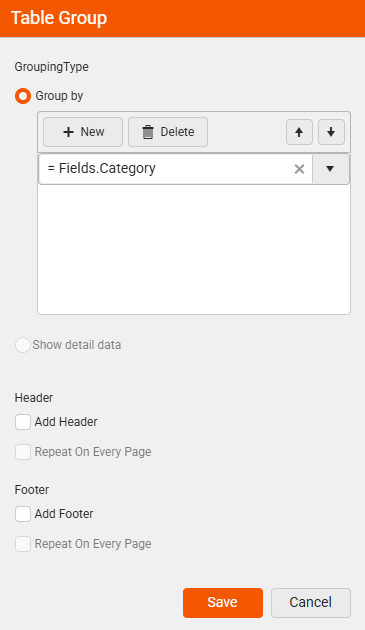
| Option | Description |
|---|---|
| Group by | Creates a regular group that aggregates data based on an expression. Click New to add a grouping expression (for example, = Fields.Category). Multiple expressions can be combined using a logical AND. |
| Show detail data | Creates a details group that displays individual data records without grouping. A details group has no grouping expression and creates a row (for row groups) or column (for column groups) for each record in the dataset. |
When Show detail data is selected, the header and footer options in the sections below become disabled.
Group Header Options
Configure whether and how the group header appears.
The Repeat On Every Page functionality for group headers and footers was introduced in version
20.0.26.211.
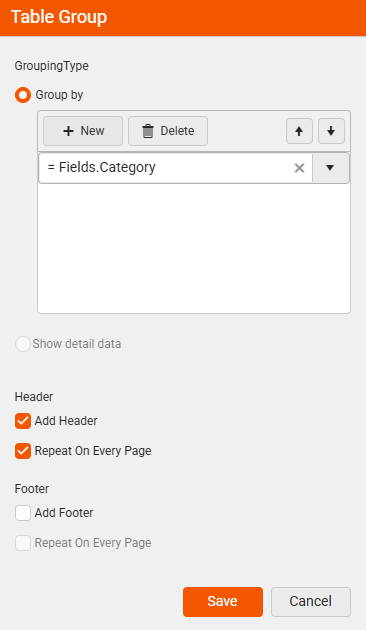
| Option | Description |
|---|---|
| Add Header | Adds a group header row (for row groups) or column (for column groups). The header displays once at the beginning of each group. |
| Repeat On Every Page | Repeats the group header on every page where the group appears. This option is only enabled when Add Header is selected. Useful for multi-page reports where a group spans multiple pages. When this option is enabled, the content of the repeated header can be controlled with the ReportItem.IsRepeated property in expressions to display different content for the first and subsequent appearances. To change the repeat behavior after group creation, see Edit the Repeat On Every Page Behavior. |
Group Footer Options
Configure whether and how the group footer appears.
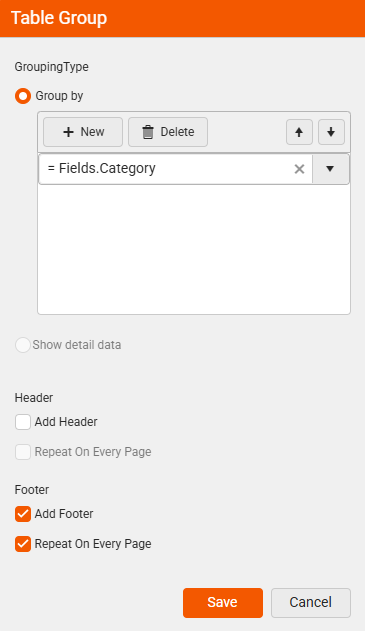
| Option | Description |
|---|---|
| Add Footer | Adds a group footer row (for row groups) or column (for column groups). The footer displays once at the end of each group. |
| Repeat On Every Page | Repeats the group footer on every page where the group appears. This option is only enabled when Add Footer is selected. When this option is enabled, the content of the repeated footer can be controlled with the ReportItem.IsRepeated property in expressions. To change the repeat behavior after group creation, see Edit the Repeat On Every Page Behavior. |
Repeatable headers and footers are not compatible with the
PageBreakproperty. If any group in the table has aPageBreakvalue other thanNone, repeatable headers and footers will not be processed and rendered, even ifPrintOnEveryPageis enabled.