Getting Started with the Telerik WebForms MultiColumnComboBox
The following tutorial demonstrates how you can add RadMultiColumnComboBox bound to SqlDataSource control. The end result will be similar to Figure 1:
Figure 1: RadMultiColumnComboBox bound to SqlDataSource control
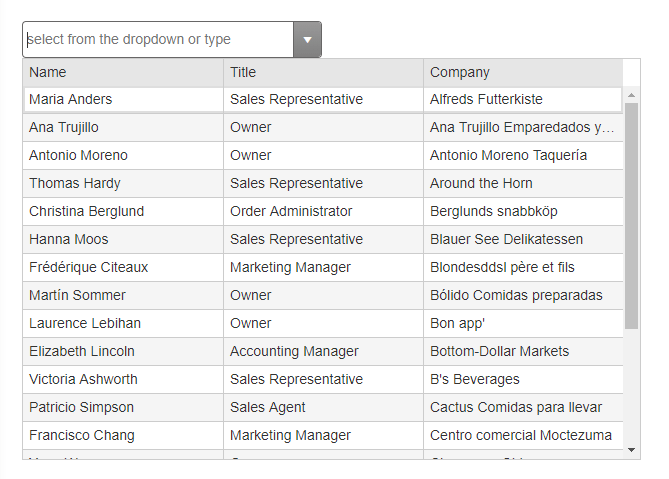
Add a ScriptManager control on a Web Form. After thatm, create a data source with your preferred method. For example:
    <asp:SqlDataSource runat="server" ID="SqlDataSource1" ConnectionString="<%$ ConnectionStrings:NorthwindConnectionString %>"
    ProviderName="System.Data.SqlClient"
    SelectCommand="SELECT Top 20 [CustomerID], [ContactName], [ContactTitle], [CompanyName] FROM [Customers]"></asp:SqlDataSource>
Add a RadMultiColumnComboBox control to the page, and set its properties:
-
DataSourceID- points to the SqlDataSource control ID. -
DataTextFieldandDataValueField- point them to the respective fields of the data source. -
FilterFields- these are the fields from the data source that will be used for filtering the text the user types. Set them according to the data source and your UX preferences. -
Filter- set it to "contains" to enable generic filtering. -
Placeholder,DropDownWidth,HeightandWidthcontrol its appearance much like with other inputs and dropdowns. -
HighlightFirst- by default, the first search result will be highlighted. You can disable this functionnality by setting the value to false. -
Populate the
ColumnsCollectionwithMultiColumnComboBoxColumninstances and set their properties:Field- the field from the data source that will be rendered.Title- the header text.Width- the width of the column. They should add up to the value of DropDownWidth.
The end result should be similar to the following:
    <telerik:RadMultiColumnComboBox runat="server" ID="RadMultiColumnComboBox1" DataSourceID="SqlDataSource1"
        DropDownWidth="600px" Height="400px" Width="100%" HighlightFirst="true"
        Filter="contains" FilterFields="ContactName, ContactTitle, CompanyName"
        DataTextField="ContactName" DataValueField="CustomerID"
        Placeholder="select from the dropdown or type" Skin="Default">
        <ColumnsCollection>
            <telerik:MultiColumnComboBoxColumn Field="ContactName" Title="Name" Width="200px" />
            <telerik:MultiColumnComboBoxColumn Field="ContactTitle" Title="Title" Width="200px" />
            <telerik:MultiColumnComboBoxColumn Field="CompanyName" Title="Company" Width="200px" />
        </ColumnsCollection>
    </telerik:RadMultiColumnComboBox>