New to Telerik UI for ASP.NET AJAX? Start a free 30-day trial
Toolbar Items
Updated on Nov 2, 2026
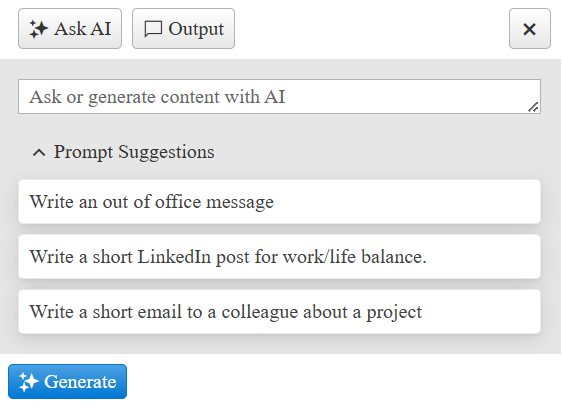
The AIPrompt gives the user the option to add Toolbar Items that display in the header Toolbar. They will be rendered after the items generated from the configurations of the views.
Options
Type
Set the Type of the Toolbar Item. Available options are Spacer and Button.
Icon
Sets the icon of the Toolbar Item. For a full list of icons, please check the Progress Design System Kit
Click
Set a function to the Toolbar Item.
Create Toolbar Items
In the Markup
Example: Add a spacer and button to the AIPrompt toolbar
ASP.NET
<telerik:RadAIPrompt runat="server" ID="RadAIPrompt1" Width="400px">
    <ToolbarItems>
        <telerik:AIPromptToolbarItem Type="Spacer" />
        <telerik:AIPromptToolbarItem Type="Button" Icon="x" Click="onClick" />
    </ToolbarItems>
</telerik:RadAIPrompt>
In the CodeBehind
Example: Create AIPrompt toolbar items in code
C#
protected void Page_Load(object sender, EventArgs e)
{
    if (!IsPostBack)
    {
        // Add a spacer before the custom toolbar button.
        AIPromptToolbarItem toolbarItem = new AIPromptToolbarItem()
        {
            Type = AIPromptToolbarItemType.Spacer
        };

        RadAIPrompt1.ToolbarItems.Add(toolbarItem);

        toolbarItem = new AIPromptToolbarItem()
        {
            Type = AIPromptToolbarItemType.Button,
            Icon = "x",
            Click = "onClick"
        };

        RadAIPrompt1.ToolbarItems.Add(toolbarItem);
    }
}JavaScript
// Handle clicks from the custom toolbar button.
function onClick() {
    console.log("Click");
}