Progress Agentic RAG Demo App with Telerik UI for .NET MAUI
The Telerik UI for .NET MAUI Progress Agentic RAG Demo App is a comprehensive demo application showcasing the powerful integration between Progress Agentic RAG AI-powered search capabilities and Telerik UI for .NET MAUI controls. This application demonstrates how to build intelligent, data-driven cross-platform mobile and desktop interfaces that combine enterprise-grade AI retrieval with beautiful, functional user interfaces.
The app provides a practical example of how to leverage AI in .NET MAUI applications using the Telerik UI for .NET MAUI controls for the user interface and the Progress Agentic RAG service for the backend.
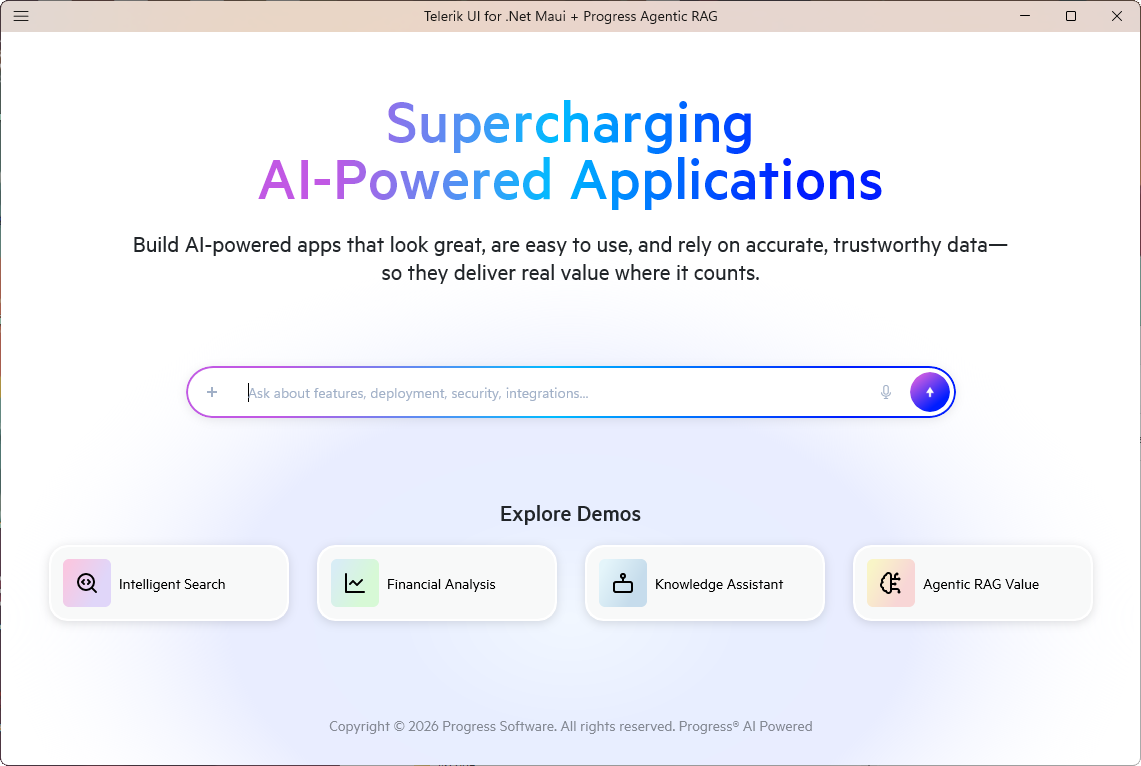
Desktop look of the .NET MAUI Progress Agentic RAG Demo App:
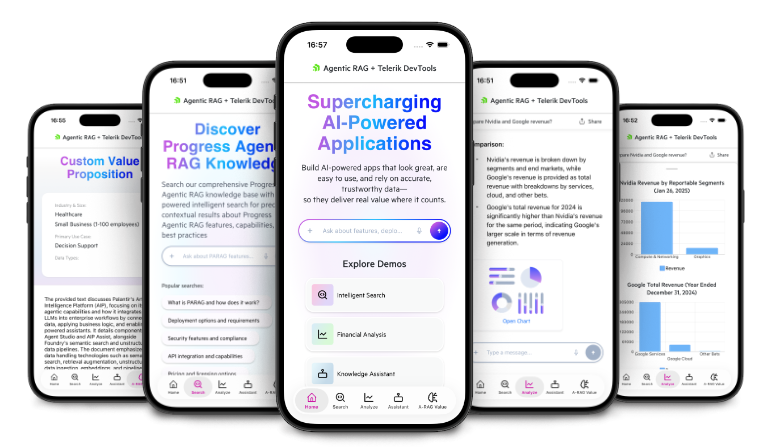
Mobile look of the .NET MAUI Progress Agentic RAG Demo App:
For full overview, features, setup, and usage, see the GitHub page: Progress Agentic RAG + Telerik UI for .NET MAUI Demo.
Prerequisites
Before running this project, ensure you have:
-
.NET 9.0 SDK—Download here.
-
Platform-specific requirements:
- Android—Android SDK (API level 21 or higher).
- iOS/macOS—macOS with Xcode 15.0 or later.
- Windows—Windows 10 SDK (10.0.17763.0 or higher).
-
Telerik UI for .NET MAUI license or trial
- Visit Telerik UI for .NET MAUI to obtain a license.
- You can start with a free trial. The trial provides full access to all components for 30 days.
-
Progress Agentic RAG account
- Sign up at Progress Agentic RAG.
- Create Knowledge Boxes and obtain API keys.
Getting Started
To run the Telerik UI for .NET MAUI Progress Agentic RAG Demo App, follow these steps:
1. Clone the Repository
Execute the following command in your terminal to clone the demo app repository:
git clone https://github.com/telerik/telerik-maui-progress-rag-demoThen navigate to the project directory:
cd maui-progress-rag-demo2. Configure Telerik UI for .NET MAUI controls Using the NuGet Package Sources
The Telerik packages require the Telerik NuGet feed. Add it to your NuGet configuration:
dotnet nuget add source "https://nuget.telerik.com/v3/index.json" \
  --name "TelerikNuGet" \
  --username "<your-telerik-email>" \
  --password "<your-telerik-password>"
Replace
<your-telerik-email>and<your-telerik-password>with your Telerik account credentials.
3. Configure Progress Agentic RAG
Update the maui-progress-rag-demo/appsettings.json file with your Progress Agentic RAG credentials:
{
  "NucliaDb": {
    "ZoneId": "europe-1",
    "KnowledgeBoxId": "<your-knowledge-box-id>",
    "ApiKey": "<your-api-key>"
  },
  "NucliaDbCharts": {
    "ZoneId": "aws-eu-central-1-1",
    "KnowledgeBoxId": "<your-charts-knowledge-box-id>",
    "ApiKey": "<your-charts-api-key>"
  },
  "NucliaDbVerse": {
    "ZoneId": "aws-us-east-2-1",
    "KnowledgeBoxId": "<your-verse-knowledge-box-id>",
    "ApiKey": "<your-verse-api-key>"
  }
}
For production deployments, use environment variables or secure storage instead of storing credentials in configuration files.
4. Restore Dependencies
Navigate to the project directory by running the following command:
cd telerik-maui-progress-rag-demoThen restore the NuGet packages:
dotnet restore5. Run the Application
Use the following commands to run the application on your desired platform:
| Platform | Command |
|---|---|
| Android | dotnet build -t:Run -f net9.0-android |
| Windows | dotnet build -t:Run -f net9.0-windows10.0.19041.0 |
| iOS (requires macOS) | dotnet build -t:Run -f net9.0-ios |
| MacCatalyst (requires macOS) | dotnet build -t:Run -f net9.0-maccatalyst |
Another approach is to open the maui-progress-rag-demo.slnx in Visual Studio and select your target platform from the dropdown (Android or Windows).
To run the app on iOS or MacCatalyst you can use Visual Studio Code for macOS.
Configuration
Configure the app to use Progress Agentic RAG with the environment variables below.
Environment Variables
For production deployments, configure the following environment variables:
| Variable | Description |
|---|---|
NucliaDb__ZoneId | Zone ID for the default Knowledge Box |
NucliaDb__KnowledgeBoxId | Knowledge Box ID for general queries |
NucliaDb__ApiKey | API key for the default Knowledge Box |
NucliaDbCharts__ZoneId | Zone ID for the charts Knowledge Box |
NucliaDbCharts__KnowledgeBoxId | Knowledge Box ID for financial data |
NucliaDbCharts__ApiKey | API key for the charts Knowledge Box |
NucliaDbVerse__ZoneId | Zone ID for the verse Knowledge Box |
NucliaDbVerse__KnowledgeBoxId | Knowledge Box ID for documentation |
NucliaDbVerse__ApiKey | API key for the verse Knowledge Box |
For more details about the application structure and configuration, refer to the README file in the GitHub repo: maui-progress-rag-demo.