.NET MAUI Chat Attachments Templates
The Telerik UI for .NET MAUI Chat control allows you to customize the appearance of the attachments in both the input area and the messages by changing the default template of the ChatInputAreaAttachedFileItemView.
When working with attachments, you need to grant permissions to access the device camera and device external storage. For more details, review the Microsoft Media Picker article.
Customize the Attachments Template in the Input Area
To customize the appearance of the attachments in the input area, you can define a custom ControlTemplate for the ChatInputAreaAttachedFileItemView.
Customize the Attachments Template in the Messages
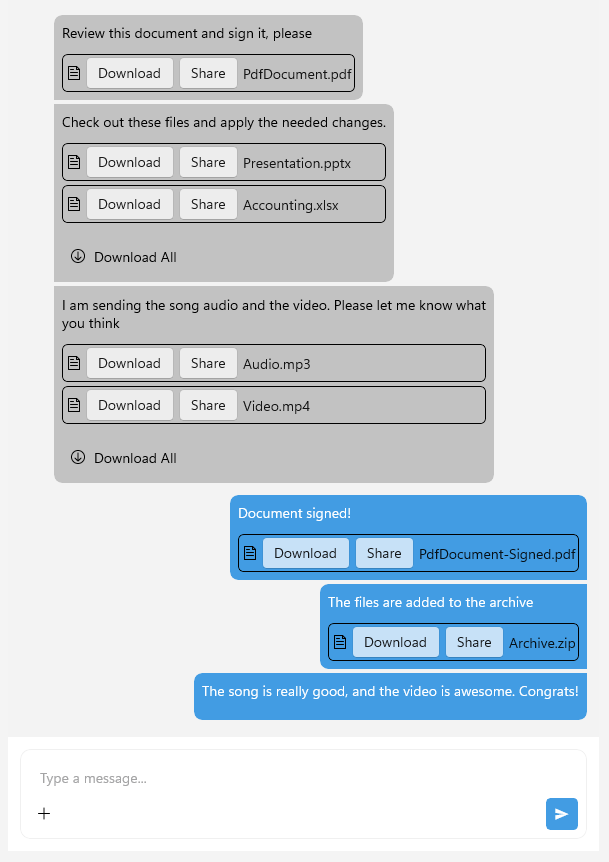
To customize the appearance of the attachments in the messages, you can define a custom ControlTemplate in the ChatMessageAttachmentView. Below is an example of how to create a custom template for the attachments in the messages:
<Style TargetType="telerik:ChatMessageAttachmentView">
	<Setter Property="ControlTemplate">
		<Setter.Value>
			<ControlTemplate>
				<telerik:RadBorder BorderColor="Black" BorderThickness="1" CornerRadius="5">
					<HorizontalStackLayout Spacing="5" Padding="2">
						<Image>
							<Image.Source>
								<FontImageSource FontFamily="{Static telerik:TelerikFont.Name}"
												 Glyph="{Static telerik:TelerikFont.IconFile}"
												 Size="16"
												 Color="Black" />
							</Image.Source>
						</Image>
						<telerik:RadTemplatedButton Content="Download"
													Command="{Binding DownloadAttachmentsCommand, Source={RelativeSource AncestorType={Type telerik:RadChat}}}"
													CommandParameter="{TemplateBinding Attachment}" />
						<telerik:RadTemplatedButton Content="Share"
													Command="{Binding ShareAttachmentsCommand, Source={RelativeSource AncestorType={Type telerik:RadChat}}}"
													CommandParameter="{TemplateBinding Attachment}" />
						<Label Text="{TemplateBinding Attachment.FileName}"
							   VerticalTextAlignment="Center"/>
					</HorizontalStackLayout>
				</telerik:RadBorder>
			</ControlTemplate>
		</Setter.Value>
	</Setter>
</Style>
And the final result:
Customize the Attachment Actions Template
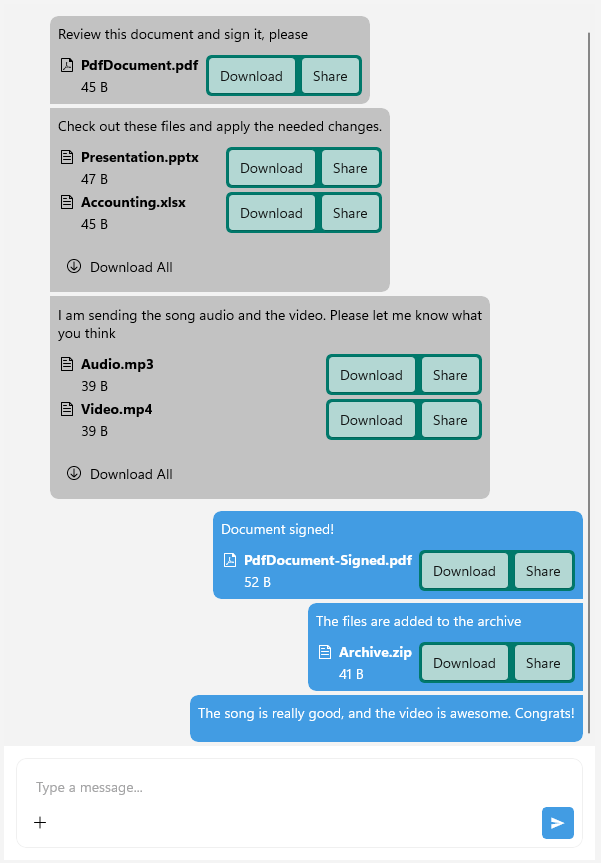
You can also customize the actions template of the attachments in the messages by defining a custom ControlTemplate for the ChatMessageAttachmentActionsView.
Here is an example of how to create a custom actions template for the attachments in the messages:
<Style TargetType="telerik:ChatMessageAttachmentActionsView">
	<Setter Property="ControlTemplate">
		<Setter.Value>
			<ControlTemplate>
				<telerik:RadBorder BackgroundColor="#00796B" CornerRadius="5">
					<HorizontalStackLayout Spacing="5" Padding="2">
						<telerik:RadTemplatedButton Content="Download"
													Command="{Binding DownloadAttachmentsCommand, Source={RelativeSource AncestorType={Type telerik:RadChat}}}"
													CommandParameter="{TemplateBinding Attachment}" />
						<telerik:RadTemplatedButton Content="Share"
													Command="{Binding ShareAttachmentsCommand, Source={RelativeSource AncestorType={Type telerik:RadChat}}}"
													CommandParameter="{TemplateBinding Attachment}" />
					</HorizontalStackLayout>
				</telerik:RadBorder>
			</ControlTemplate>
		</Setter.Value>
	</Setter>
</Style>
And the final result:
For a runnable example with the Chat Attachments Template, see the SDKBrowser Demo Application and go to Chat > Features category.