New to Telerik UI for .NET MAUI? Start a free 30-day trial
.NET MAUI Chat Commands
Updated on Aug 20, 2026
The Telerik UI for .NET MAUI Chat allows you to attach commands that will be executed when certain actions occur.
Commands Related to the Chat Input Area:
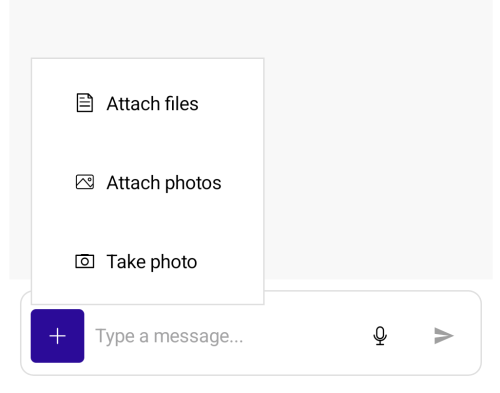
SendMessageCommand(ICommand)—Defines the command that is executed when the send button is clicked or theEnterkey is pressed.PickFileCommand(ICommand)—Defines the command that opens the Microsoft.Maui.Storage.FilePicker for attaching files for upload.PickPhotoCommand(ICommand)—Defines the command that opens the Microsoft.Maui.Media.MediaPicker for attaching photos for upload.TakePhotoCommand(ICommand)—Defines the command that opens the camera for attaching a photo.
When working with attachments, you need to grant permissions to access the device camera and device external storage. For more details, review the Microsoft Media Picker article.
Commands Related to Attachments
AttachFilesCommand(ICommand)—Defines the command that is executed when the files the end-user picked need to be attached/uploaded. The command need to be implemented in order to attach files to the messages.DownloadAttachmentsCommand(ICommand)—Defines the command that is executed when the end user initiates download of attachments for aTelerik.Maui.Controls.Chat.ChatAttachmentsMessage. The command parameter of this command is of typeTelerik.Maui.Controls.Chat.ChatDownloadAttachmentsCommandContext.ShareAttachmentsCommand(ICommand)—Defines the command that triggers the share attachments operation.RemoveAttachedFileCommand(ICommand)—Defines the command that should remove an attached file from theTelerik.Maui.Controls.RadChat.AttachedFilesSourcecollection in the view model.
Example with SendMessageCommand
Here is an example on how to define a command in the ViewModel and bind the SendMessageCommand to it:
- Add the command's
Executemethod.
C#
private void NewMessageCommandExecute(object obj)
{
    var newMessage = (string)obj;
    //any additional logic you need to implement
    this.MessagesLog.Add(new LogItem() { Message = "You just added a new message with text " + newMessage });
}- Define the
RadChatcomponent:
XAML
<telerik:RadChat x:Name="chat"
                Grid.Row="1"
                ItemsSource="{Binding Items}"
SendMessageCommand="{Binding NewMessageCommand}" />- Add the ViewModel:
C#
public ViewModel()
{
    this.Items = new ObservableCollection<ChatItem>();
    this.NewMessageCommand = new Command(NewMessageCommandExecute);

    this.MessagesLog = new ObservableCollection<LogItem>();
}

public ObservableCollection<LogItem> MessagesLog { get; set; }
public ICommand NewMessageCommand { get; set; }
public IList<ChatItem> Items { get; set; }
Example with AttachFilesCommand
- Define the
RadChatcomponent:
XAML
<ContentView.Resources>
	<ResourceDictionary>
		<local:ItemConverter x:Key="ItemConverter" />
	</ResourceDictionary>
</ContentView.Resources>

<telerik:RadChat ItemConverter="{StaticResource ItemConverter}"
				 ItemsSource="{Binding Items}"
				 IsMoreButtonVisible="True"
				 Message="{Binding Message}"
				 SendMessageCommand="{Binding SendMessageCommand}"
				 AttachedFileConverter="{Static local:AttachedFileConverter.Instance}"
				 AttachedFilesSource="{Binding AttachedFiles}"
AttachFilesCommand="{Binding AttachFilesCommand, Converter={Static local:AttachFilesCommandConverter.Instance}}" />- Add the
ViewModelwith theAttachFilesCommanddefinition:
C#
public class ChatWithAttachmentsViewModel : NotifyPropertyChangedBase
{
	private int attachmentsCount;
	private ObservableCollection<AttachedFileData> attachedFiles;
	private Command sendMessageCommand;
	private object message;

	public ChatWithAttachmentsViewModel()
	{
		this.Me = "human";
		this.Bot = "bot";

		this.Items = new ObservableCollection<MessageItem>();
		this.sendMessageCommand = new Command(this.ExecuteSendMessageCommand, this.CanExecuteSendMessageCommand);
		this.AttachedFiles = new ObservableCollection<AttachedFileData>();
		this.AttachFilesCommand = new Command(this.AttachFiles);

		this.LoadDataFromService();
	}

	public object Me { get; }

	public object Bot { get; }

	public object Message
	{
		get => this.message;
		set => this.UpdateValue(ref this.message, value);
	}

	public IList<MessageItem> Items { get; set; }

	public ICommand AttachFilesCommand { get; }

	public ICommand SendMessageCommand { get => this.sendMessageCommand; }

	public ObservableCollection<AttachedFileData> AttachedFiles
	{
		get => this.attachedFiles;
		set => this.UpdateValue(ref this.attachedFiles, value, this.OnAttachedFilesChanged);
	}

	private async void LoadDataFromService()
	{
		await DataFileService.Init();
		List<PredefinedFile> files = DataFileService.predefinedFiles;

		this.Items.Add(new AttachmentsItem { Author = this.Bot, Text = "Review this document and sign it, please", Attachments = this.GetAttachments(1) });
		this.Items.Add(new AttachmentsItem { Author = this.Bot, Text = "Check out these files and apply the needed changes.", Attachments = this.GetAttachments(2) });
		this.Items.Add(new AttachmentsItem { Author = this.Bot, Text = "I am sending the song audio and the video. Please let me know what you think", Attachments = this.GetAttachments(2) });
		this.Items.Add(new AttachmentsItem { Author = this.Me, Text = "Document signed!", Attachments = this.GetAttachments(1) });
		this.Items.Add(new AttachmentsItem { Author = this.Me, Text = "The files are added to the archive", Attachments = this.GetAttachments(1) });
		this.Items.Add(new AttachmentsItem { Author = this.Me, Text = "The song is really good, and the video is awesome. Congrats!", Attachments = this.GetAttachments(0) });
	}

	private void OnAttachedFilesChanged(ObservableCollection<AttachedFileData> oldValue)
	{
		if (oldValue != null)
		{
			oldValue.CollectionChanged -= this.AttachedFiles_CollectionChanged;
		}

		if (this.attachedFiles != null)
		{
			this.attachedFiles.CollectionChanged += this.AttachedFiles_CollectionChanged;
		}

		this.sendMessageCommand.ChangeCanExecute();
	}

	private async void AttachedFiles_CollectionChanged(object sender, NotifyCollectionChangedEventArgs args)
	{
		this.sendMessageCommand.ChangeCanExecute();

		if (args.Action == NotifyCollectionChangedAction.Add)
		{
			// We want to start the upload process for the newly added file.
			foreach (AttachedFileData attachedFileData in args.NewItems)
			{
				await this.TryUploadFile(attachedFileData);
			}
		}
		else if (args.Action == NotifyCollectionChangedAction.Remove)
		{
			// User decided to not send the file, so delete it from the server.
			foreach (AttachedFileData attachedFileData in args.OldItems)
			{
				this.TryDeleteFile(attachedFileData);
			}
		}

		this.sendMessageCommand.ChangeCanExecute();
	}

	private async Task TryUploadFile(AttachedFileData attachedFileData)
	{
		if (!this.AttachedFiles.Contains(attachedFileData))
		{
			// The item was removed before we had a chance to upload it.
			return;
		}

		using (Stream stream = await attachedFileData.GetStream())
		{
			Guid guid = await DataFileService.UploadFile(stream);

			if (!this.AttachedFiles.Contains(attachedFileData))
			{
				// The item was removed while upload was running.
				DataFileService.DeleteFile(guid);
				return;
			}
			else if (guid != Guid.Empty)
			{
				attachedFileData.Guid = guid;
			}
		}
	}

	private void TryDeleteFile(AttachedFileData attachedFileData)
	{
		DataFileService.DeleteFile(attachedFileData.Guid);
	}

	private void AttachFiles(object commandParameter)
	{
		IList<AttachedFileData> filesToAttach = (IList<AttachedFileData>)commandParameter;
		foreach (AttachedFileData attachedFileData in filesToAttach)
		{
			this.AttachedFiles.Add(attachedFileData);
		}

		// Instruct the RadChat to not attempt to auto add files.
		filesToAttach.Clear();
	}

	private ObservableCollection<AttachmentData> GetAttachments(int count)
	{
		ObservableCollection<AttachmentData> list = new ObservableCollection<AttachmentData>();

		for (int i = 0; i < count; i++)
		{
			PredefinedFile file = DataFileService.predefinedFiles[this.attachmentsCount % DataFileService.predefinedFiles.Count];
			AttachmentData attachmentsData = new AttachmentData { Name = file.fileName, Size = file.fileSize, Guid = file.guid, };
			list.Add(attachmentsData);
			this.attachmentsCount++;
		}

		return list;
	}

	private static AttachmentData CreateAttachmentData(AttachedFileData attachedFile)
	{
		return new AttachmentData { Name = attachedFile.Name, Size = attachedFile.Size, Guid = attachedFile.Guid, };
	}

	private bool CanExecuteSendMessageCommand(object arg)
	{
		string myMessageString = this.message as string;
		if (string.IsNullOrWhiteSpace(myMessageString))
		{
			return true;
		}

		if (this.AttachedFiles.Any(file => file.Guid == Guid.Empty))
		{
			return false;
		}

		return true;
	}

	private void ExecuteSendMessageCommand(object obj)
	{
		string myMessageString = this.message as string;
		this.Message = string.Empty;
		ObservableCollection<AttachedFileData> attachedFiles = this.AttachedFiles;

		if (attachedFiles.Count != 0)
		{
			// Create a new collection without deleting the uploaded files.
			this.AttachedFiles = new ObservableCollection<AttachedFileData>();
			ObservableCollection<AttachmentData> attachments = new ObservableCollection<AttachmentData>(attachedFiles.Select(CreateAttachmentData));
			AttachmentsItem attachmentsMessage = new AttachmentsItem { Author = this.Me, Text = myMessageString, Attachments = attachments };
			this.Items.Add(attachmentsMessage);
		}
		else
		{
			MessageItem message = new MessageItem { Author = this.Me, Text = myMessageString, };
			this.Items.Add(message);
		}
	}
}- Create a sample
MessageItemmodel:
C#
public class MessageItem : NotifyPropertyChangedBase
{
	private object author;
	private string text;

	public object Author
	{
		get => this.author;
		set => this.UpdateValue(ref this.author, value);
	}

	public string Text
	{
		get => this.text;
		set => this.UpdateValue(ref this.text, value);
	}
}
- Create
AttachmentsItemclass and define the attachments collection property:
C#
public class AttachmentsItem : MessageItem
{
	private ObservableCollection<AttachmentData> attachments;

	public ObservableCollection<AttachmentData> Attachments
	{
		get => this.attachments;
		set => this.UpdateValue(ref this.attachments, value);
	}
}- Define an
AttachmentDataclass to hold the attachment information:
C#
public class AttachmentData : NotifyPropertyChangedBase
{
	private string name;
	private long size;
	private Guid guid;

	public string Name
	{
		get => this.name;
		set => this.UpdateValue(ref this.name, value);
	}

	public long Size
	{
		get => this.size;
		set => this.UpdateValue(ref this.size, value);
	}

	public Guid Guid
	{
		get => this.guid;
		set => this.UpdateValue(ref this.guid, value);
	}
}- Define the custom class for the attachments file data:
C#
public class AttachedFileData : NotifyPropertyChangedBase
{
	private string name;
	private long size;
	private Func<Task<Stream>> getStream;
	private Guid guid;

	public string Name
	{
		get => this.name;
		set => this.UpdateValue(ref this.name, value);
	}

	public long Size
	{
		get => this.size;
		set => this.UpdateValue(ref this.size, value);
	}

	public Guid Guid
	{
		get => this.guid;
		set => this.UpdateValue(ref this.guid, value);
	}

	public Func<Task<Stream>> GetStream
	{
		get => this.getStream;
		set => this.UpdateValue(ref this.getStream, value);
	}
}- Define a converter to convert a data item to a chat attachment. In general here you need to create and set up the corresponding
Telerik.Maui.Controls.Chat.ChatAttachedFilefor the given business object:
C#
public class AttachedFileConverter : IChatAttachedFileConverter
{
	private static AttachedFileConverter instance;

	public static AttachedFileConverter Instance => instance ??= new AttachedFileConverter();

	public ChatAttachedFile ConvertToChatAttachedFile(object dataItem, ChatAttachedFileConverterContext context)
	{
		AttachedFileData data = (AttachedFileData)dataItem;
		ChatAttachedFile chatAttachedFile = new ChatAttachedFile { Data = data, FileName = data.Name, FileSize = data.Size };
		return chatAttachedFile;
	}

	public object ConvertToDataItem(IFileInfo fileToAttach, ChatAttachedFileConverterContext context)
	{
		return CreateAttachedFileData(fileToAttach);
	}

	internal static AttachedFileData CreateAttachedFileData(IFileInfo file)
	{
		return new AttachedFileData { Name = file.FileName, Size = file.FileSize, GetStream = file.OpenReadAsync, };
	}
}- Define a custom converter that converts from chat specific objects to business objects, so that the
ViewModeldoes not have to handle chat specific classes:
C#
/// <summary>
/// A custom converter that converts from chat specific objects to business objects,
/// so that the ViewModel does not have to handle chat specific classes.
/// </summary>
public class AttachFilesCommandConverter : IValueConverter
{
	private static AttachFilesCommandConverter instance;

	public static AttachFilesCommandConverter Instance => instance ??= new AttachFilesCommandConverter();

	public object Convert(object value, Type targetType, object parameter, CultureInfo culture)
	{
		if (value is ICommand command)
		{
			return new AttachFilesCommand(command);
		}
		else
		{
			return value;
		}
	}

	public object ConvertBack(object value, Type targetType, object parameter, CultureInfo culture) => throw new NotImplementedException();

	class AttachFilesCommand : ICommand
	{
		private ICommand command;

		public AttachFilesCommand(ICommand command)
		{
			this.command = command;
			this.command.CanExecuteChanged += (s, e) => this.CanExecuteChanged?.Invoke(this, e);
		}

		public event EventHandler CanExecuteChanged;

		public bool CanExecute(object parameter)
		{
			if (parameter is IList<IFileInfo> filesToAttach)
			{
				List<AttachedFileData> attachedFileDatas = ToAttachedFileDatas(filesToAttach);
				return this.command.CanExecute(attachedFileDatas);
			}
			else
			{
				return false;
			}
		}

		public void Execute(object parameter)
		{
			if (parameter is IList<IFileInfo> filesToAttach)
			{
				List<AttachedFileData> attachedFileDatas = ToAttachedFileDatas(filesToAttach);
				this.command.Execute(attachedFileDatas);

				if (attachedFileDatas.Count == 0)
				{
					// Instruct the RadChat to not attempt to auto add files.
					filesToAttach.Clear();
				}
			}
			else
			{
				throw new InvalidOperationException($"The command parameter must be of type {nameof(IList<IFileInfo>)}.");
			}
		}

		private static List<AttachedFileData> ToAttachedFileDatas(IList<IFileInfo> filesToAttach)
		{
			return new List<AttachedFileData>(filesToAttach.Select(AttachedFileConverter.CreateAttachedFileData));
		}
	}
}- The
ItemConverteris need in MVVM scenario as custom items are used:
C#
public class ItemConverter : IChatItemConverter
{
	private static ItemConverter instance;

	public static ItemConverter Instance => instance ??= new ItemConverter();

	private Dictionary<object, Author> authorDict;

	public ItemConverter()
	{
		this.authorDict = new Dictionary<object, Author>();
	}

	public ChatItem ConvertToChatItem(object dataItem, ChatItemConverterContext context)
	{
		MessageItem message = (MessageItem)dataItem;
		ChatMessage chatMessage;

		if (message is AttachmentsItem attachmentsItem)
		{
			List<ChatAttachment> chatAttachments = attachmentsItem.Attachments.Select(CreateChatAttachment).ToList();
			chatMessage = new ChatAttachmentsMessage { Attachments = chatAttachments };
			chatMessage.SetBinding(ChatAttachmentsMessage.TextProperty, new Binding(nameof(MessageItem.Text)) { Source = message });
		}
		else
		{
			chatMessage = new TextMessage();
			chatMessage.SetBinding(TextMessage.TextProperty, new Binding(nameof(MessageItem.Text)) { Source = message });
		}

		chatMessage.Data = message;
		chatMessage.Author = GetOrCreateAuthor(message.Author, context);
		return chatMessage;
	}

	public object ConvertToDataItem(object message, ChatItemConverterContext context)
	{
		// We add a new message into the messages in the view model when the SendMessageCommand is executed, so no need to create a new data item here.
		return null;
	}

	private static ChatAttachment CreateChatAttachment(AttachmentData attachment)
	{
		ChatAttachment chatAttachment = new ChatAttachment { Data = attachment, FileName = attachment.Name, FileSize = attachment.Size };
		chatAttachment.GetFileStream = () => GetFileStreamTask(attachment);
		return chatAttachment;
	}

	private static async Task<Stream> GetFileStreamTask(AttachmentData attachment)
	{
		if (attachment.Guid != Guid.Empty)
		{
			Stream stream = await DataFileService.OpenFileStream(attachment.Guid);
			return stream;
		}
		else
		{
			return null;
		}
	}

	private Author GetOrCreateAuthor(object authorData, ChatItemConverterContext context)
	{
		Author author;

		if (!this.authorDict.TryGetValue(authorData, out author))
		{
			ChatWithAttachmentsViewModel vm = (ChatWithAttachmentsViewModel)context.Chat.BindingContext;

			if (object.Equals(vm.Me, authorData))
			{
				author = context.Chat.Author;
			}
			else
			{
				author = new Author();
				author.Data = authorData;
				author.Name = "" + authorData;
				author.Avatar = string.Format("{0}.png", authorData);
			}

			this.authorDict[authorData] = author;
		}

		return author;
	}
}- The demo uses a custom data file server for uploading, downloading and deleting attachments:
C#
public static class DataFileService
{
	internal static List<PredefinedFile> predefinedFiles;

	private static readonly Dictionary<Guid, ServerFile> files = new Dictionary<Guid, ServerFile>();

	internal static async Task Init()
	{
		if (predefinedFiles != null)
		{
			return;
		}

		List<PredefinedFile> list = new List<PredefinedFile>();

		List<string> fileNames = new List<string>
		{
			"PdfDocument.pdf",
			"Presentation.pptx",
			"Accounting.xlsx",
			"Audio.mp3",
			"Video.mp4",
			"PdfDocument-Signed.pdf",
			"Archive.zip",
			"TextFile.txt",
		};

		foreach (string fileName in fileNames)
		{
			using (MemoryStream stream = new MemoryStream(Encoding.UTF8.GetBytes($"this is fake content for file {fileName}")))
			{
				Guid guid = await UploadFile(stream);
				list.Add(new PredefinedFile { fileName = fileName, fileSize = stream.Length, guid = guid, });
			}
		}

		predefinedFiles = list;
	}

	public static async Task<Guid> UploadFile(Stream stream)
	{
		await Task.Yield();

		MemoryStream streamCopy = new MemoryStream();
		stream.CopyTo(streamCopy);
		ServerFile file = new ServerFile { stream = streamCopy };

		lock (files)
		{
			Guid guid = Guid.NewGuid();
			files[guid] = file;
			return guid;
		}
	}

	public static void DeleteFile(Guid guid)
	{
		ServerFile file;

		lock (files)
		{
			if (!files.ContainsKey(guid))
			{
				return;
			}

			file = files[guid];
			files.Remove(guid);
		}

		_ = Task.Run(() =>
		{
			lock (file)
			{
				file.stream.Dispose();
				file.isDisposed = true;
			}
		});
	}

	public static async Task<Stream> OpenFileStream(Guid guid)
	{
		await Task.Yield();

		ServerFile file;

		lock (files)
		{
			file = files[guid];
		}

		MemoryStream streamCopy = new MemoryStream();

		lock (file)
		{
			if (file.isDisposed)
			{
				throw new ObjectDisposedException("The file has been deleted from the server.");
			}

			file.stream.Position = 0;
			file.stream.CopyTo(streamCopy);
			streamCopy.Position = 0;
		}

		return streamCopy;
	}

	class ServerFile
	{
		internal MemoryStream stream;
		internal bool isDisposed;
	}

	internal class PredefinedFile
	{
		internal string fileName;
		internal long fileSize;
		internal Guid guid;
	}
}