or
0 answers
403 views
As we are internally using StyleCop for analyzing our C# code and improving readability and code maintainability, when using the Source Code of RadControls for WPF you should have StyleCop installed on your machine.
The "Microsoft.StyleCop.Targets was not found" error states that you either do not have StyleCop installed or not completely installed on your computer.
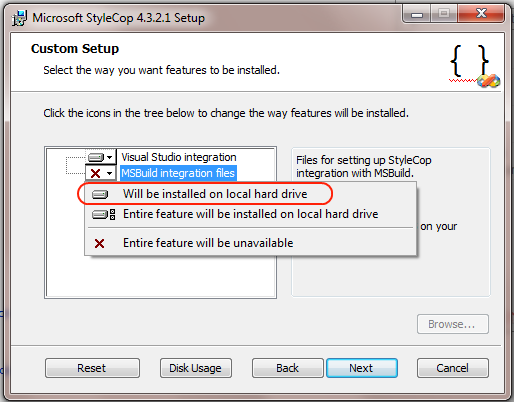
Our source code project requires this Visual Studio add-in. You should install the latest StyleCop version and try the Source Code project once again.
The "Microsoft.StyleCop.Targets was not found" error states that you either do not have StyleCop installed or not completely installed on your computer.
Our source code project requires this Visual Studio add-in. You should install the latest StyleCop version and try the Source Code project once again.

Telerik Admin
Top achievements
 Rank 1
 Iron
Iron
Rank 1
Iron
asked
on
04 Dec 2009
6 answers
525 views
I am evaluating the DataGrid you offer and I am trying to determine if it is possible to have multiple column headers on the grid. In other words the user can stack columns on top of other columns when reordering. Thank you
Keith Williams

Pavel Pavlov
Telerik team

answered
on
04 Dec 2009
1 answer
208 views
Hi,
My gridview is bound to collection of business objects that are generated by Linq2SQL. Some columns are bound to plain properties (string, int, etc.) while other columns are bound to entire objects like so....
Everything is working fine so far, except for the column filtering options. I want to be able to filter the 'Items' column like if it was of type string. I want to be able to choose "StartsWith" or "Contains" from the FilterEditor. All I see are equality operations to choose from. Is this somehow possible without reverting the column datatype to 'string' or having to write a custom filter editor?
| <telerik:RadGridView.Columns> |
| ... |
| <telerik:GridViewDataColumn Header="ID" IsReadOnly="True" DataMemberBinding="{Binding Path=Id}" |
| DataType="{x:Type System:Int32}" /> |
| <telerik:GridViewComboBoxColumn Header="Items" |
| DataType="{x:Type local:MyItem}" |
| ItemsSource="{Binding ElementName=MyWindow, Path=ViewModel.AvailableItems}" |
| DataMemberBinding="{Binding Path=SelectedItem}" |
| DisplayMemberPath="ItemName" |
| SelectedValueMemberPath=""/> |
| ... |
| </telerik:RadGridView.Columns> |
Everything is working fine so far, except for the column filtering options. I want to be able to filter the 'Items' column like if it was of type string. I want to be able to choose "StartsWith" or "Contains" from the FilterEditor. All I see are equality operations to choose from. Is this somehow possible without reverting the column datatype to 'string' or having to write a custom filter editor?
Thanks,
-Stephan Ziep
Rossen Hristov
Telerik team
answered
on
04 Dec 2009
1 answer
66 views
Created DataTemplateSelector for RadCalendar.
I have done it for day, month and year:
When i select year view (the view where i see all months for that year) this is the trace of what received (first column is CalendarButtonContent type) :
I have done it for day, month and year:
<telerik:RadCalendar x:Name="tlrkCalendar" Grid.Row="0" Grid.ColumnSpan="2" HorizontalAlignment="Center" VerticalAlignment="Center" Visibility="Visible" DayTemplate="{x:Null}" MonthTemplate="{x:Null}" YearTemplate="{x:Null}" IsTodayHighlighted="False" SelectionMode="Extended">
the problem is that that i receive correctly CalendarButtonType.Day and Year but never CalendarButtonType.Month.
When i select year view (the view where i see all months for that year) this is the trace of what received (first column is CalendarButtonContent type) :
Year -- 01/01/2009 00:00:00
Year -- 01/02/2009 00:00:00
Year -- 01/03/2009 00:00:00
Year -- 01/04/2009 00:00:00
Year -- 01/05/2009 00:00:00
Year -- 01/06/2009 00:00:00
Year -- 01/07/2009 00:00:00
Year -- 01/08/2009 00:00:00
Year -- 01/09/2009 00:00:00
Year -- 01/10/2009 00:00:00
Year -- 01/11/2009 00:00:00
Year -- 01/12/2009 00:00:00
Kaloyan
Telerik team
answered
on
04 Dec 2009
1 answer
181 views
Hi..
Any ideas how I can create a cool carousel of buttons (i.e. a Menu)
I have 10 buttons like this... thanks in advance
Any ideas how I can create a cool carousel of buttons (i.e. a Menu)
I have 10 buttons like this... thanks in advance
<telerik:RadButton Height="43" Margin="13.015,18,0,0" BorderThickness="1" BorderBrush="Blue" Name="btnMenu" VerticalAlignment="Top" FontSize="20" ClickMode="Press" Click="btnMenu1_Click" HorizontalAlignment="Left" Width="217">
<telerik:RadButton.Effect>
<DropShadowEffect ShadowDepth="5" />
</telerik:RadButton.Effect>
<StackPanel Orientation="Horizontal" Height="32" HorizontalAlignment="Right" VerticalAlignment="Bottom" Width="148.687">
<Image Source="/icons/truck_blue.png" Height="32" Width="32" />
<TextBlock Text="Menu Option1" Foreground="Navy" FontSize="18" Margin="9 0 0 0" />
</StackPanel>
</telerik:RadButton>
Milan
Telerik team
answered
on
04 Dec 2009
3 answers
247 views
If a click an image on the radcarousel how do I do to open a window or a dialog when I double click the selected image item of the carousel?
Milan
Telerik team
answered
on
04 Dec 2009
1 answer
196 views
Hi,
I am unable to find OldSortingState & NewSortingState properties in GridViewSortingEventArgs.. Follwing is your example, Please suggest
private void CustomSortingGrid_Sorting( object sender, GridViewSortingEventArgs e )
{
//Gets the value of the ItemsSource property as IEnumerable.
IEnumerable<Employee> employees = e.DataControl.ItemsSource as IEnumerable<Employee>;
//Checks if the value of the collection is null.
if ( employees == null )
{
e.Cancel = true;
return;
}
//If the sorting state is none, sort the items ascending.
if ( e.OldSortingState == SortingState.None )
{
e.NewSortingState = SortingState.Ascending;
employees = employees.OrderBy( employee => employee.GetType()
.GetProperty( e.SortPropertyName )
.GetValue( employee, null ) );
}
//If the sorting state is none, sort the items descending.
else if ( e.OldSortingState == SortingState.Ascending )
{
e.NewSortingState = SortingState.Descending;
employees = employees.OrderByDescending( employee => employee.GetType()
.GetProperty( e.SortPropertyName )
.GetValue( employee, null ) );
}
//If the sorting state is descending, apply default sorting to the items.
else
{
e.NewSortingState = SortingState.None;
employees = employees.OrderBy( employee => employee.EmployeeID );
}
//Set the sorted collection as source of the RadGridView
e.DataControl.ItemsSource = employees.ToList();
e.Cancel = true;
}
I am unable to find OldSortingState & NewSortingState properties in GridViewSortingEventArgs.. Follwing is your example, Please suggest
private void CustomSortingGrid_Sorting( object sender, GridViewSortingEventArgs e )
{
//Gets the value of the ItemsSource property as IEnumerable.
IEnumerable<Employee> employees = e.DataControl.ItemsSource as IEnumerable<Employee>;
//Checks if the value of the collection is null.
if ( employees == null )
{
e.Cancel = true;
return;
}
//If the sorting state is none, sort the items ascending.
if ( e.OldSortingState == SortingState.None )
{
e.NewSortingState = SortingState.Ascending;
employees = employees.OrderBy( employee => employee.GetType()
.GetProperty( e.SortPropertyName )
.GetValue( employee, null ) );
}
//If the sorting state is none, sort the items descending.
else if ( e.OldSortingState == SortingState.Ascending )
{
e.NewSortingState = SortingState.Descending;
employees = employees.OrderByDescending( employee => employee.GetType()
.GetProperty( e.SortPropertyName )
.GetValue( employee, null ) );
}
//If the sorting state is descending, apply default sorting to the items.
else
{
e.NewSortingState = SortingState.None;
employees = employees.OrderBy( employee => employee.EmployeeID );
}
//Set the sorted collection as source of the RadGridView
e.DataControl.ItemsSource = employees.ToList();
e.Cancel = true;
}

Vlad
Telerik team
answered
on
04 Dec 2009
7 answers
170 views
OPening the datagrid example I get this error:
User Instance login flag is not supported
I know it must have something to do with sql setteings.. any ideas on how to troubleshoot?
User Instance login flag is not supported
I know it must have something to do with sql setteings.. any ideas on how to troubleshoot?
Milan
Telerik team
answered
on
03 Dec 2009
1 answer
78 views
Hello
after I add or remove rows to my grid
I cant move between the rows with the arrow buttons
Thanks
after I add or remove rows to my grid
I cant move between the rows with the arrow buttons
Thanks
Vlad
Telerik team
answered
on
03 Dec 2009
3 answers
480 views
Lets say I have 100 rows, I want to select row number 10, how do I do that and also scroll the selected row into view.
Milan
Telerik team
answered
on
03 Dec 2009




