or
2 answers
430 views
I have a RadTextBox and RadDropDownList (DropDown style) on a winform and when I right click at runtime the context menu that pops up contains the usual cut/copy/paste items but it also has "Right to left Reading order", "Show Unicode control characters", "Insert Unicode control character", "Open IME" and "Reconversion" items. How can I disable/hide these unwanted context menu items?
Thanks!
~Paul
Thanks!
~Paul

Stefan
Telerik team

answered
on
11 Oct 2013
4 answers
333 views
I am using the ScreenTip feature to show some extra info in my RadGridView row when mousing over. That is working great but the delay is a bit much before it pops up when you mouse over it. I noticed here that the regular ToolTip has lots of properties that can be set to adjust this:
http://www.telerik.com/community/forums/winforms/gridview/tooltip-visible-time.aspx
I am wondering if you can include some code with samples here on how to do the same thing with the ScreenTip. Changing the code from that sample around didn't seem to work.
Thanks in advance!
http://www.telerik.com/community/forums/winforms/gridview/tooltip-visible-time.aspx
I am wondering if you can include some code with samples here on how to do the same thing with the ScreenTip. Changing the code from that sample around didn't seem to work.
Thanks in advance!

3 answers
183 views
I have combobox column that is populated with id's and set up to show the given name as a display member. I also set DisplayMemberSort to true.
This works great and sorting the column sorts by display member and not value member like it should. But when I group by this column it seems to revert back to sorting by value member when sorting the groups.
Is this supposed to happen? Is there a different way to keep sorting by display member?
' create location combo box columncol = grdPurchases.Columns("location_id")col.DataSource = locations ' DataGrid with "id" and "name" columns
col.DisplayMember = "name"col.ValueMember = "id"col.DisplayMemberSort = True' create default groupingsDim locationDescriptor As New GroupDescriptor()locationDescriptor.GroupNames.Add("location_id", System.ComponentModel.ListSortDirection.Ascending)grdPurchases.GroupDescriptors.Add(locationDescriptor)
Stefan
Telerik team
answered
on
11 Oct 2013
3 answers
139 views
Telerik,
If my program detects that new tag has been created, then I would like to have a message box prompting the user if they want to create the new tag. If they choose 'No' then the tag will not be created.
How would I cancel the creation of a new tag?
Thanks
If my program detects that new tag has been created, then I would like to have a message box prompting the user if they want to create the new tag. If they choose 'No' then the tag will not be created.
How would I cancel the creation of a new tag?
Thanks
Stefan
Telerik team
answered
on
10 Oct 2013
1 answer
742 views
How do I center the text in the Column Header?
Stefan
Telerik team
answered
on
10 Oct 2013
1 answer
191 views
Hey! I'm new using the RadlistView and I'm trying to use it with custom items. I'm working in winforms with c# and I've populated the ListView with some entities (working with entity framework) and used the VisualItemCreating for give them format (my list is on listview mode and each item has a picture).
Now I'm a little confused, how can I keep the highlitght on the selected item when the control lost the focus (I have more controls where I edit the info of the selected items)? And btw how can I format the highlight (when the items have the focus and when don't)?
thanks!
Juan.
Now I'm a little confused, how can I keep the highlitght on the selected item when the control lost the focus (I have more controls where I edit the info of the selected items)? And btw how can I format the highlight (when the items have the focus and when don't)?
thanks!
Juan.

Dess | Tech Support Engineer, Principal
Telerik team
answered
on
10 Oct 2013
5 answers
223 views
If have some related data in a couple of IList<> that I have read from SQL Server using Fluent NHibernate.
If have object of the following class in a list
and I have objects of this class in a list also
In my WinForms application I want to edit the MediaProperty value in a drop down list, and select the MediaProperty by the Name field in the list. The RadGridView has its DataSource property set as the list of Media, how do I configure the GridViewComboBoxColumn to provide the functionality I want.
Thanks in advance
If have object of the following class in a list
public class Media{ public virtual int Id { get; set; } public virtual string Name { get; set; } public virtual decimal Halo { get; set; } public virtual decimal ExchangeRate { get; set; } public virtual int DecimalPlaces { get; set; } public virtual bool IsCash { get; set; } public virtual MediaProperty Property { get; set; }}and I have objects of this class in a list also
public class MediaProperty{ public virtual int Id { get; set; } public virtual string Name { get; set; } public virtual bool InUse { get; set; } public virtual bool IsForeign { get; set; } public virtual bool TenderingProhibited { get; set; } public virtual bool OverTenderingProhibited { get; set; } public virtual bool TenderingZeroBalanceProhibited { get; set; } public virtual bool NoChangeFromThisMedia { get; set; } public virtual bool NoChangeGiven { get; set; } public virtual bool TenderingCompulsory { get; set; } public virtual bool ChangeGoesToTips { get; set; } public virtual bool ChangeFromSelectedMedia { get; set; } public virtual Enumerations.CidAffect AffectsCid { get; set; } public virtual Enumerations.DrawerOpen OpensDrawer { get; set; }}In my WinForms application I want to edit the MediaProperty value in a drop down list, and select the MediaProperty by the Name field in the list. The RadGridView has its DataSource property set as the list of Media, how do I configure the GridViewComboBoxColumn to provide the functionality I want.
Thanks in advance
5 answers
1.9K+ views
I'm trying to handle the KeyPress Event in the grid but it is never triggered ? I've tried the KeyUp and KeyDown too.
Once i set the TabStop property to true, i get the KeyUp event triggered but then again the next cell is not selected.
Question 1:
How can i handle the tab being press to move in the grid?
Question 2:
I also see that when TabStop is set to false, pressing the tab key moves the focus to the next cell and if rows are available bellow will move the focus to the first cell of next row when being at the end of a row. But this does not trigger the CurrentRowChanged? Is this normal ?
Thanks
Once i set the TabStop property to true, i get the KeyUp event triggered but then again the next cell is not selected.
Question 1:
How can i handle the tab being press to move in the grid?
Question 2:
I also see that when TabStop is set to false, pressing the tab key moves the focus to the next cell and if rows are available bellow will move the focus to the first cell of next row when being at the end of a row. But this does not trigger the CurrentRowChanged? Is this normal ?
Thanks

Peter
Telerik team
answered
on
10 Oct 2013
1 answer
842 views
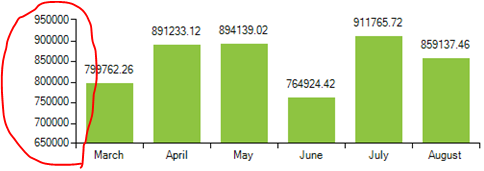
I use a bar chart in my project which displays the sales data. I would like to define the max and min values and also the increment value for each step .How can this be done please help or point me out to some articles.

Dimitar
Telerik team
answered
on
10 Oct 2013
1 answer
175 views
Hi,
I have a few issues and am using version 2012.2.608.20.
1) Hyperlink column ignores TextAlignment property for column and I have also set this with cell.ContentElement.TextAligment in the CellFormatting event. Neither will center the column contents.
2) My Hyperlink column does not contain a url, but simply is used to launch a detail form (it is a date field). The HyperlinkOpened/HyperlinkOpening have no effect and do not execute when the Hyperlink column/text is clicked. Is it possible to use the Hyperlink column for something other than a url?
3) I have used the Expression property of a textbox column to add the totals of other columns and this works. However, I have set the FormatString to {0:C2} and it does not work. The column is unformatted and does not show the $ sign or the comma in the number. What am I doing wrong?
Thank you,
David A.
I have a few issues and am using version 2012.2.608.20.
1) Hyperlink column ignores TextAlignment property for column and I have also set this with cell.ContentElement.TextAligment in the CellFormatting event. Neither will center the column contents.
2) My Hyperlink column does not contain a url, but simply is used to launch a detail form (it is a date field). The HyperlinkOpened/HyperlinkOpening have no effect and do not execute when the Hyperlink column/text is clicked. Is it possible to use the Hyperlink column for something other than a url?
3) I have used the Expression property of a textbox column to add the totals of other columns and this works. However, I have set the FormatString to {0:C2} and it does not work. The column is unformatted and does not show the $ sign or the comma in the number. What am I doing wrong?
Thank you,
David A.
George
Telerik team
answered
on
10 Oct 2013





