There is currently no component that has automatic currency formatting for Blazor. This is critical feature for business users who work with large amounts. People have no idea what they are typing without focusing out of input box.
2 Answers, 1 is accepted

Hello Garrett,
There are three ways to hint users what to type when they use a NumericTextBox:
- The non-focused value can show a currency symbol via Format.
- A non-focused empty nullable NumericTextBox can show a Placeholder.
- A non-empty automatically focused NumericTextBox can have an associated <label>.
Here is a REPL test page to demonstrate the above options.
Do I understand correctly that your scenario cannot fit in any of the above three suggestions? What is the exact use case?
Regards,
Dimo
Progress Telerik
 Rank 1
Hi,
No, that REPL test page does not demonstrate what I am talking about.
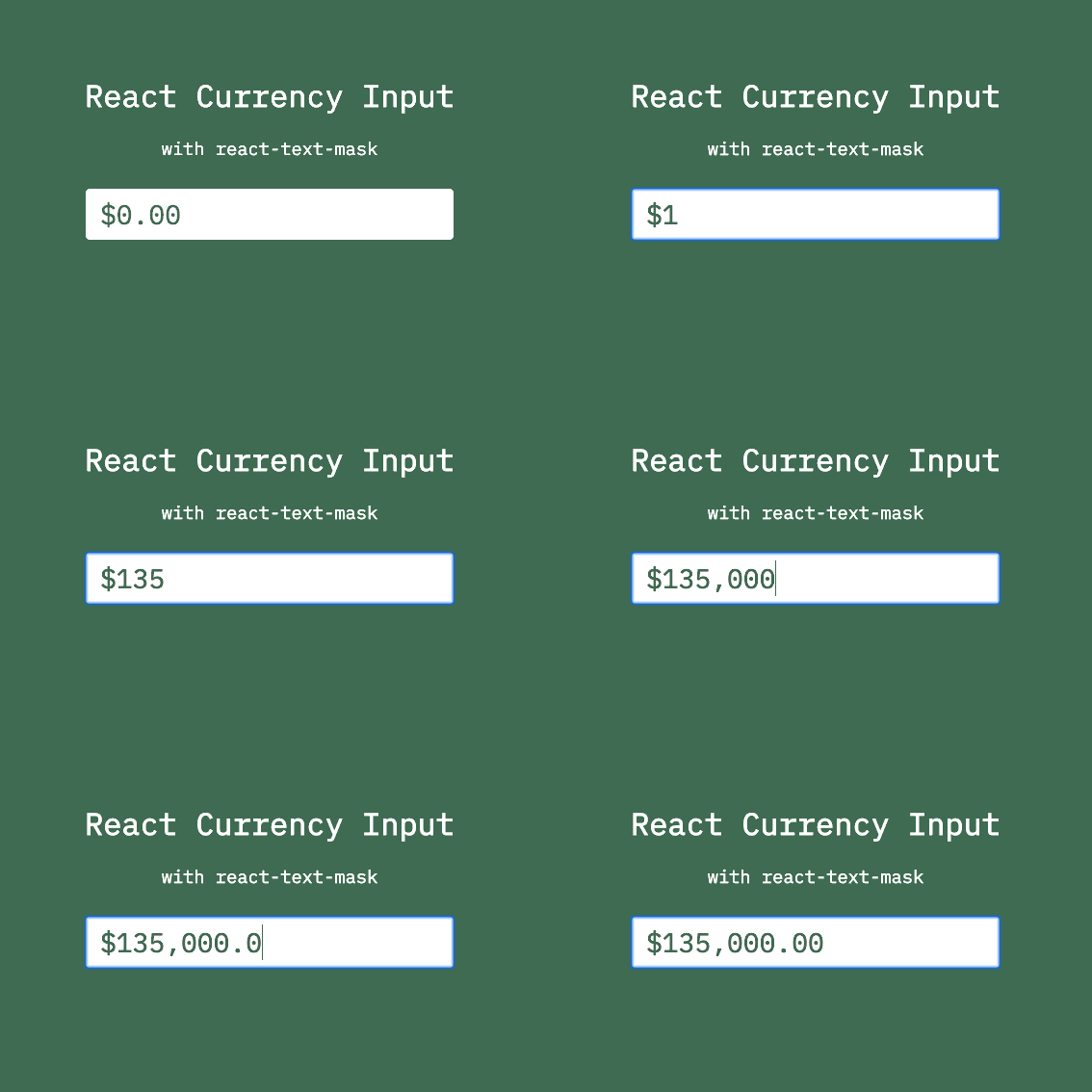
If you view the GIF I shared, it's a react masking library that shows the commas of a currency value before you focus out of the input field. This allows you to see the number that you are typing, as you are typing it.
Typing 156 billion with cents is not easy when there are so many 0's and you have no idea where you are at

Hi Garrett,
It seems that I have misunderstood you, sorry about that. I thought that "currency formatting" and "people have no idea what they are typing" refers to the currency symbol.
Well, yes - I admit that currently we don't provide a numeric input with a mask, or one that shows a formatted value during typing. Based on our research, this feature cannot be integrated easily in the current NumericTextBox. Surely, if more customers demand it, we will consider a major overhaul of the component UX, similarly to the new keyboard UX that we implemented for the DateInput for version 4.0.
Rank 1
 Iron
Iron
Despite this being a rather stale thread, I would like to chime in as I need something similar. In my case a numeric input box is needed where cents are entered but the eventual value is displayed in the regular currency format.
For instance:
- user inputs "123456"
- on blur, the control shows 1.234,56 € (example for German currency formatting)
- when going back to editing, the raw value "123456" is displayed again until next blur
In the very best case, the formatting is applied as you type continuously, with digits being "pushed" from right to left while the next digit is added on the right, just like a cash register. The result would be like this example, on the left each user's input, on the right the result being displayed:
1 -> [    0,01 €]
2 -> [    0,12 €]
3 -> [    1,23 €]
4 -> [   12,34 €]
5 -> [  123,45 €]
6 -> [1.234,56 €] (thousands separator is automatically added)
Cheers,
Johannes
@Johannes - thanks for sharing your use case and needs. Alas, I must admit that formatted values during typing are still a very rare request, which wouldn't justify the required development effort.
On a side note, have you ever seen a third-party numeric textbox with the described POS-terminal-like typing experience? I thought only physical POS terminals had it.
Rank 1
Iron
@Dimo, thanks for your reply. I feared that this is not of broad use and might be omitted. Actually, I cannot name any such component in existence, hoping you might be the first^^
The request for this functionality is from the workplace people who are used to process dentist billings and sometimes are required to type an entire bill off paper into the system. Yes, these things still happen. The old software allowed them to input cents. Sad fact though: the text boxes where the amounts were entered never displayed anything but these raw cents in digits. No currency symbol, no formatting whatsoever.
People who have done it like this naturally understand the numbers, and after decades of doing so won't easily change and start entering decimal points or commas now that the fields are showing decimals in the typical currency format. I would expect some resistance if I enforce that now.
I was hoping to improve this by allowing them to still enter and edit the value in cents (~ raw format) but having the effective amount in a prettier format. It's most intuitive if it happens "as you type" but even a box that switches to raw format for input, and after editing goes to a formatted view would be a massive improvement.
Creating a control like this on my own is out of the question as my JavaScript skills are marginal and I will probably just mess things up.
I'll keep an eye out for projects that implement such a functionality. Maybe some Blazor hero already did and I just overlooked it.
Thanks for your help anyway!
Cheers,
Johannes
Thanks for the follow-up, Johannes.
>> "even a box that switches to raw format for input, and after editing goes to a formatted view would be a massive improvement."
This is possible now with the NumericTextBox OnChange event. You may need to enhance the logic to match your user behavior.
<TelerikNumericTextBox @bind-Value="@NumericValue"
                       OnChange="@OnNumericValueChange"
                       Format="c2"
                       Decimals="2"
                       Width="180px" />

@code {
    private decimal? NumericValue { get; set; }

    private void OnNumericValueChange(object? value)
    {
        string valueAsString = value?.ToString() ?? string.Empty;
        if (!string.IsNullOrEmpty(valueAsString))
        {
            NumericValue = int.Parse(valueAsString) / 100m;
        }
    }
}
You can also use ValueChanged with a similar logic, but first we need to fix an existing problem with numeric value overrides. I voted on your behalf to bump the priority and you can also follow the item to receive status updates..
Rank 1
Iron
Dear Dimo,
thank you, much appreciated! However, I cannot confirm that this works as-is. The string.IsNullOrEmpty condition must be negated, and decimal.Parse is needed instead of int.Parse. But even then, the result is that pushing <Enter> will divide the existing value by 100 no matter what, even multiple times during the same edit. There is no differentiation between editing the current value (as raw), sending it off (parsing raw, dividing by 100, then showing the currency format), and coming back into the field (showing raw again). This is definitely needed for consistence.
It's not me being so picky, it's actually the users. They would accept the old-style raw text boxes with only digits in them, even if my implementation is the same. But I hope I can do better than that. If I do replace this by anything better, it needs to be a perfect control, i.e. entering values needs to be as before to be swift, and nothing must go wrong processing these inputs. Readability is not actually an aspect for them but they see my point that showing raw values with no currency symbol is the opposite of clarity and is hard to understand and error-prone. Mostly, these values are below 1000 EUR so we are talking about three to five digits only. As they are doing this constantly, they have adjusted to dealing with these numbers and understanding them. But in cases where numbers get bigger, it's easy to misread something by an order of magnitude. That's what I would like to prevent for good.
Problem is, even if a component like that exists, it's most likely in node.js or the like, and hard to integrate into Blazor. I found JSInterop to be highly unstable and problematic regarding memory leaks, and I don't want to blow up my solution with a node.js framework just for one component. At the moment I wouldn't dare going down that rabbit hole.
By the way, one existing implementation is in PayPal. If you enter an amount to send, it does exactly what I would like to achieve. Will try to see how they did it and if it can be harvested for my case.
I'll have a look around and inform y'all if any news come up.
Cheers,
Johannes
Rank 1
Iron
Hiya,
I have completed a custom Razor component that does what I need. It wraps around a TelerikTextBox and allows to configure:
- the number of decimal places
- the display format when not being edited
- a suffix for the unit, so it's either a format without unit, and the suffix to show that (which I prefer), or the format includes the unit and there is no suffix
- a lot of parameters passed through such as Width, Title, MaxLength, ReadOnly, Enabled etc.
It needs some JavaScript to switch to edit mode when getting focused. The value shown will turn to just digits then. Once the value is submitted (OnBlur), it gets reparsed and formatted. The specialty here is how it deals with decimal places. If we have defined, say, 2 decimal places, then we have these results:
- a value of 1 is shown as 1.00 (unless you have assigned a different format string)
- when editing, this switches to 100, i.e. the last two digits are the decimal place. In case of currencies, they represent the "cents"
- when adding the digits 23 at the end, we are seeing 10023. Nothing else will happen yet
- when getting unfocused, the control will reparse the raw (digits-only) value, divide it by 100 (or rather, 10 ^ { number of digits }) and show the value in the formatted representation, e.g. 100.23
- when entering a decimal separator, it will be respected. So entering 14.5 will actually have the control accept this as 14.50 and show it accordingly. This is for the cases where users do enter a decimal separator and ensure that their input does not get confused, accidentally multiplied / divided etc.
- entering more decimal digits than configured will cause mathematical rounding. If 14.2896 is entered, this value gets rounded to 14.29 and the deeper precision is lost
A good amount of the time went into the JavaScript part. Each component registers a DotNetReference and I had to find out the hard way that if multiple such components exist on the same page, they share the same JavaScript, and the registration of each overwrites previous registrations so only one would work properly. The JavaScript handles this by GUIDs that clearly identify each component (the GUID is also assigned to the textbox), and uses a Map internally to store references separately for each GUID that ever registered.
This achieves most of what I need. For now, I have given up on trying to represent the input with the display format applied at all times, it's just too crazy dealing with all the implications the formats might have. So the input mode is digits-only and the "show" mode is formatted. Pretty acceptable like that.
I would love to upload the code for the component if you tell me where would be a good place to do that.
Hi Johannes,
Thanks for the follow-up! can suggest three options:
- Create a pull request in the https://github.com/telerik/blazor-ui repository. This approach requires some commitment from you for a minimum level of future maintenance, if such is necessary. Note that the repo currently uses central package management.
- Attach a small sample app in this thread.
- Post a new thread with the sample app there, so that all the important information is in the first message at the top.
 Rank 1
Iron
Rank 1
Iron
Hi,
sorry, I just overlooked the upload box. So here is a demo project. Please be aware that the following key parts need to exist:
- DecimalInput.js in the wwwroot/js subfolder. It provides an OnFocus event to select the entire contents of the textbox and switch to edit mode when the component is focused, and also allows the textbox to be right-aligned by assigning the CSS class "r" to it
- DecimalInput.razor
- the .r class in the app.cs
Probably this is not the cleanest solution, e.g. the JS focus event and the .NET reference map entry may have to be unregistered when the component gets disposed. So I'm grateful for any advice on how to enhance it and make it ready for production.
Cheers,
Johannes
Thanks, Johannes!
I awarded you some Telerik points for your contribution.