or
1 answer
54 views
We are using reorderable.rowson a very wide grid with many columns (maybe 2 times the width of the screen, horizontal scroll is enabled) and the line that hints at where you're dropping a dragged row can be out of view in some situations, making it quite difficult to figure out where exactly you're moving a row to. Is there a way to customize its appearance?
Thanks,
Kris

Neli
Telerik team

answered
on
22 Jul 2026
1 answer
51 views
We have implemented reorderable.rows in our grid, which uses the columns.draggable handler, alongisde the columns.selectable checkbox. We want to achieve two things:
- Dragging and dropping single rows without needing to select a checkbox (e.g. user loads the grid, drags and drops using the handler, rows are reordered)
- Multi-row dragging and dropping (e.g. user loads in, selects 2 checkboxes, uses the handler to reorder both rows at the same time)
According to the documentation, both behaviors are seemingly not achievable at the same time. Is there a work around or a different feature that we could use to get the desired result?
Also, we would like to make the handler display data as well. In essence, we want another column that displays a date to be the one column that you can use for dragging and dropping. My thinking was to give the draggable column a template with the data, but it seems to always be overwritten with the three stripes icon. Is there a way to achieve this?
Thank you,
Kris
Neli
Telerik team
answered
on
03 Jul 2026
0 answers
91 views
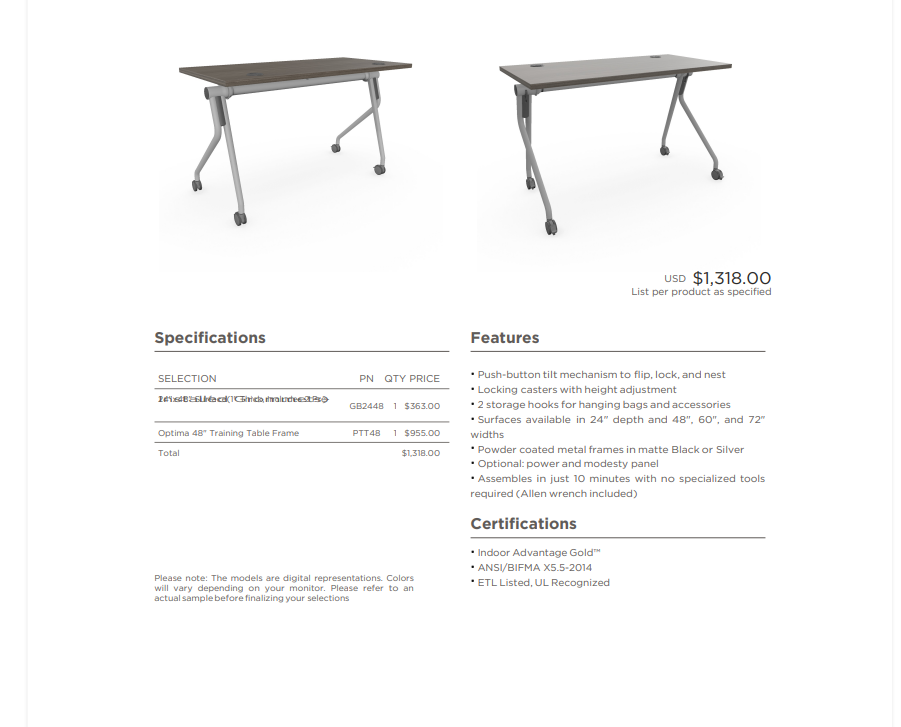
Hi guys , im new here but i wanted to get some support on kendo PDF exporting library, Im using it to export a pdf and it works just fine on all windows devices but its a different story on IOs devices, the bug is really simple when having a cell on a table with a text that is long enouhg to break into 2 lines the engine renders both lines in the same space so the text looks overlapped, have tried a lot of css to try and force the engine to split the lines but havent been able to accomplish it , here is some of the css, the table is a div with elements div.line inside, those have 4 cells as you can see in the image, the selection .sel, the partnumber .pn, the quantity .qty and the price .price, I even tried wrapping the text of the selection inside span to force the calculation of the 2 lines but didnt work either, so at this point im kinda giving up on something that shouldnt be so difficult, I would appreciatte some help in this matter , if anyone needs more information about this problem you can just let me know , thanks in advance :
#pdf-table{
display: table;
font-family: "Gotham";
}
#pdf-table .line{
display: table-row;
align-items: flex-start;
border-bottom: 1px solid var(--graphitewash);
font-size: 12px;
}
#pdf-table .header.line{
font-size: 14px;
}
.line > div{
display: table-cell;
padding: 5px 0;
line-height: 1.5 !important;
}
.line .line-sel{
position: relative;
vertical-align: top;
white-space: normal;
word-break: break-word;
height: auto !important;
min-height: 18px;
overflow: visible !important;
letter-spacing: 0.2px;
width: 65%;
text-align: start;
padding-right: 5px;
}
.line .line-sel span{
display: block;
line-height: 1.5 !important;
}
.line .line-pn{
width: 15%;
text-align: center;
vertical-align: middle;
}
.line .line-qty{
width: 5%;
text-align: center;
vertical-align: middle;
}
.line .line-price{
width: 15%;
text-align: end;
vertical-align: middle;
padding-right: 8px;
}

Juan David
Top achievements
 Rank 1
Rank 1
asked
on
27 Mar 2026
1 answer
138 views
Hello all,
I’m working on an inline editable Kendo Grid and trying to add a dropdown list for one of the columns. However, when I run it, the dropdown doesn’t load properly. Instead of showing the item names, the textbox displays [object Object].
I’m using Kendo version 2025.3.825, and my code must comply with CSP rules.
Could someone guide me on how to fix this so the dropdown shows the correct text values instead of the object?
ASP.NET MVC Grid Custom Editing Demo | Telerik UI for ASP.NET MVC

Viktor Tachev
Telerik team
answered
on
18 Mar 2026
1 answer
365 views
I am trying to implement keyboard only navigation on a web application I am developing to meet accessibility requirements. I am running into problems with the Kendo Grid.
Here is a dojo: https://dojo.telerik.com/KUcMekCh
I have a grid with 2 locked columns with a button in the first column and a hyperlink in the second column, the other columns just have text. I set navigatable to true. None of my fields are editable.
When the user tabs to the grid, they first get the search bar in my custom grid toolbar. Next they tab to the button (which happens to be a bootstrap dropdown menu but I don't think that is relevant). Here is where the issues start:
- They then hit tab again and sometimes are taken to the hyberlink while other times they are taken to the next row, skipping column 2's hyperlink.
- The grid does not always enter Kendo's navigation mode. When it doesn't, there is no way for the user to interact with the column header which has the sort and tooltip buttons in it.
- When they get to the bottom of the grid, the locked side will scroll vertically but the unlocked side remains in place, causing the rows to be misaligned.
- When an input cell is in the unlocked portion of the table, the user has to tab through the entire list before getting back to editing the input for a row. This isn't logical.
- I worry that if there were editable cells, which some of my grids have, the user won't be able to tab to the next editable cell and instead will be forced to navigate through every cell. I don't want to make it more difficult for a normal user in order to accommodate a keyboard only user so there needs to be a way for both to work well.
- Often the focus ends up on the unlocked table which attempts to put a blue outline around that, however, the outline isn't fully visible since that is inside of a scrollable div.
- You can click into a cell with navigatable set to true and then use the navigation but that doesn't work for a keyboard only user.
- When navigatable is not turned on, the user cannot scroll vertically if they tab to the table.
Nikolay
Telerik team
answered
on
09 Feb 2026
1 answer
128 views
I have a kendo grid with several columns. The grid has in-cell editing enabled. I need the user to be able to press the tab key and ONLY tab between cells with focusable elements (such as a button) or editable cells. How would I accomplish this?
Note: the solution here does not work when you have grouped or filtered rows.
https://www.telerik.com/kendo-jquery-ui/documentation/knowledge-base/skip-non-editable-cells-when-tabbing



1 answer
88 views
I have a grid with a local data source and some editable cells. When a user changes one of the cell's values, it needs to run a few different api calls to get the new values for some of the other cells and then display those. The problem is that when I call .set("fieldName", "value") inside the save command, I get an endless loop. How do I fix this? I have attached a Dojo showing what I mean. If you change the name in the Dojo, the age and DOB should change to something else (I know my example is a little silly given the fields but this is just an example, my real fields are different). Instead, I get an endless loop in the console.

Anton Mironov
Telerik team
answered
on
22 Jan 2026
1 answer
203 views
Hi,
I have downloaded the zip file from telerik(Progress® Telerik® UI for ASP.NET MVC) site and used in my project. I have licensed version of telerik. I applied license in below approaches
1. Downloaded the key license .txt file and placed in the root folder of project and also added in system variables.
2. Downloaded the script license and placed in the project scripts, refereed in _layout.cshtml page.
Either of the approaches I am getting a warning message at the top of my application while running the application.
message: both paid and trial usage. Learn how to set up a license key."
Please guide me how to setup license if I am missing something here.

Eyup
Telerik team
answered
on
06 Jan 2026
1 answer
138 views
I have a grid with a filterable cell. A translate pipe is used in its template - this causes that the filter does not work properly, as it recognizes the original values and not the translated ones.
{
field: "xxx",
title: "foo",
width: "120px",
template: "{{ 'yyy' | translate }}",
filterable: {
cell: {
showOperators: false,
operator: 'contains',
suggestionOperator: "contains"
}
}
},
Is there any way to get the filter values translated as well?
This question is similar to https://www.telerik.com/forums/grid---custom-filtering-function-for-a-particular-column, except that this is related to Kendo for jQuery.
Eyup
Telerik team
answered
on
18 Dec 2025
2 answers
119 views
Hi,
I want load dropdown list in a editable grid, I have used below approach. But List was not loading instead I am getting [object object] in textbox.
Can you please help me to find fault.
I ma using Kendo 2025.3.825 version and it should compile with CSP.
ASP.NET MVC Grid Custom Editing Demo | Telerik UI for ASP.NET MVC





