or
0 answers
218 views
Hey guys,
I'm relatively new to Kendo UI and just had a question about filtering a grid by using values from a combobox. From my understanding I can do something like this:
@(Html.Kendo().ComboBox()
.Name("combobox name")
.Events(e=>e.Change(@<text>
function(e) {
var grid = $("#Grid").data("kendoGrid");
var value = this.value();
if(value) {
grid.dataSource.filter({ field: "filter field", operator: "eq", value: parseInt(value) });
}
else{
grid.dataSource.filter({});
}
}
</text>
)
)
.Placeholder("Place holder..")
.DataTextField("Text")
.DataValueField("Value")
.DataSource(source => {
source.Read(read =>
{
read.Action("Controller Action", "Controller");
});
})
.SelectedIndex(0)
I've tried this and leads it filters my grid with my desired results, but if I go about it this way and try to add a new item, the item is then added to the unfiltered page of the grid (which is not desirable). From a few other posts I have read, I found I could navigate around this issue simply by adding a few things to to the filter command, like so:
grid.dataSource.filter({logic: "or", filters[{ field: "filter field", operator: "eq", value: parseInt(value) }, { field: "filter field", operator: "eq", value: 0 }]})
Having that allows me to, when I click add a new item, to have that item show up on the filtered page of the grid. However, I am then unable to save that newly created instance. I wonder is there another way of filtering a grid using a combobox? If there is, any help/ advice would be really helpful.
Thanks,
Chris
I'm relatively new to Kendo UI and just had a question about filtering a grid by using values from a combobox. From my understanding I can do something like this:
@(Html.Kendo().ComboBox()
.Name("combobox name")
.Events(e=>e.Change(@<text>
function(e) {
var grid = $("#Grid").data("kendoGrid");
var value = this.value();
if(value) {
grid.dataSource.filter({ field: "filter field", operator: "eq", value: parseInt(value) });
}
else{
grid.dataSource.filter({});
}
}
</text>
)
)
.Placeholder("Place holder..")
.DataTextField("Text")
.DataValueField("Value")
.DataSource(source => {
source.Read(read =>
{
read.Action("Controller Action", "Controller");
});
})
.SelectedIndex(0)
I've tried this and leads it filters my grid with my desired results, but if I go about it this way and try to add a new item, the item is then added to the unfiltered page of the grid (which is not desirable). From a few other posts I have read, I found I could navigate around this issue simply by adding a few things to to the filter command, like so:
grid.dataSource.filter({logic: "or", filters[{ field: "filter field", operator: "eq", value: parseInt(value) }, { field: "filter field", operator: "eq", value: 0 }]})
Having that allows me to, when I click add a new item, to have that item show up on the filtered page of the grid. However, I am then unable to save that newly created instance. I wonder is there another way of filtering a grid using a combobox? If there is, any help/ advice would be really helpful.
Thanks,
Chris
0 answers
154 views
Hi,
I'm creating donut charts and setting the title like this:
My problem is that the series title comes from the json object I use to populate the chart.
Is it possible to set the chart title using the same binding feature of the one in the series object? (categoryField, field, colorField, etc...).
Something like:
Thanks,
André
I'm creating donut charts and setting the title like this:
$("#" + divName).kendoChart({ title: { text: "my title" },Is it possible to set the chart title using the same binding feature of the one in the series object? (categoryField, field, colorField, etc...).
Something like:
$("#" + divName).kendoChart({ title: { textField: "fieldWithTitle" },André
1 answer
101 views
Does the KendoUI mobile work on Android ?
Which minimal version / device vendor is required ?
From cheap android version 4.0.3 it won't work.
Taps not working, scrolls not working. Loading page
gives terrible white screen on few tiny moments enough
to see it.
Tried several examples from local network and latest
download. Then from your site. Effect is the same.
The framwork looks promising from the browser
but first attempt from a real devices was terrible.
Thanks.
Which minimal version / device vendor is required ?
From cheap android version 4.0.3 it won't work.
Taps not working, scrolls not working. Loading page
gives terrible white screen on few tiny moments enough
to see it.
Tried several examples from local network and latest
download. Then from your site. Effect is the same.
The framwork looks promising from the browser
but first attempt from a real devices was terrible.
Thanks.

Iliana Dyankova
Telerik team

answered
on
14 Nov 2012
5 answers
516 views
Hi, I'm looking at the "binding to local source" treeview demo below and was wondering how do you structure this AND the schema to allow 3+ levels of "subCategeries" for something like a parts list. I'm playing with local data but want to eventually populate from remote data and with the list initially expanded.
Once I find this out, I want to use that format to build the JSON response sent from the service. Thanks.
var inline = new kendo.data.HierarchicalDataSource({
data: [
{ categoryName: "Storage", subCategories: [
{ subCategoryName: "Wall Shelving" },
{ subCategoryName: "Floor Shelving" },
{ subCategoryName: "Kids Storage" }
] },
{ categoryName: "Lights", subCategories: [
{ subCategoryName: "Ceiling" },
{ subCategoryName: "Table" },
{ subCategoryName: "Floor" }
] }
],
schema: {
model: {
children: "subCategories"
}
}
});
$("#treeview-right").kendoTreeView({
dataSource: inline,
dataTextField: [ "categoryName", "subCategoryName" ]
});
Once I find this out, I want to use that format to build the JSON response sent from the service. Thanks.
var inline = new kendo.data.HierarchicalDataSource({
data: [
{ categoryName: "Storage", subCategories: [
{ subCategoryName: "Wall Shelving" },
{ subCategoryName: "Floor Shelving" },
{ subCategoryName: "Kids Storage" }
] },
{ categoryName: "Lights", subCategories: [
{ subCategoryName: "Ceiling" },
{ subCategoryName: "Table" },
{ subCategoryName: "Floor" }
] }
],
schema: {
model: {
children: "subCategories"
}
}
});
$("#treeview-right").kendoTreeView({
dataSource: inline,
dataTextField: [ "categoryName", "subCategoryName" ]
});


0 answers
109 views
Hi,
I'm looking to change the dimensions of the TabStrip, specifically on Android.
Any help would be great
I'm looking to change the dimensions of the TabStrip, specifically on Android.
Any help would be great
Charlie
Top achievements
 Rank 1
Rank 1
asked
on
14 Nov 2012
3 answers
702 views
Hello I am using Kendo UI Treeview and loading the nodes dynamically from a Json Data source.The nodes are getting loaded correctly, but when i expand a node it is calling the webapi, if it does not have any child nodes it is not suppose to show the arrow, but it is. Can anybody help me suggest some solution?
Thanks
Thanks
Mike Rybnikov
Top achievements
Rank 1
Rank 1
answered
on
14 Nov 2012
1 answer
124 views
Hi,
when I use a template to specify the layout of a cell within a grid, the filter icon is not displayed anymore (see red square in comparison to the green one in my image).
What do I have to do that it shows up again?
Thanks
Florian
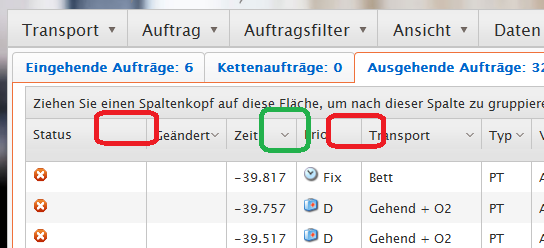
when I use a template to specify the layout of a cell within a grid, the filter icon is not displayed anymore (see red square in comparison to the green one in my image).
What do I have to do that it shows up again?
Thanks
Florian

5 answers
404 views
Hi,
I'm having a problem with at least one of the demos when using the latest normal version of chrome -- http://demos.kendoui.com/web/dropdownlist/index.html
When I click the dropdown it shows the list of cap colors, but when I select one it doesn't work. It works fine in IE and firefox. I'm also having problems with this in my application (thus why I looked at the demos). Should I file this as a bug somewhere with you?
Thanks,
se
I'm having a problem with at least one of the demos when using the latest normal version of chrome -- http://demos.kendoui.com/web/dropdownlist/index.html
When I click the dropdown it shows the list of cap colors, but when I select one it doesn't work. It works fine in IE and firefox. I'm also having problems with this in my application (thus why I looked at the demos). Should I file this as a bug somewhere with you?
Thanks,
se
Georgi Krustev
Telerik team
answered
on
14 Nov 2012
1 answer
964 views
I have a combobox bound to a viewmodel and configured to use a remote datasource for the list of choices as follows:
As seen above, the the combobox is configured as "
Is it a bug that
input.kendoComboBox({ dataTextField: 'label', dataValueField: 'id', autoBind: false, dataSource: { type: "json", serverFiltering: true, transport: { read: { url: 'api/getchoices, data: { filter: function(){ return input.val(); } } } } }});<input data-role="combobox" data-bind="value: id, comboboxText:idText"/>autoBind: false". This value is respected for those comboboxes on the page which have no value (in the viewmodel) but for those comboboxes that do have a value, the combobox will immediately query the remote server when the page loads. This is undesirable from a performance perspective, and also unnecessary since both the dataTextField and dataValueField are being set from the viewmodel.Is it a bug that
autoBind: false is not being respected? How can I suppress this unnecessary call to the remote datasource?
Georgi Krustev
Telerik team
answered
on
14 Nov 2012
1 answer
1.0K+ views
I am using Kendo UI grid with GridEditMode.InCell and I need to add hyperlink for delete/destroy command in the grid column instead of default "Delete" button.
My current code looks like:
c.Command(command => command.Destroy()).Width(90);
I also placed the same question at Stack Overflow. I hope one of the forums will answer my question.
Thanks in advance.











