or
2 answers
193 views
As far as I understood, HierarchicalDataSource does not have get method, meaning recursively traverse the structure for a node by its attribute. Am I correct?

Vladimir Iliev
Telerik team

answered
on
15 Nov 2012
2 answers
120 views
While working with the Treeview, I noticed that checkboxes would only work if I switched from 2012.2.xxxx to 2012.3.xxxx. Fine. After switching to the 3Q release, I get bad behavior with the Grid. Without changing the code, only switching the reference from 2Q to 3Q CSS & JS, the checked-treeview now works but the Grid does not. Am I missing something? See the JSFiddle here: http://jsfiddle.net/TJxFZ/
Paul Seabury
Top achievements
 Rank 1
Rank 1
answered
on
15 Nov 2012
1 answer
872 views
When I have a date time with milliseconds, the milliseconds will always be set to 0 if you change the date with the calandar while the hours, minutes and seconds remains the same.
Am I the only one dealing with this issue?
Am I the only one dealing with this issue?
Georgi Krustev
Telerik team
answered
on
15 Nov 2012
1 answer
639 views
I have a pageable list-view (mobile) bound to a remote data set.
So far, so good. I can connect, get the data, scroll on demand.
Sometimes, however, I need to "reset" the data-source because some parameters that are used for the read are changed and I need to restart reading from scratch.
I am not sure how to do that.
an alternative for me would be to 'unbind' the list-view element, and assign a new data source that I create to it - but I am not sure how to access the data of a list-view item I already created with kendoMobileListView already.
So far, so good. I can connect, get the data, scroll on demand.
Sometimes, however, I need to "reset" the data-source because some parameters that are used for the read are changed and I need to restart reading from scratch.
I am not sure how to do that.
an alternative for me would be to 'unbind' the list-view element, and assign a new data source that I create to it - but I am not sure how to access the data of a list-view item I already created with kendoMobileListView already.
Alexander Valchev
Telerik team
answered
on
15 Nov 2012
4 answers
356 views
I have simple Kendo UI Grid in partialview to display information using AJAX binding.
Sample Code Below
@(Html.Kendo().Grid(Model)
.Name("Grid")
.Columns(columns => {
columns.Bound(p => p.Id).Groupable(false).Hidden();
columns.Bound(p => p.Name);
})
.DataSource(dataSource => dataSource
.Ajax()
.Read(read => read.Action("Value_Read", "Value"))
)
.Pageable()
.Sortable()
.Filterable()
I have problem with filtering. When I clicks on Filtering icon, it works as sorting.
If I add filtering only without sorting, then it works.
Only way to make filtering working along with sorting is by turning on Compatibility View
Below is pictorial explanation. Hope this helps.
launch partialview with Grid. You see filtering icon next to name.
when hover over filtering icon to click, the icon disappears.
Tries to click filtering icon, sorting will work.
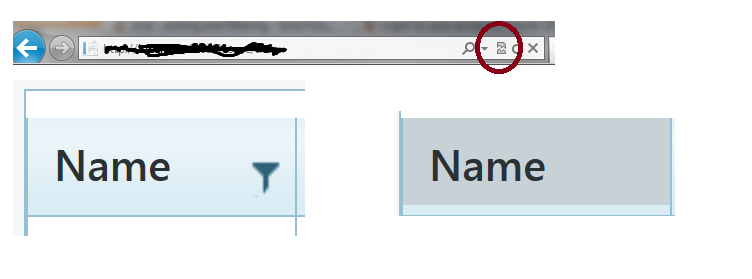
Do same step as above. But this time I turn on Compatibility View (Notice red circle)
This times, when I hover over on Filtering icon, I can see filtering icon.
Filtering and sorting are working here.
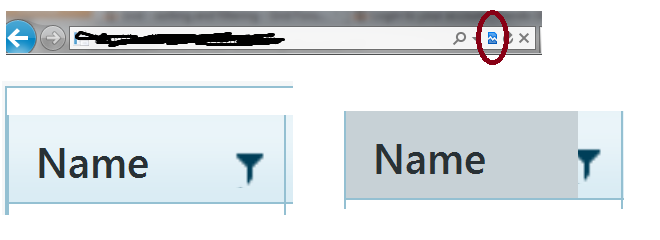
I have IE9.
I ran this with Firefox, I cannot make filtering works regardless what.
I added below as order suggested.
<script src="@Url.Content("~/Scripts/jquery.min.js")"></script>
<script src="@Url.Content("~/Scripts/kendo/2012.2.710/kendo.web.min.js")"></script>
<script src="@Url.Content("~/Scripts/kendo/2012.2.710/kendo.aspnetmvc.min.js")"></script>
I also have jQuery 1.7.2 and 1.8.20
Please let me if there is any information I need to provide. I really spent huge amount of time to figure out this issue.
Thank you in advance.
Sample Code Below
@(Html.Kendo().Grid(Model)
.Name("Grid")
.Columns(columns => {
columns.Bound(p => p.Id).Groupable(false).Hidden();
columns.Bound(p => p.Name);
})
.DataSource(dataSource => dataSource
.Ajax()
.Read(read => read.Action("Value_Read", "Value"))
)
.Pageable()
.Sortable()
.Filterable()
I have problem with filtering. When I clicks on Filtering icon, it works as sorting.
If I add filtering only without sorting, then it works.
Only way to make filtering working along with sorting is by turning on Compatibility View
Below is pictorial explanation. Hope this helps.
launch partialview with Grid. You see filtering icon next to name.
when hover over filtering icon to click, the icon disappears.
Tries to click filtering icon, sorting will work.
Do same step as above. But this time I turn on Compatibility View (Notice red circle)
This times, when I hover over on Filtering icon, I can see filtering icon.
Filtering and sorting are working here.
I have IE9.
I ran this with Firefox, I cannot make filtering works regardless what.
I added below as order suggested.
<script src="@Url.Content("~/Scripts/jquery.min.js")"></script>
<script src="@Url.Content("~/Scripts/kendo/2012.2.710/kendo.web.min.js")"></script>
<script src="@Url.Content("~/Scripts/kendo/2012.2.710/kendo.aspnetmvc.min.js")"></script>
I also have jQuery 1.7.2 and 1.8.20
Please let me if there is any information I need to provide. I really spent huge amount of time to figure out this issue.
Thank you in advance.

1 answer
193 views
This is the html code of one of my views in an Android app. What I have in this view is a listview (li-items are added dynamically) and when an item in the listview is clicked, the 'contenPageContainer' is made 'visisble'
In the click event I call a function that sets the content of div 'eventTitle' and div 'entryText' and it sets visibility of div 'contentPageContainer' to 'visible'.
This seems to work ok als long as the scrolling functionality of scroller is not needed. Ie. if div 'entryText' contains only a few lines of text there is no problem. The 'Ok' button is in view and when the user clicks it, the javascript code to close it is executed properly causing the div 'contenPageContainer' to hide again.
If it contains too much text to show in the div 'contentPageContainer' then the user has to scroll down to get the 'Ok' button in view. Closing still works fine, but when you click a differen listview item afterwards, then the container is shown, but eventTitle and entryText are not visible.
I have tried to solve that with this code, but to no avail.
Clicking the listview item with many lines again, shows the bottom of the content and the 'Ok' button, but I can't scroll to the top of the text. Actually I can, but when I lift my finger from the screen, the scroller jumps back to the bottom.
Any suggestions what could be wrong?
To make it complete, here is the css code of the div 'contentPageContainer'
<div data-role="view" id="tabstrip-home" data-title="MaxApp"> <ul id="linksList" data-role="listview" data-style="inset">
</ul>
<div id="contentPageContainer" class="contentPageContainer" style="visibility:hidden">
<div data-role="scroller" class="contentPageContainer" id="scrollContentPageContainer"> <div id="eventTitle" class="contentPageHeader"></div> <div id="entryText"></div> <p><a id="btnOk" data-role="button" style="background-color: rgb(0, 111, 81);float:right;">Ok</a></p> <p> </p> </div> </div></div>function showRssItem(selectedEntry) { document.getElementById("eventTitle").innerHTML = '<strong><p>' + entries[selectedEntry].title + '</p></strong>'; var contentHTML = ""; contentHTML += entries[selectedEntry].description; contentHTML = '<p><img src="images/menu_logo_maxgrip.png" /> ' + contentHTML + '</p>'; contentHTML += '<p><a href="' + entries[selectedEntry].link + '">Read Entry on Site</a></p>'; document.getElementById("entryText").innerHTML = ''; document.getElementById("entryText").innerHTML = contentHTML; document.getElementById('contentPageContainer').style.visibility = 'visible';}If it contains too much text to show in the div 'contentPageContainer' then the user has to scroll down to get the 'Ok' button in view. Closing still works fine, but when you click a differen listview item afterwards, then the container is shown, but eventTitle and entryText are not visible.
I have tried to solve that with this code, but to no avail.
var scroller = $("#scrollContentPageContainer").kendoMobileScroller();scroller.reset();scroller.movable.moveTo({x:0,y:0});Any suggestions what could be wrong?
To make it complete, here is the css code of the div 'contentPageContainer'
div.contentPageContainer{ display: block; background-color: #5EA491; color: #FFFFFF; position: absolute; top: 10px; left: 2%; width: 96%; height: 95%; -moz-border-radius: 5px; border-radius: 5px;}
Jan-Dirk
Top achievements
Rank 1
Rank 1
answered
on
15 Nov 2012
5 answers
2.6K+ views
Hello,
I'm wondering if what I'm doing to remove the grid's filter is correct or if there's a right approach.
Here's the code
var filter = { };
grid.dataSource.filter(filter);
I'm wondering if what I'm doing to remove the grid's filter is correct or if there's a right approach.
Here's the code
var filter = { };
grid.dataSource.filter(filter);
0 answers
153 views
Why can you not release the samples you have in your various screenshots as demos? The Music Store demo
was nice but I still prefer that interesting looking Customer View you have in your screenshots for Web Demos.
Also. The nice looking Mobile screenshot with various DataViz integrations looks exactly what we would need as inspiration.
The Webcast yesterday promised some new interesting Mobile Demos but I have yet to see any.
was nice but I still prefer that interesting looking Customer View you have in your screenshots for Web Demos.
Also. The nice looking Mobile screenshot with various DataViz integrations looks exactly what we would need as inspiration.
The Webcast yesterday promised some new interesting Mobile Demos but I have yet to see any.
Marcus
Top achievements
Rank 1
Rank 1
asked
on
15 Nov 2012
1 answer
317 views
I found similar posts but nothing that really addresses the concern. Basically want to implement Cancel on a ViewModel. I've created a fiddle http://jsfiddle.net/yN5Cd/1/
Pretty simple, just create a model and a schema. Create a datasource setting the schema. Add the model to the datasource and call sync(). Bind the first and only item in the datasource to a template.
What I really want to is to able to cancel changes on the item in the datasource. I do have a Cancel button and it calles cancelChanges on the datasource but results in a an empty dataSource.
I don't see why it's so much different than editing a datasource bound to a listview. The cancel works great when the datasource is populated using the transport url. But when I add an item in the javascript, the datasource removes it as soon as cancelChanges is called.
I would expect the original state of the model to be restored and the model to remain in the datasource.
Thanks,
Pretty simple, just create a model and a schema. Create a datasource setting the schema. Add the model to the datasource and call sync(). Bind the first and only item in the datasource to a template.
What I really want to is to able to cancel changes on the item in the datasource. I do have a Cancel button and it calles cancelChanges on the datasource but results in a an empty dataSource.
I don't see why it's so much different than editing a datasource bound to a listview. The cancel works great when the datasource is populated using the transport url. But when I add an item in the javascript, the datasource removes it as soon as cancelChanges is called.
I would expect the original state of the model to be restored and the model to remain in the datasource.
Thanks,
Petur Subev
Telerik team
answered
on
15 Nov 2012
1 answer
208 views
Hi All i am trying to change the width of the actual drop-down from the dropdownlist while keeping the dropdownlist element itself a smaller size.
In the combobox you can
.data("kendoComboBox").list.width(380); and that sets the width of drop down itself.
this does not work for the kendoDropDownList . I've tried:
data("kendoDropDownList").list.width(380); and the items themselves no longer wrap BUT the actually background container stays the fixed width.
I don't want to go and modify the css because different instances of the drop down require different widths.
In the combobox you can
.data("kendoComboBox").list.width(380); and that sets the width of drop down itself.
this does not work for the kendoDropDownList . I've tried:
data("kendoDropDownList").list.width(380); and the items themselves no longer wrap BUT the actually background container stays the fixed width.
I don't want to go and modify the css because different instances of the drop down require different widths.
Georgi Krustev
Telerik team
answered
on
15 Nov 2012











