or
1 answer
711 views
Hi
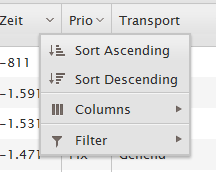
Within a grid the header of each column allows to open a popup showing the items:
1) sort ascending
2) sort descending
3) columns
4) filter
How can I change the displayed text into a different langugage?
Thanks for your help
Florian
Within a grid the header of each column allows to open a popup showing the items:
1) sort ascending
2) sort descending
3) columns
4) filter
How can I change the displayed text into a different langugage?
Thanks for your help
Florian

4 answers
317 views
Hello,
I know this isn't a Microsoft forum however I think my question will get a better answer if I post it here.
I've just had two new ASP.Net projects handed to me and I'm really stressed! I always want to start new projects with the latest tools at my disposal... well, wouldn't you know that they've landed on my desk yesterday! Pretty much the last day of Teleriks Webinar week (thank you very much, it was great!) and the day Windows 8 was officially released.
I have not installed Visual Studio 2012 on my dev pc yet because I'm worried that it might break my installation of VS 2010 and I have several projects in production that I'm supporting and I wouldn't want anything to happen...
So, my question is this; after installing VS2012 NEXT TO VS 2010, how badly is VS 2010 broken?
I've read that the .net 4.5 release is an In-place upgrade and that I will run into issues when trying to support my Windows XP apps that were build on .Net 4.0.
I've also read Microsoft's posts but I'd like to know what's happening in 'our' world... I really want to build these new projects with MVC 4 and Kendo UI, but I'd like to be sure I won't break anything...
Please let me know if the water is safe!
Thanks!
~ Dave
I know this isn't a Microsoft forum however I think my question will get a better answer if I post it here.
I've just had two new ASP.Net projects handed to me and I'm really stressed! I always want to start new projects with the latest tools at my disposal... well, wouldn't you know that they've landed on my desk yesterday! Pretty much the last day of Teleriks Webinar week (thank you very much, it was great!) and the day Windows 8 was officially released.
I have not installed Visual Studio 2012 on my dev pc yet because I'm worried that it might break my installation of VS 2010 and I have several projects in production that I'm supporting and I wouldn't want anything to happen...
So, my question is this; after installing VS2012 NEXT TO VS 2010, how badly is VS 2010 broken?
I've read that the .net 4.5 release is an In-place upgrade and that I will run into issues when trying to support my Windows XP apps that were build on .Net 4.0.
I've also read Microsoft's posts but I'd like to know what's happening in 'our' world... I really want to build these new projects with MVC 4 and Kendo UI, but I'd like to be sure I won't break anything...
Please let me know if the water is safe!
Thanks!
~ Dave

Steve
Top achievements
 Rank 1
Rank 1
answered
on
14 Nov 2012
2 answers
371 views
Cascading
dropdowns are not autopopulated on selecting an Autocomplete value. We have to
click on the cascading dropdown arrow(then only it hits controller{Spring mvc controller}).
On value change of autocomplete, cascading dropdown values are not getting changed, as the required controller is not getting hit
On value change of autocomplete, cascading dropdown values are not getting changed, as the required controller is not getting hit

Sanat
Top achievements
Rank 1
Rank 1
answered
on
14 Nov 2012
0 answers
87 views
All I am trying to do is have a row in a grid be highlighted when the mouse pointer is over that row (and "un-highlight" the row when the mouse leaves of course). This was simple to do in RadGrid, but I am having a very hard time finding an answer to this one. Thanks in advance.
2 answers
559 views
Hello,
I'm using a hierarchical grids and I have a a DropDown editor for each row, I would like to expand the hierarchical grid that belongs to the row when a value of the DropDown is selected. Is that possible?
Thanks,
I'm using a hierarchical grids and I have a a DropDown editor for each row, I would like to expand the hierarchical grid that belongs to the row when a value of the DropDown is selected. Is that possible?
Thanks,
3 answers
310 views
Is there a way to customize the tool tip for the Slider in the KendoUI? With the ASP.Net Ajax version I was updating it during the OnClientSlideStart/End events as well as the OnClientValueChanging event by using a tooltip control and sending it an reference to the active handle by calling the slider.get_activeHandle() method.
I'm not sure how to do this with the KendoUI slider. The ASP.Net one works but I'd like to use the Kendo one because it works much better with tablet browsers.
Thanks.
I'm not sure how to do this with the KendoUI slider. The ASP.Net one works but I'd like to use the Kendo one because it works much better with tablet browsers.
Thanks.
Aleksandar
Top achievements
Rank 1
Rank 1
answered
on
14 Nov 2012
1 answer
115 views
How to retrieve value
of Autocomplete component in case of Json content type
Alexander Valchev
Telerik team

answered
on
14 Nov 2012
1 answer
300 views
Hi, I'm new in using Kendo UI ,
I've tried to use the Binding to remote data example on localhost. but it always load in the first time ,and it hangs on loading the childs
firebug shows the request to the service done successfully ,
I also notices that the service request for the online example appears in the XHR Tab in firebug, but in my test project appear in the JS tab , can anyone explain to me Why??
I've tried to use the Binding to remote data example on localhost. but it always load in the first time ,and it hangs on loading the childs
firebug shows the request to the service done successfully ,
I also notices that the service request for the online example appears in the XHR Tab in firebug, but in my test project appear in the JS tab , can anyone explain to me Why??
0 answers
461 views
When I created a grid, I tried to use a .ashx file as a datasource. No data displayed in IE.
But when I save the .ashx result as a .json file and bind to the datasource. Grid displyed ok.
Please help to find what is wrong with my code? Thank.
internet-users.json :
[{"Name":"System","Role":"a","Birthdate":"\/Date(259074000000)\/","ID":3},{"Name":"Moataieh","Role":"CHASSIS INSTALLATION","Birthdate":"\/Date(259074000000)\/","ID":26}]
My JsonDataSrc.ashx is:
I ran it in IE and IE displayed the same data as in internet-users.json
My index.html is:
But when I save the .ashx result as a .json file and bind to the datasource. Grid displyed ok.
Please help to find what is wrong with my code? Thank.
internet-users.json :
[{"Name":"System","Role":"a","Birthdate":"\/Date(259074000000)\/","ID":3},{"Name":"Moataieh","Role":"CHASSIS INSTALLATION","Birthdate":"\/Date(259074000000)\/","ID":26}]
My JsonDataSrc.ashx is:
I ran it in IE and IE displayed the same data as in internet-users.json
<%@ WebHandler Language="C#" Class="GetData" %> using System; using System.Web; using System.Data.SqlClient; using System.Data; using System.Collections.Generic; using System.Web.Script.Serialization;public class GetData : IHttpHandler{ public void ProcessRequest(HttpContext context) { string connectionString = @"Data Source=.;Initial Catalog=MyData;User ID=MyData;Password=;"; context.Response.ContentType = "text/plain"; List<Person> list = new List<Person>(); using (SqlDataReader sdr = StockIMS.IDataAccessLayer.SqlHelper.ExecuteReader(connectionString, CommandType.Text, "SELECT top 2 isnull(Name,''), isnull([Job Role],'N/A') role, isnull(Birthday,'1972-01-01'), [Person ID] id FROM [Staff Names]")) { while (sdr.Read()) { Person Personitem = new Person(); Personitem.Name=sdr[0].ToString(); Personitem.Role=sdr[1].ToString(); try { Personitem.Birthdate = Convert.ToDateTime(sdr[2].ToString()); } catch { } Personitem.ID =Convert.ToInt32( sdr[3].ToString()); list.Add(Personitem); } sdr.Close(); } context.Response.Write(new JavaScriptSerializer().Serialize(list).ToString());//转为Json格式 } public bool IsReusable { get { return false; } }}public class Person { private System.String _Name; private System.DateTime _Birthdate; private System.Int32 _ID; private System.String _Role; public Person() { } public string Name { get { return _Name; } set { _Name = value; } } public string Role { get { return _Role; } set { _Role = value; } } public DateTime Birthdate { get { return _Birthdate; } set { _Birthdate = value; } } public Int32 ID { get { return _ID; } set { _ID = value; } }} My index.html is:
<!DOCTYPE html><html><head> <title>Basic usage</title> <link href="../content/shared/styles/examples-offline.css" rel="stylesheet"> <link href="../styles/kendo.common.min.css" rel="stylesheet"> <link href="../styles/kendo.default.min.css" rel="stylesheet"> <script src="../js/jquery.min.js"></script> <script src="../js/kendo.web.min.js"></script> <script src="../content/shared/js/console.js"></script> <script src="../content/shared/js/people.js"></script> <style > body { font-size: 9pt; } #dvGrid { width: 500px; } span.hi-lite { color: red; } #dvGrid th.k-header { text-align: center } </style> </head><body> <a class="offline-button" href="index.html">Back</a> <div id="example" class="k-content"> <div id="clientsDb"> <div id="dvgrid" style="height: 380px"></div> </div> <script> $(document).ready(function() { var dataSrc = new kendo.data.DataSource( { transport: { read: { type:"POST", url: "internet-users.json",// "JsonDataSrc.ashx", dataType: "json" } }, pageSize: 10, serverPaging: true, serverSorting: true }); var dateRegExp = /^\/Date\((.*?)\)\/$/; window.toDate = function (value) { var date = dateRegExp.exec(value); return new Date(parseInt(date[1])); } function createGrid() { $("#dvgrid").kendoGrid ({ dataSource: dataSrc,
autoBind: false, sortable: { allowUnsort: false }, columns: [ { field: "Name", width: 90, title: "Name" } ,{ width: 100, field: "Role" } , { field: "Birthdate", title: "Birth Date", template: '#= kendo.toString(toDate(Birthdate), "yyyy/MM/dd")#' } , { width: 50, field: "ID" } ] }) ; } createGrid() ; dataSrc.read(); }); </script> </div></body></html>
Shirley
Top achievements
Rank 1
Rank 1
asked
on
14 Nov 2012
0 answers
140 views
Hello,
I have this scenario that user can highlight certain rows with different selectable colours and these colours must be stored in some db so that when user come again the particular row will show in the very same colour that he has selected earlier.
Thanks in advance
I have this scenario that user can highlight certain rows with different selectable colours and these colours must be stored in some db so that when user come again the particular row will show in the very same colour that he has selected earlier.
Thanks in advance











