or
2 answers
333 views
I have a paged TelerikGrid loaded using OnRead event with 2 filter modes: Inline and programmately.
With inline filter i manage a FilterCellTemplate and call FilterCellTemplateContext.FilterAsync() to refresh the grid after setting the filter value.
If i set a filter programmately, to update the grid i call Grid.Rebind(), but i need to set the grid to page 1, so i need to set the Page property binding to 1 before calling Grid.Rebind.
There is a better way to refresh the grid for filtering programmately? the best would be a method to call (as done with FilterCellTemplateContext.FilterAsync()) who manage the page reset.
Thanks




1 answer
175 views
Hello!
I want to export Blazor grid content to CSV and make some changes before export. This example works fine with GridCommandButton
Blazor Grid Export Export Events - Telerik UI for Blazor
I want to use a standard button instead of GridCommandButton.
     <Button ..
             OnClick="ExportGridData">
         Export
     </Button>
    internal void ExportGridData()
    {
        gridRef?.ExportToCsv();
    }
My issue is, executing ExportToCsv does not trigger OnBeforeExport. Is there a way to trigger OnBeforeExport when calling ExportToCsv() from a button click event?
Thank you.

Dimo
Telerik team

answered
on
31 Jan 2025
0 answers
152 views
This is on a Windows 10 OS Version 22HG2 (OS Build 19045.5371)
How do I make a C# Console app build and debug in Visual Studio Code?
I have already built my C# Console App in Visual Studio Code. The issue I have is when I reopen the folder where the project file is in Visual Studio Code and then rebuilding the code and debugging it again.
Here is what I do and what happens. After I open the folder where the project file resides, I click on this to process the code to debug:

And then I click on the appearing "Run and Debug" button
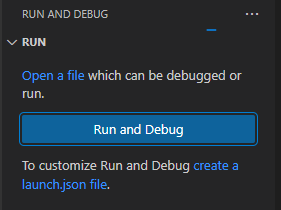
But then the bottom status bar says "Looking for CSS classes in the workspace..." followed by a percentage in paragraphs. Why is this? Why does this happen when there are no CSS classes at all and my project is a C# project?

Why is this? This is just a brief snapshot of some difficulties I find when I reopen a project after I have closed Visual Studio Code. I have experienced other errors and problems in building and running my code.
To continue, in order to deal with the project as a solution, I click on this icon to open the solution panel.

This seemingly allows me to view the solution. As the following view appears, I click on the project.cs file and attempt a debugging session from there.
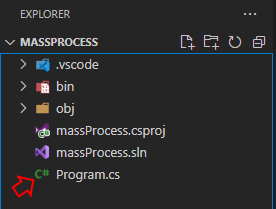
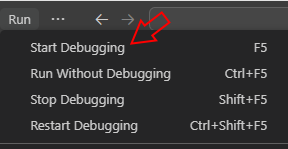
With this file being displayed, I clicked on the menu option, Run -> Start Debugging
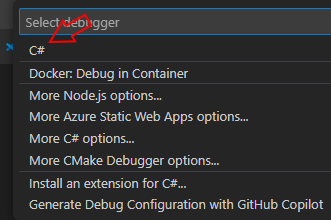
Then, at this point, in the pop up option window that appears in the middle and top of the development environment, I pick "C#":
Something went wrong and in the bottom right of my IDE, I get this message:
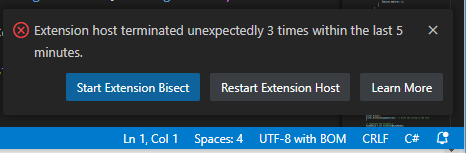
Please advise. What should I do now?
There are some websites where I can spend time following steps to set up a proper development environment. Before I spend time doing this, I think I will spend time looking at the a few short tutorials Youtube on this topic. The one I seemed to be the best had a step at the beginning of the tutorial where he typed 'dotnet run' in the terminal window of the IDE. I tried that and I got some wierd results on my project that I thought I would mention here.
First of all, in the status bar at the bottom, it mentioned CSS loading, for some reason, but also a notice that the IDE was initialising MSBuild project tools.


Then, once that was over, I got this error message:

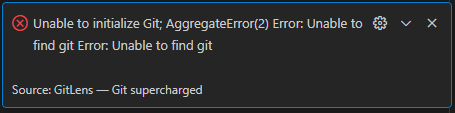
Please advise. What should I do now?
How do I make a C# Console app build and debug in Visual Studio Code?
I have already built my C# Console App in Visual Studio Code. The issue I have is when I reopen the folder where the project file is in Visual Studio Code and then rebuilding the code and debugging it again.
Here is what I do and what happens. After I open the folder where the project file resides, I click on this to process the code to debug:
And then I click on the appearing "Run and Debug" button
But then the bottom status bar says "Looking for CSS classes in the workspace..." followed by a percentage in paragraphs. Why is this? Why does this happen when there are no CSS classes at all and my project is a C# project?
Why is this? This is just a brief snapshot of some difficulties I find when I reopen a project after I have closed Visual Studio Code. I have experienced other errors and problems in building and running my code.
To continue, in order to deal with the project as a solution, I click on this icon to open the solution panel.
This seemingly allows me to view the solution. As the following view appears, I click on the project.cs file and attempt a debugging session from there.
With this file being displayed, I clicked on the menu option, Run -> Start Debugging
Then, at this point, in the pop up option window that appears in the middle and top of the development environment, I pick "C#":
Something went wrong and in the bottom right of my IDE, I get this message:
Please advise. What should I do now?
There are some websites where I can spend time following steps to set up a proper development environment. Before I spend time doing this, I think I will spend time looking at the a few short tutorials Youtube on this topic. The one I seemed to be the best had a step at the beginning of the tutorial where he typed 'dotnet run' in the terminal window of the IDE. I tried that and I got some wierd results on my project that I thought I would mention here.
First of all, in the status bar at the bottom, it mentioned CSS loading, for some reason, but also a notice that the IDE was initialising MSBuild project tools.
Then, once that was over, I got this error message:
Please advise. What should I do now?

William
Top achievements
 Rank 1
Rank 1
asked
on
30 Jan 2025
0 answers
95 views
Hello,
We recently upgraded to Telerik v7.0 for our controls and since then expanding a single item always expands all items. Has anyone else run into this or does anyone know a workaround?
1 answer
142 views
Does anyone know if there is a way I can export Blazor Gannt to excel?
At this rate I would take anything I can get? (Data and/or timeline)

Hristian Stefanov
Telerik team
answered
on
29 Jan 2025
1 answer
172 views
Hi!
I'm using the FileSelect component. When accessing the data, it's of type FileSelectFileInfo, which has a stream of type FileInfoStream, which is disposable.
So, do I have to dispose it after having read the data?
Lots of Greetings!
Volker
Dimo
Telerik team
answered
on
29 Jan 2025
0 answers
182 views
I have a grid with an Excel export. It can take some time so I want to show a Notification at the start and end of the process using OnBeforeExport and OnAfterExport. However both Notifications show at the same time. I have reproduced the issue, attached. Despite the 5 second delay being in OnAfterExport, neither Notification shows until after the delay and the Excel download.
Any ideas?
Relevant part of code:

Missing User
asked
on
28 Jan 2025
1 answer
239 views
Hello,
I want to change the background color of TelerikTooltip which is displayed inside a TelerikGrid in blazor.
I have tried following two examples but they do not seem to work for tooltips in the grid.
Change Tooltip color ? in UI for Blazor | Telerik Forums
Blazor Custom ToolTip Styles and Colors - Telerik UI for Blazor
            <GridColumn Field="ABC" Title="Title" Width="15%">
                <HeaderTemplate>
                    <span class="k-column-title k-column-title-word-break">
                       Column Title
                    </span>
                </HeaderTemplate>
                <Template>
                    @{
                        var item = (MyModel)context;
                    }
                    <div class="tooltip-target-a">
                        <MyCustomComponent  />
                    </div>
                    <TelerikTooltip TargetSelector=".tooltip-target-a" Position="@TooltipPosition.Top" >
                        <Template Context="ttipContext">
                            <div>Hello from tooltip</div>
                        </Template>
                    </TelerikTooltip>
                </Template>
</GridColumn>1 answer
127 views
Hello,
we are currently evaluating Telerik for use in a new application. One major hurdle we are facing at the moment are key bindings. The application we are working on contains quite a bit of shortcuts as it aims at power users and key bindings are important for the efficiency of the workflows. The main component we are using is the TreeList, and one basic use case would be to expand and collapse all items in the TreeList with "*"/"-".
I read the forum articles about introducing keybindings to other components by wrapping the component in a div and using onkeydown on the div. That does not work with TreeList however (as I suspect the TreeList captures key events itself). I suspect using JS Interop might be the only option we have, but I just wanted to check if I am missing anything obvious.
Thank you,
Michael
Tsvetomir
Telerik team
answered
on
28 Jan 2025
1 answer
163 views
I have put an example where Field argument cannot fulfil what I need to do.
The Column names and Field names are only discovered at runtime.
I can get the values to be displayed as I want using the <Template> element/component however I cannot grouping or sorting on these columns.
<TelerikGrid Data="@simplePropertiescollection" Height="500px"
   Sortable="true"
   Groupable="true"
   Resizable="true"
   Reorderable="true">
   <GridColumns>
      <GridColumn Field="@(nameof(SimpleProperties.Name))" Title="Name" />
      @foreach (string prop in PropColumns)
      {
         <GridColumn FieldFunc = "(v) =>v.GetProps(prop)" Title="@prop">
            <Template>
               @{
                  // FieldFunc would replace the code below
                  string text = (context as SimpleProperties)?.GetProp(prop);
               }
               @text
            </Template>
         </GridColumn>
      }
   </GridColumns>
</TelerikGrid>

@code
{

   List<SimpleProperties> simplePropertiescollection = new List<SimpleProperties>();

   List<string> PropColumns { get; set; } = new();

   public class SimpleProperties
   {
      public string Name {get; set;}

      public List<SimpleProperty?>? Properties { get; set; }

      public string? GetProp(string name)
      {
         return Properties.FirstOrDefault((SimpleProperty o) => o?.Name == name)?.Value;
      }
   }
   public class SimpleProperty
   {
      public string? Name { get; set; }

      public string? Value { get; set; }
   }
}
Dimo
Telerik team
answered
on
27 Jan 2025





