or
4 answers
211 views
I wanted to use asyncupload control with multiple files uploading. I wanted to bind meta data for each file before uploading. I should be able to bind text box and a drop down list on each row apart from the file name and remove link. Can you please provide best solution with sample code ?

jarguello
Top achievements
 Rank 1
Rank 1
answered
on
01 Feb 2017
2 answers
225 views
Hi i am using BatchEdit mode of Telerik Control binding to Objectdatasource as following markup , i want to change text of boundcolumn INVOICEUNIT from telerik ComboBox1 attribute "Attributes['Unit']" ,on selectionindexchanged event of ComboBox1 , and calculate values for another boundcolumn INVOICEAMOUNT on the basis of Attributes['Unit'] * boundcolumn INVOICENUMBER ,how can i do this with javascript so that calculated values are persisted in post back also ? I have tried with event ClientEvents-OnBatchEditSetCellValue ,but when values are changed in that boundcolumn ,it can be edited anymore ,if i click that cell (after values are changed in OnBatchEditSetCellValue)
function SetCellValue(sender, args) { if (args.get_columnUniqueName() === "ArticleNo") { var value = args.get_value(); args.get_row().cells[4].innerText = "Something"; } }
<telerik:RadGrid RenderMode="Lightweight" ID="RadGrid1" GridLines="None" runat="server" AllowAutomaticDeletes="True" AllowAutomaticUpdates="True" AllowAutomaticInserts="True" OnItemDataBound="OnItemDataBoundHandler" PageSize="10" OnItemDeleted="RadGrid1_ItemDeleted" OnItemInserted="RadGrid1_ItemInserted" OnItemUpdated="RadGrid1_ItemUpdated" OnPreRender="RadGrid1_PreRender" AllowPaging="True" DataSourceID="ObjectDataSource1" AutoGenerateColumns="False" OnBatchEditCommand="RadGrid1_BatchEditCommand"> <MasterTableView CommandItemDisplay="Top" DataKeyNames="VINVOICEROWSID" DataSourceID="ObjectDataSource1" HorizontalAlign="NotSet" EditMode="Batch" AutoGenerateColumns="False"> <BatchEditingSettings EditType="Cell" /> <SortExpressions> <telerik:GridSortExpression FieldName="VINVOICEROWSID" SortOrder="Descending" /> </SortExpressions> <Columns> <telerik:GridCheckBoxColumn DataField="SelectCheckBox" HeaderStyle-Width="80px" HeaderText="Select" SortExpression="SelectCheckBox" UniqueName="SelectCheckBox"> </telerik:GridCheckBoxColumn> <telerik:GridTemplateColumn HeaderText="InvoiceRowDate" HeaderStyle-Width="180px" UniqueName="INVOICEROWDATE" DataField="INVOICEROWDATE"> <ItemTemplate> <%-- <%# IIf(String.IsNullOrEmpty(Eval("INVOICEROWDATE")), "", Convert.ToDateTime(Eval("INVOICEROWDATE")).ToString("dd-MM-yyyy"))%>--%> <%# Eval("INVOICEROWDATE")%> </ItemTemplate> <EditItemTemplate> <telerik:RadDatePicker ID="rdInvoiceRowDate" runat="server"> </telerik:RadDatePicker> </EditItemTemplate> </telerik:GridTemplateColumn> <telerik:GridTemplateColumn HeaderText="ArticleNo" DefaultInsertValue="" HeaderStyle-Width="250px" UniqueName="ArticleNo" DataField="ArticleNo"> <ItemTemplate> <%# Eval("ArticleNo")%> </ItemTemplate> <EditItemTemplate> <telerik:RadComboBox RenderMode="Lightweight" runat="server" ID="RadComboBox1" EnableLoadOnDemand="True" DataTextField="ArticleDesc" AutoPostBack="false" OnItemsRequested="RadComboBox1_ItemsRequested" DataValueField="ArticleNo" HighlightTemplatedItems="true" Height="220px" Width="220px" DropDownWidth="420px"> <HeaderTemplate> <table> <tr> <td>ArticleNo </td> <td>Article Description </td> <td> Unit </td> </tr> </table> </HeaderTemplate> <ItemTemplate> <table> <tr> <td> <%# DataBinder.Eval(Container, "Text")%> </td> <td> <%# DataBinder.Eval(Container, "Value")%> </td> <td> <%# DataBinder.Eval(Container, "Attributes['Unit']")%> </td> </tr> </table> </ItemTemplate> </telerik:RadComboBox> </EditItemTemplate> </telerik:GridTemplateColumn> <telerik:GridBoundColumn DataField="INVOICEROWDESCRIPTION" HeaderStyle-Width="250px" ItemStyle-Width="250px" HeaderText="InvoiceRowDesc" SortExpression="INVOICEROWDESCRIPTION" UniqueName="INVOICEROWDESCRIPTION"> </telerik:GridBoundColumn> <telerik:GridBoundColumn DataField="INVOICEUNIT" HeaderStyle-Width="100px" ItemStyle-Width="100px" ItemStyle-BorderWidth="3" HeaderText="Unit" SortExpression="INVOICEUNIT" UniqueName="Unit"> </telerik:GridBoundColumn> <telerik:GridNumericColumn DataField="INVOICENUMBER" HeaderStyle-Width="100px" ItemStyle-Width="100px" HeaderText="InvoiceNumber" SortExpression="INVOICENUMBER" UniqueName="INVOICENUMBER"> </telerik:GridNumericColumn> <telerik:GridBoundColumn DataField="INVOICEAMOUNT" HeaderStyle-Width="100px" ItemStyle-Width="100px" HeaderText="InvoiceAmount" SortExpression="INVOICEAMOUNT" UniqueName="INVOICEAMOUNT"> </telerik:GridBoundColumn> <telerik:GridTemplateColumn HeaderText="InvoiceVat" DefaultInsertValue="" HeaderStyle-Width="250px" UniqueName="INVOICEVAT" DataField="INVOICEVAT"> <ItemTemplate> <%# Eval("INVOICEVAT")%> </ItemTemplate> <EditItemTemplate> <telerik:RadDropDownList RenderMode="Lightweight" runat="server" ID="VatDropDown" DataValueField="Value" DataSourceID="SqlDataSource2" DataTextField="VAT"> </telerik:RadDropDownList> </EditItemTemplate> </telerik:GridTemplateColumn> <telerik:GridTemplateColumn HeaderText="INVOICEUNIT" HeaderStyle-Width="180px" UniqueName="INVOICEUNIT" DataField="INVOICEUNIT"> <ItemTemplate> <%# Eval("INVOICEUNIT")%> </ItemTemplate> <EditItemTemplate> <asp:TextBox runat="server" ID="TextBox1" /> </EditItemTemplate> </telerik:GridTemplateColumn> <telerik:GridButtonColumn ConfirmText="Delete this product?" ConfirmDialogType="RadWindow" ConfirmTitle="Delete" HeaderText="Delete" HeaderStyle-Width="50px" CommandName="Delete" Text="Delete" UniqueName="DeleteColumn"> </telerik:GridButtonColumn> </Columns> </MasterTableView> <ClientSettings AllowKeyboardNavigation="true" ClientEvents-OnBatchEditSetCellValue="SetCellValue"></ClientSettings> </telerik:RadGrid>
0 answers
112 views
Hi,
I'm new developing using telerik and I have aproblem with the radgrid.
When I click in edit and then click in save the updatecommand does nothing.
Please help me and I really appreciate it.
Here's the code of the grid:
<telerik:RadGrid ID="rgControlPedidos" runat="server" RenderMode="Lightweight" AllowPaging="true" AllowSorting="true" AutoGenerateColumns="false" ShowStatusBar="true" AllowMultiRowSelection="True" Skin="Default" DataSourceID="datosPedidos" AllowAutomaticUpdates="true" OnItemDataBound="rgControlPedidos_ItemDataBound"> <MasterTableView ShowFooter="false" DataKeyNames="idPedido" EditMode="InPlace" CommandItemDisplay="TopAndBottom" ClientDataKeyNames="refPedido"> <Columns> <telerik:GridBoundColumn DataField="refPedido" HeaderText="Número de Referencia" ReadOnly="true"/> <telerik:GridBoundColumn DataField="numCliente" HeaderText="Número de Cliente" ReadOnly="true"/> <telerik:GridTemplateColumn HeaderText="Status"> <ItemTemplate> <%#DataBinder.Eval(Container.DataItem,"Status") %> </ItemTemplate> <EditItemTemplate> <telerik:RadDropDownList ID="ddlStatus" runat="server" DataSourceID="datosStatus" DataTextField="Status" DataValueField="idStatus" SelectedValue='<%# DataBinder.Eval(Container, "DataItem.idStatus")%>'></telerik:RadDropDownList> </EditItemTemplate> </telerik:GridTemplateColumn> <telerik:GridBoundColumn DataField="fechaPedido" HeaderText="Fecha del Pedido" ReadOnly="true"/> <telerik:GridEditCommandColumn UniqueName="ColumnaEditar" HeaderText="Editar" UpdateText="Guardar" CancelText="Cancelar" > </telerik:GridEditCommandColumn> </Columns> </MasterTableView> </telerik:RadGrid>
This is the code of SqlDataSource:
<asp:SqlDataSource ID="datosStatus" runat="server"></asp:SqlDataSource> <asp:SqlDataSource ID="datosPedidos" runat="server" UpdateCommand="UPDATE DV_CAT_PEDIDOS SET idStatus = @idStatus where refPedido=@refPedido"> <UpdateParameters> <asp:Parameter Name="idStatus" Type="Int32" /> <asp:Parameter Name="refPedido" Type="String" /> </UpdateParameters> </asp:SqlDataSource>
And this code is in CodeBehind:
string con = ConfigurationManager.AppSettings["ConeccionBD"].ToString(); datosStatus.ConnectionString = con; datosStatus.SelectCommand = "SELECT idStatus,Status FROM DV_CAT_STATUS"; datosPedidos.ConnectionString = con; datosPedidos.SelectCommand = "select pedidos.idPedido, pedidos.refPedido , pedidos.numCliente, " + "pedidos.fechaPedido , status.Status, status.idStatus " + "from DV_CAT_PEDIDOS pedidos " + "JOIN DV_CAT_STATUS status ON status.idStatus=pedidos.idStatus "+ "ORDER BY pedidos.idPedido desc";
1 answer
218 views
I have a .NET 4.5 webforms site that uses a mixture of Telerik AJAX Tools and ASP.NET AJAX tools. Separately these tools work fine, but I have one page that has a RadTabStrip, RadMultiPage items, and RadGrids, along with an ASP.NET UpdatePanel with some ModalPopupExtender controls. Now, in my local dev environment and my staging environment, this page works as intended. In my grid, I have a link on each row that, when clicked, opens a modal popup. However, when I move this to our production web server, the popups don't render and I get the following error returned:
SCRIPT5022: Sys.WebForms.PageRequestManagerServerErrorException: An unknown error occurred while processing the request on the server. The status code returned from the server was: 404
Telerik.Web.UI.WebResource.axd (15,16485)
Not sure what is wrong, as both staging and production environments are the same. Here is the markup for the page that is having trouble:
001.<%@ Page Title="" Language="C#" MasterPageFile="~/Suppliers/Suppliers.Master" AutoEventWireup="true" CodeBehind="BidBoard.aspx.cs" Inherits="Preferred_Vendor_Site.Suppliers.BidBoard" %>002. 003.<%@ Register Assembly="Telerik.Web.UI" Namespace="Telerik.Web.UI" TagPrefix="telerik" %>004.<asp:Content ID="Content1" ContentPlaceHolderID="head" runat="server">005.</asp:Content>006.<asp:Content ID="Content2" ContentPlaceHolderID="ContentPlaceHolder1" runat="server">007. <%--<telerik:RadScriptManager ID="RadScriptManager1" runat="server"></telerik:RadScriptManager>--%>008. <telerik:RadScriptBlock ID="radSriptBlock" runat="server">009. <script type="text/javascript">010. function bidOnProject(rfbID) {011. //save the rfbID012. $("#<%= hfRFBID.ClientID%>").val(rfbID);013. //load the rfb014. $("#<%= btnLoadRFBforBid.ClientID%>").trigger('click');015. }016. 017. function viewBid(bidID) {018. //save the bidID019. $("#<%= hfBidID.ClientID%>").val(bidID);020. //load bid information021. $("#<%= btnLoadViewBid.ClientID%>").trigger('click');022. }023. 024. function showAlert(message) {025. alert(message);026. }027. </script>028. </telerik:RadScriptBlock>029. <div class="container">030. <div class="row">031. <div class="col-lg-12">032. <telerik:RadAjaxManager ID="ramAjaxManager" runat="server" UpdateInitiatorPanelsOnly="True" OnAjaxRequest="ramAjaxManager_AjaxRequest">033. <AjaxSettings>034. <telerik:AjaxSetting AjaxControlID="rmpBidMultiPage">035. <UpdatedControls>036. <telerik:AjaxUpdatedControl ControlID="rmpBidMultiPage" />037. </UpdatedControls>038. 039. </telerik:AjaxSetting>040. 041. <telerik:AjaxSetting AjaxControlID="btnLoadRFBforBid">042. 043. </telerik:AjaxSetting>044. <telerik:AjaxSetting AjaxControlID="btnLoadViewBid" />045. </AjaxSettings>046. </telerik:RadAjaxManager>047. <telerik:RadTabStrip RenderMode="Lightweight" ID="rtsBidTabs" runat="server" MultiPageID="rmpBidMultiPage" AutoPostBack="false">048. <Tabs>049. <telerik:RadTab PageViewID="rpvOpenRFBs" Text="Open Request for Bids" />050. <telerik:RadTab PageViewID="rpvMyProjects" Text="Bidding History" />051. <telerik:RadTab PageViewID="rpvAwarded" Text="Awarded Projects" />052. </Tabs>053. </telerik:RadTabStrip>054. <telerik:RadMultiPage ID="rmpBidMultiPage" runat="server">055. <telerik:RadPageView ID="rpvOpenRFBs" runat="server" Selected="true">056. <h3>Open Requests for Bids</h3>057. <p>058. The following Requests for Bids are open for your company to bid on. To bid on a project, click on the "Bid on Project" link.059. </p>060. <telerik:RadGrid ID="rgOpenRFBs" runat="server" AllowPaging="true" PageSize="5" AllowSorting="true" GridLines="Horizontal" OnNeedDataSource="rgOpenRFBs_NeedDataSource"061. AutoGenerateColumns="false">062. <MasterTableView>063. <Columns>064. <telerik:GridBoundColumn DataField="viewRFB" DataType="System.String" HtmlEncode="false" />065. <telerik:GridBoundColumn DataField="Project Department" HeaderText="Project Department" DataType="System.String" />066. <telerik:GridBoundColumn DataField="Project Description" HeaderText="Project Description" DataType ="System.String" />067. <telerik:GridBoundColumn DataField="Start Date" HeaderText="Start Date" DataType ="System.String" />068. <telerik:GridBoundColumn DataField="End Date" HeaderText="End Date" DataType ="System.String" />069. </Columns>070. </MasterTableView>071. <ClientSettings EnableRowHoverStyle="true"></ClientSettings>072. </telerik:RadGrid>073. </telerik:RadPageView>074. <telerik:RadPageView ID="rpvMyProjects" runat="server">075. <div id="MyProjects" style="margin-bottom: 25px;">076. <h3>Pending Bids</h3>077. <p>078. The following is a list of projects your company has bidded on but have not been awarded. 079. </p>080. 081. <telerik:RadGrid ID="rgMyProjects" runat="server" AllowPaging="true" PageSize="5" AllowSorting="true" GridLines="Horizontal" AutoGenerateColumns="false" OnNeedDataSource="rgMyProjects_NeedDataSource"082. OnItemDataBound="rgMyProjects_ItemDataBound">083. <MasterTableView>084. <Columns>085. <telerik:GridBoundColumn DataField="viewBid" DataType ="System.String" HtmlEncode="false" />086. <telerik:GridBoundColumn DataField ="Project Department" HeaderText ="Project Department" DataType="System.String" />087. <telerik:GridBoundColumn DataField="Project Description" HeaderText="Project Description" DataType ="System.String" />088. <telerik:GridBoundColumn DataField="Status" HeaderText="Bid Status" DataType="System.String" />089. <telerik:GridBoundColumn DataField ="Start Date" HeaderText ="Bidding Start" DataType ="System.String" />090. <telerik:GridBoundColumn DataField ="End Date" HeaderText ="Bidding End" DataType="System.String" />091. <telerik:GridBoundColumn DataField ="Bid Date" HeaderText ="Bid Date" DataType="System.String" />092. </Columns>093. </MasterTableView>094. <ClientSettings EnableRowHoverStyle="true" />095. </telerik:RadGrid>096. </div>097. <div id="projectsLost">098. <h3>Projects Not Awarded</h3>099. <p>100. The following is a listing of projects that your company placed a bid on but were not awarded.101. </p>102. <telerik:RadGrid ID="rgProjectsLost" runat="server" AllowPaging="true" PageSize="5" AllowSorting="true" GridLines="Horizontal" AutoGenerateColumns="false" OnNeedDataSource="rgProjectsLost_NeedDataSource"103. >104. <MasterTableView>105. <Columns>106. <telerik:GridBoundColumn DataField="viewBid" DataType ="System.String" HtmlEncode="false" />107. <telerik:GridBoundColumn DataField ="Project Department" HeaderText ="Project Department" DataType="System.String" />108. <telerik:GridBoundColumn DataField="Project Description" HeaderText="Project Description" DataType ="System.String" />109. <telerik:GridBoundColumn DataField ="Start Date" HeaderText ="Bidding Start" DataType ="System.String" />110. <telerik:GridBoundColumn DataField ="End Date" HeaderText ="Bidding End" DataType="System.String" />111. <telerik:GridBoundColumn DataField ="Bid Date" HeaderText ="Bid Date" DataType="System.String" />112. <telerik:GridBoundColumn DataField="Award Date" HeaderText="Award Date" DataType="System.String" />113. </Columns>114. </MasterTableView>115. <ClientSettings EnableRowHoverStyle="true" />116. </telerik:RadGrid>117. </div>118. </telerik:RadPageView>119. <telerik:RadPageView ID="rpvAwarded" runat="server">120. <h3>Projects Awarded</h3>121. <p>122. The following is a listing of projects your company was awarded.123. </p>124. <telerik:RadGrid ID="rgProjectsAwarded" runat="server" AllowPaging="true" PageSize="5" AllowSorting="true" GridLines="Horizontal" AutoGenerateColumns="false" OnNeedDataSource="rgProjectsAwarded_NeedDataSource">125. <ClientSettings EnablePostBackOnRowClick="true" />126. <MasterTableView>127. <Columns>128. <telerik:GridBoundColumn DataField="viewBid" DataType ="System.String" HtmlEncode="false" />129. <telerik:GridBoundColumn DataField ="Project Department" HeaderText ="Project Department" DataType="System.String" />130. <telerik:GridBoundColumn DataField="Project Description" HeaderText="Project Description" DataType ="System.String" />131. <telerik:GridBoundColumn DataField ="Bid Date" HeaderText ="Bid Date" DataType="System.String" />132. <telerik:GridBoundColumn DataField="Award Date" HeaderText="Award Date" DataType="System.String" />133. </Columns>134. </MasterTableView>135. </telerik:RadGrid>136. </telerik:RadPageView>137. </telerik:RadMultiPage> 138. </div>139. </div>140. </div>141. <asp:UpdatePanel ID="upModals" runat="server">142. <ContentTemplate>143. <ajaxToolkit:ModalPopupExtender ID="mpxBidOnRFB" runat="server" BackgroundCssClass="modalBackground" DropShadow="true" TargetControlID="btnShowBidModal"144. PopupControlID="pBidOnRFB" CancelControlID="btnCancelBid" />145. <asp:Panel ID="pBidOnRFB" runat="server" style ="display:none;" CssClass="modalPanel">146. <div id="bidOnRFB" class="bidModal">147. <asp:HiddenField ID="hfRFBID" runat="server" />148. <h2>Bid on this Project</h2>149. <p>150. Please review the project listed in this RFB and place your bid below:151. </p>152. <dl>153. <dt>154. <span id="bidOnRFBDepart" runat="server" />155. </dt>156. <dd>157. <h3>Project Description</h3>158. <div id="bidOnRFBDescpt" runat="server" style="margin-bottom: 10px;"/>159. </dd>160. <dd>161. <strong>Start Date:</strong> <span id="bidOnRFBStart" runat="server" />162. </dd>163. <dd>164. <strong>End Date:</strong> <span id="bidOnRFBEnd" runat="server" />165. </dd>166. <dd>167. My Bid Amount: $<asp:TextBox ID="txtBidOnRFBAmount" runat="server" />168. </dd>169. </dl>170. 171. <asp:Button ID="btnSubmitBid" runat="server" Text ="Submit Bid" OnClick="btnSubmitBid_Click"/>172. <asp:Button ID="btnCancelBid" runat="server" Text="Cancel" />173. </div>174. </asp:Panel>175. <asp:Button ID="btnLoadRFBforBid" runat="server" style ="display:none;" OnClick="btnLoadRFBforBid_Click" />176. 177. <ajaxToolkit:ModalPopupExtender ID="mpxViewBid" runat="server" BackgroundCssClass="modalBackground" DropShadow="true" TargetControlID="btnShowViewBidModal"178. PopupControlID="pViewBid" CancelControlID="btnCloseViewBid" />179. <asp:Panel ID="pViewBid" runat="server" style ="display:none; min-width:50%;" CssClass="modalPanel">180. <asp:HiddenField ID="hfBidID" runat="server" />181. <div id="viewBid" class="bidModal">182. <h2>View Bid</h2>183. <dl>184. <dt>185. <span id="vwBidProjectDepart" runat="server" />186. </dt>187. <dd>188. <h3>Project Description:</h3>189. <div id="vwBidProjectDescript" runat="server" style="margin-bottom: 10px;" />190. </dd>191. <dd>192. <strong>Bid Amount:</strong> <span id="vwBidAmount" runat="server" />193. </dd>194. <dd>195. <strong>Bidding Start Date:</strong> <span id="vwBidRFBStartDate" runat="server" />196. </dd>197. <dd>198. <strong>Bidding End Date:</strong> <span id="vwBidRFBEndDate" runat="server" />199. </dd>200. <dd>201. <strong>Project Awarded Date:</strong> <span id="vwBidAwardDate" runat="server" />202. </dd>203. </dl>204. 205. <asp:Button ID="btnCloseViewBid" runat="server" Text="Close" />206. </div>207. </asp:Panel>208. <asp:Button ID="btnLoadViewBid" runat="server" style ="display:none;" OnClick="btnLoadViewBid_Click"/>209. <asp:Button ID="btnShowViewBidModal" runat="server" style ="display:none;" />210. <asp:Button ID="btnShowBidModal" runat="server" style ="display:none;"/>211. </ContentTemplate>212. <Triggers>213. <asp:AsyncPostBackTrigger ControlID="btnLoadViewBid" />214. <asp:AsyncPostBackTrigger ControlID="btnShowViewBidModal" />215. <asp:AsyncPostBackTrigger ControlID="btnShowBidModal" />216. <asp:AsyncPostBackTrigger ControlID="btnLoadRFBforBid" />217. </Triggers>218. </asp:UpdatePanel>219. 220.</asp:Content>
Is there something I'm missing, or could there be a setting on the web server that is causing the error to be thrown?
Marin Bratanov
Telerik team

answered
on
31 Jan 2017
5 answers
252 views
Hi Guys,
I have 2 RadComboBox in my asp page when I select values in any of these object it trigger selectedindexchanged handler for both combobox.
These are my codes
<telerik:RadScriptManager runat="server" ID="RadScriptManager" />
<table>
<tr>
<td>Customer Set:</td>
<td>
<telerik:RadComboBox ID="Radbox1" runat="server" CheckBoxes="true" EnableCheckAllItemsCheckBox="true"
Width="300" Height="200" AutoPostBack="True" OnSelectedIndexChanged="Radbox1_SelectedIndexChanged" />
</td>
</tr>
<tr>
<td>Event Set:</td>
<td>
<telerik:RadComboBox ID="Radbox2" runat="server" CheckBoxes="true" EnableCheckAllItemsCheckBox="true"
Width="300" Height="200" AutoPostBack="True" OnSelectedIndexChanged="Radbox2_SelectedIndexChanged" />
</td>
</tr>
Protected Sub Radbox1_SelectedIndexChanged(sender As Object, e As Telerik.Web.UI.RadComboBoxSelectedIndexChangedEventArgs) Handles Radbox1.SelectedIndexChanged
End Sub
Protected Sub Radbox2_SelectedIndexChanged(sender As Object, e As Telerik.Web.UI.RadComboBoxSelectedIndexChangedEventArgs) Handles Radbox2.SelectedIndexChanged
End Sub
When I click on Radbox1 it trigger both Radbox1 and Radbox2 handler.
Edit : I tried to put a asp dropdown along with these combo boxes and when I select these combo boxes handler of asp drop down is not triggering which made me think if it is anything to do with telerik handler.
Edit2: When I tried to set CheckBoxes="false" for Radbox2 then Radbox1 event handler is only executed .
Any Help much appreciated ,
Thanks,
Rahul
I have 2 RadComboBox in my asp page when I select values in any of these object it trigger selectedindexchanged handler for both combobox.
These are my codes
<telerik:RadScriptManager runat="server" ID="RadScriptManager" />
<table>
<tr>
<td>Customer Set:</td>
<td>
<telerik:RadComboBox ID="Radbox1" runat="server" CheckBoxes="true" EnableCheckAllItemsCheckBox="true"
Width="300" Height="200" AutoPostBack="True" OnSelectedIndexChanged="Radbox1_SelectedIndexChanged" />
</td>
</tr>
<tr>
<td>Event Set:</td>
<td>
<telerik:RadComboBox ID="Radbox2" runat="server" CheckBoxes="true" EnableCheckAllItemsCheckBox="true"
Width="300" Height="200" AutoPostBack="True" OnSelectedIndexChanged="Radbox2_SelectedIndexChanged" />
</td>
</tr>
Protected Sub Radbox1_SelectedIndexChanged(sender As Object, e As Telerik.Web.UI.RadComboBoxSelectedIndexChangedEventArgs) Handles Radbox1.SelectedIndexChanged
End Sub
Protected Sub Radbox2_SelectedIndexChanged(sender As Object, e As Telerik.Web.UI.RadComboBoxSelectedIndexChangedEventArgs) Handles Radbox2.SelectedIndexChanged
End Sub
When I click on Radbox1 it trigger both Radbox1 and Radbox2 handler.
Edit : I tried to put a asp dropdown along with these combo boxes and when I select these combo boxes handler of asp drop down is not triggering which made me think if it is anything to do with telerik handler.
Edit2: When I tried to set CheckBoxes="false" for Radbox2 then Radbox1 event handler is only executed .
Any Help much appreciated ,
Thanks,
Rahul
Balakrishna
Top achievements
Rank 1
Rank 1
answered
on
31 Jan 2017
1 answer
175 views
I am using VS 2013 and have the most current Telerik ASP.NET AJAX components loaded.
I have a single view I am accessing and I want to have three groups: Year > Month > Ingredient
I want all child columns under the Ingredient group to be collapsed by default. I have tried to use the GroupsDefaultExpanded but it seems to collapse everything to the first group (Year).
ASPX code below:
<telerik:RadGrid ID="FutureViewGrid" OnColumnCreated="FutureViewGrid_ColumnCreated" ShowHeader="true" runat="server" SelectMethod="GetFuturesView" ItemType="RawPricing.DataModel.RawPricingFuturesView" AllowFilteringByColumn="True" AllowSorting="True" ShowGroupPanel="True"> <ClientSettings Resizing-AllowColumnResize="true" Resizing-ResizeGridOnColumnResize="true" AllowColumnsReorder="True" AllowDragToGroup="True" ReorderColumnsOnClient="True" Resizing-AllowResizeToFit="true"> <Scrolling AllowScroll="True" UseStaticHeaders="True" /> </ClientSettings> <MasterTableView SelectMethod="GetFuturesView" GroupsDefaultExpanded="false" GroupLoadMode="Server" RetainExpandStateOnRebind="true" EnableGroupsExpandAll="true" > <GroupByExpressions> <telerik:GridGroupByExpression> <SelectFields> <telerik:GridGroupByField FieldName="Year" FieldAlias="Year"/> <telerik:GridGroupByField FieldName="Cost_Change" FieldAlias="CostChange" Aggregate="Sum" FormatString="{0:c}" /> <telerik:GridGroupByField FieldName="Amount" FieldAlias="AmountLBS" Aggregate="Sum" FormatString="{0:#,##}" /> </SelectFields> <GroupByFields> <telerik:GridGroupByField FieldName="Year" SortOrder="Ascending" /> </GroupByFields> </telerik:GridGroupByExpression> <telerik:GridGroupByExpression> <SelectFields> <telerik:GridGroupByField FieldName="Year" FieldAlias="Year"/> <telerik:GridGroupByField FieldName="Month" FieldAlias="Month" /> <telerik:GridGroupByField FieldName="Cost_Change" FieldAlias="CostChange" Aggregate="Sum" FormatString="{0:c}" /> <telerik:GridGroupByField FieldName="Amount" FieldAlias="AmountLBS" Aggregate="Sum" FormatString="{0:#,##}" /> </SelectFields> <GroupByFields> <telerik:GridGroupByField FieldName="Month" SortOrder="Ascending" /> </GroupByFields> </telerik:GridGroupByExpression> <telerik:GridGroupByExpression> <SelectFields> <telerik:GridGroupByField FieldName="Year" FieldAlias="Year"/> <telerik:GridGroupByField FieldName="Month" FieldAlias="Month" /> <telerik:GridGroupByField FieldName="Ingredient" FieldAlias="Ingredient" /> <telerik:GridGroupByField FieldName="Cost_Change" FieldAlias="CostChange" Aggregate="Sum" FormatString="{0:c}" /> <telerik:GridGroupByField FieldName="Amount" FieldAlias="AmountLBS" Aggregate="Sum" FormatString="{0:#,##}" /> </SelectFields> <GroupByFields> <telerik:GridGroupByField FieldName="Ingredient" SortOrder="Ascending" /> </GroupByFields> </telerik:GridGroupByExpression> </GroupByExpressions> </MasterTableView> </telerik:RadGrid>
Konstantin Dikov
Telerik team
answered
on
31 Jan 2017
0 answers
95 views
Hi,
I got some issue with the autogenerated features :
I generated column dynamically with a StoredProcedure.
1. Change the default DatePicker of autogenerated DateTimeColumn :
I'm able to change the columnEditor with a customEditor. But here it is already a RadDateTimeColumnEditor, I need to find how change the default picker(datePicker) with a DateTimePicker.
protected void RadGridEdit_CreateColumnEditor(object sender, Telerik.Web.UI.GridCreateColumnEditorEventArgs e) { GridBoundColumn col = e.Column as GridBoundColumn; if (col != null && col.UniqueName!="Item" && Session["DataDef"]!=null) { DataSet ds = (DataSet)Session["DataDef"]; DataRow[] drDeff = null; if (ds.Tables[0].AsEnumerable().Any(row => col.UniqueName == row.Field<String>("ListColumnNameFr"))) { drDeff = ds.Tables[0].Select("ListColumnNameFr='" + col.UniqueName + "'"); } else { drDeff = ds.Tables[0].Select("ListColumnNameFr='" + (col.UniqueName).Replace(" ", "") + "'"); } if(drDeff.Length == 0) return; switch(drDeff[0][4] as string) { case "DROPDOWN": e.ColumnEditor = new CustomDropDownListEditor((ds.Tables[1].Select("ColumnKey='" + drDeff[0][1] + "'")).CopyToDataTable()); break; default: if (e.ColumnEditor is GridTextBoxColumnEditor) { GridTextBoxColumnEditor txt = e.ColumnEditor as GridTextBoxColumnEditor; txt.TextBoxMode = TextBoxMode.MultiLine; } else if (e.ColumnEditor is GridDateTimeColumnEditor) { GridDateTimeColumnEditor gdtce = e.ColumnEditor as GridDateTimeColumnEditor; gdtce.PickerControl.GetType(); } break; } } }
2. Change autogenerated filters :
Where and when can I change it?
Thx,
Bouyez.
5 answers
334 views
Hi
im new in asp and telerik i want to know how to show the value of the gridBoundColumn that has the employeeID and set it as default in the textbox of the GridBoundcolumn, so i want to know if its possible and if it is how to do it or a workaround
Thanks

Viktor Tachev
Telerik team
answered
on
31 Jan 2017
5 answers
185 views
HI all,
Im trying to change the maxvalue from a radnumericbox from codebehind.
the value changes depending the value of od a radcombobox, i having problem with that tried in selectindexchange and even on the radnumeric onload but nothing works any opinions how i can do this , from code behind.
Best Regards
Konstantin Dikov
Telerik team
answered
on
31 Jan 2017
2 answers
437 views
Hi,
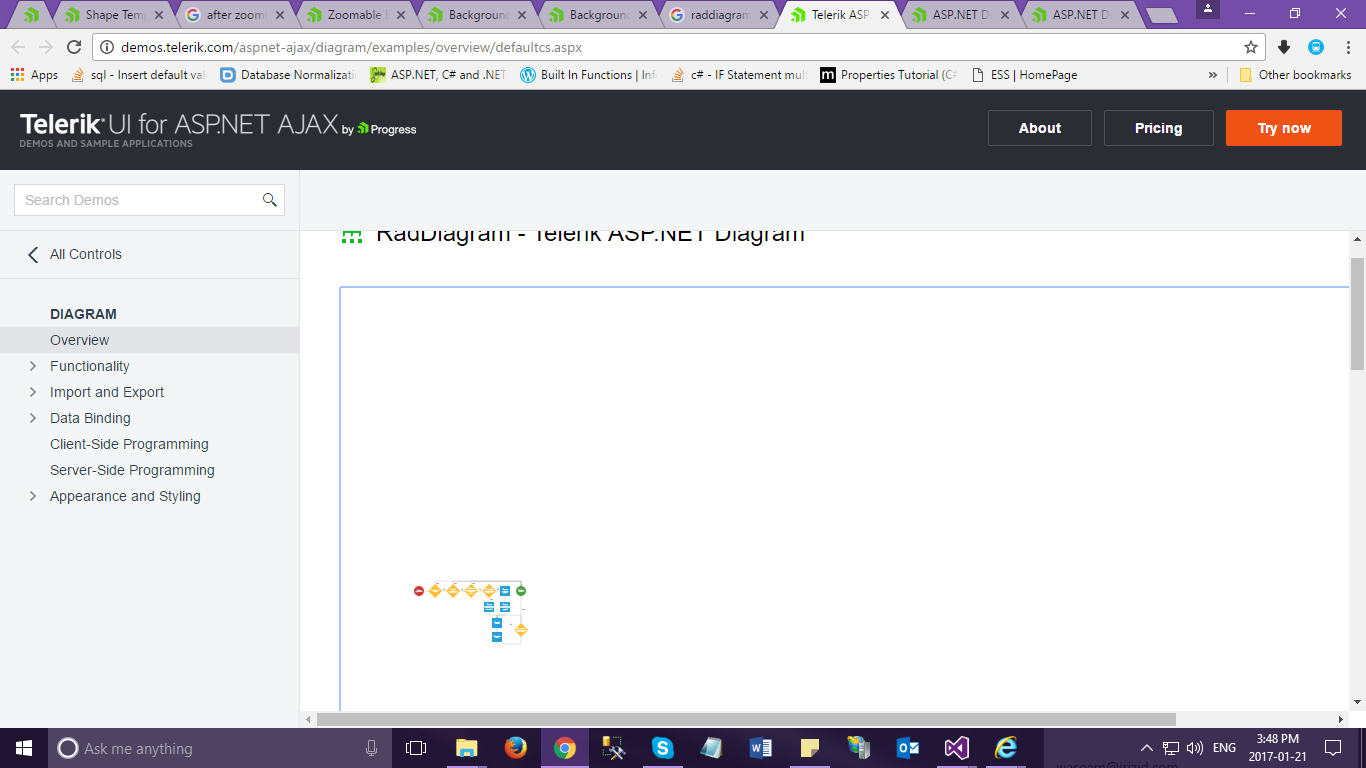
As we are working on RAD DIAGRAM and we are trying to customise. Our requirement is to show the designed diagram even after zoom in and zoom out but in the existing one once we zoom in and try to zoom out the designed diagram is going out of the RAD DIAGRAM window. So can you please suggest us to resolve this issue asap.
Thanks & Regards
Bhavya