or
2 answers
163 views
Hi,
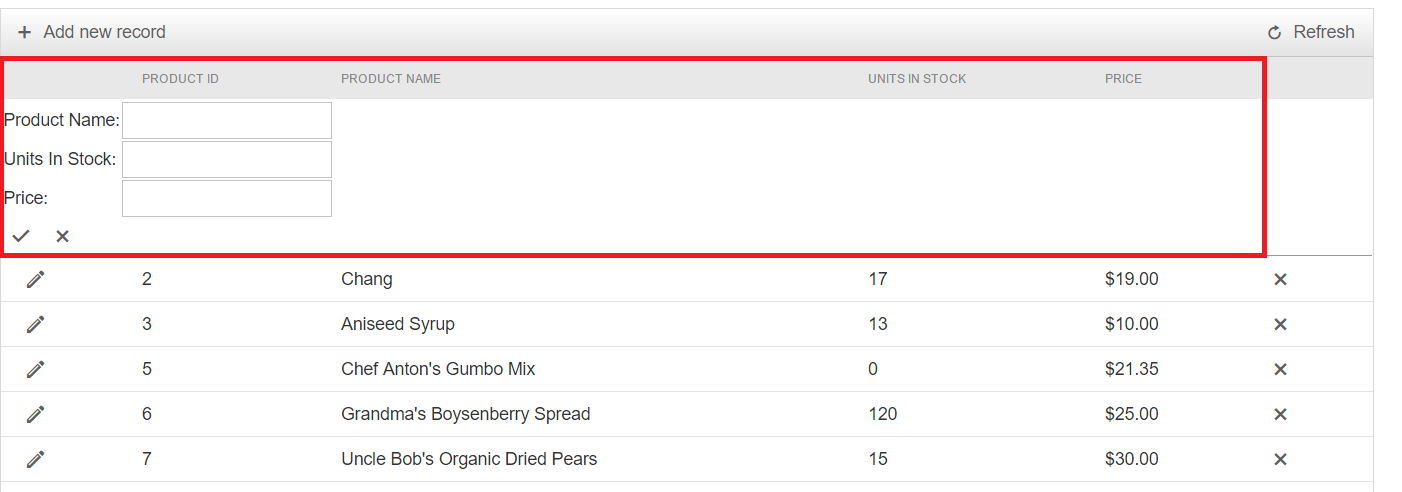
I try to update to the last version of telerik but I got an issue with a new fonctionnality (ref image)
How can I disable it, I must be blind.
Thx.

0 answers
175 views
I have a radgrid as below.
<telerik:RadGrid runat="server" ID="gridEconomist" EnableViewState="true" AllowPaging="true" OnNeedDataSource="gridEconomist_NeedDataSource"
OnItemCommand="gridEconomist_ItemCommand" OnItemDataBound="gridEconomist_ItemDataBound" AutoGenerateColumns="false" AllowAutomaticDeletes="false" AllowAutomaticInserts="false" AutoGenerateEditColumn="false"
AutoGenerateDeleteColumn="false" >
<MasterTableView AutoGenerateColumns="false" EnableViewState="true" EditMode="InPlace" DataKeyNames="assignedTo" NoDetailRecordsText="No Vouchers Found"
CommandItemDisplay="none">
<Columns>
<telerik:GridTemplateColumn UniqueName="VoucherCode" HeaderText="Voucher Code" DataField="VoucherCode">
<ItemTemplate>
<asp:Label ID="lblCode" runat="server" Enabled="true" Text='<%# Eval( "VoucherCode" )%>'>
</asp:Label>
</ItemTemplate>
</telerik:GridTemplateColumn>
<telerik:GridTemplateColumn UniqueName="createdDate" HeaderText="Created Date" DataField="createdDate">
<ItemTemplate>
<asp:Label ID="lblCreatedDate" runat="server" Enabled="false" Text='<%# Eval( "createdDate" )%>'>
</asp:Label>
</ItemTemplate>
</telerik:GridTemplateColumn>
<telerik:GridTemplateColumn UniqueName="assignedTo" HeaderText="Assigned To" DataField="assignedTo">
<ItemTemplate>
<asp:Label ID="lblAssgTo" runat="server" Text='<%# Eval( "assignedTo" )%>'>
</asp:Label>
<asp:TextBox ID="txtAssgTo" runat="server" Visible="false" Text='<%# Eval( "assignedTo" )%>'>
</asp:TextBox>
</ItemTemplate>
</telerik:GridTemplateColumn>
<telerik:GridTemplateColumn UniqueName="assignedDate" HeaderText="Assigned Date" DataField="assignedDate">
<ItemTemplate>
<asp:Label ID="lblAssgDate" runat="server" Enabled="false" Text='<%# Eval( "assignedDate" )%>'>
</asp:Label>
</ItemTemplate>
</telerik:GridTemplateColumn>
<telerik:GridTemplateColumn UniqueName="organization" HeaderText="Organization" DataField="organization">
<ItemTemplate>
<asp:Label ID="lblorganization" runat="server" Enabled="false" Text='<%# Eval( "organization" )%>'>
</asp:Label>
<asp:DropDownList CssClass="fontEIS" Visible="false" ID="ddlorganization" runat="server">
<asp:ListItem Value="IMF">IMF</asp:ListItem>
<asp:ListItem Value="WB">WB</asp:ListItem>
<asp:ListItem Value="IFC">IFC</asp:ListItem>
</asp:DropDownList>
</ItemTemplate>
</telerik:GridTemplateColumn>
<telerik:GridTemplateColumn UniqueName="Edit" HeaderText="Edit">
<ItemTemplate>
<asp:ImageButton ID="btnEdit" runat="server" ImageUrl="~/Images/Edit.jpg" Width="10px" Height="10px" CommandName="Edit" />
</ItemTemplate>
</telerik:GridTemplateColumn>
<telerik:GridTemplateColumn UniqueName="Save" HeaderText="Save">
<ItemTemplate>
<asp:ImageButton ID="btnSave" runat="server" ImageUrl="~/Images/Action_Save.png" Width="10px" Height="10px" CommandName="Save" />
</ItemTemplate>
</telerik:GridTemplateColumn>
<telerik:GridTemplateColumn UniqueName="Delete" HeaderText="Delete">
<ItemTemplate>
<asp:ImageButton ID="btnDelete" runat="server" ImageUrl="~/Images/Action_Delete.png" Width="10px" Height="10px" CommandName="Save" />
</ItemTemplate>
</telerik:GridTemplateColumn>
</Columns>
</MasterTableView>
</telerik:RadGrid>
I need to hide the label lblAssgTo and make txtassgto visible in item command. I have the below code in item command.
protected void gridEconomist_ItemCommand(object sender, Telerik.Web.UI.GridCommandEventArgs e)
{
if (e != null)
{
e.Item.Edit = true;
GridEditableItem item = e.Item as GridDataItem;
item.Edit = true;
if (e.CommandName == "Edit")
{
TextBox txtAssgTo = (item.FindControl("txtAssgTo") as TextBox);
Label lblAssgTo = (item.FindControl("lblAssgTo") as Label);
Label lblorganization = (item.FindControl("lblorganization") as Label);
DropDownList ddlorganization = (item.FindControl("ddlorganization") as DropDownList);
lblAssgTo.Visible = false;
txtAssgTo.Visible = true;
ddlorganization.Visible = true;
lblorg.Visible = false;
}
}
}
When I debug I can see that the visible property is set to false in lblassg but it is not reflected in the UI. After item command the need data source event is fired. I'm not sure if thatis causing the issue.
3 answers
1.8K+ views
Hi All,
How to bind a dropdown in radgrid filter template in codebehind page? Please help
Thanks,
Mahesh
How to bind a dropdown in radgrid filter template in codebehind page? Please help
Thanks,
Mahesh

Eyup
Telerik team

answered
on
27 Mar 2017
1 answer
1.6K+ views
How can I make rowspan (merge) same named rows for grouped rows? (There are sub total rows)
Example : (I want to merge A,B,C values as merged..)
A B
A B
A B
B - Subtotal
A C
A C
A C
C - Subtotal
GRAND TOTAL
Eyup
Telerik team
answered
on
27 Mar 2017
0 answers
470 views
How to Pass the Child window data to Textbox control within RadDock on parent page?
-----------------------------------------------------------------------------------------------------------------------------------------------------------------------------------------------------------
Parent Page code:
01.<%@ Page Language="C#" AutoEventWireup="true" CodeFile="Default.aspx.cs" Inherits="radwindow_parent_child_relation_Default" %>02. 03.<%@ Register assembly="Telerik.Web.UI" namespace="Telerik.Web.UI" tagprefix="telerik" %>04. 05.<!DOCTYPE html PUBLIC "-//W3C//DTD XHTML 1.0 Transitional//EN" "http://www.w3.org/TR/xhtml1/DTD/xhtml1-transitional.dtd">06.<html xmlns="http://www.w3.org/1999/xhtml">07. <head runat="server">08. <title></title>09. <%--This script contains the commonly used functions for all dialogs. It is referenced by all dialog pages--%>10. <script src="JScript.js" type="text/javascript"></script>11. </head>12. <body>13. <form id="form1" runat="server">14. <telerik:RadScriptManager ID="RadScriptManager1" runat="server">15. <Scripts>16. <asp:ScriptReference Assembly="Telerik.Web.UI" Name="Telerik.Web.UI.Common.Core.js">17. </asp:ScriptReference>18. <asp:ScriptReference Assembly="Telerik.Web.UI" Name="Telerik.Web.UI.Common.jQuery.js">19. </asp:ScriptReference>20. <asp:ScriptReference Assembly="Telerik.Web.UI" Name="Telerik.Web.UI.Common.jQueryInclude.js">21. </asp:ScriptReference>22. </Scripts>23. </telerik:RadScriptManager>24. <telerik:RadAjaxManager ID="RadAjaxManager1" runat="server">25. </telerik:RadAjaxManager>26. This is the main form. It will host all RadWindows. The JavaScript functions that are used are defined in a common27. JavaScript file so they can be reused easily. In a real application each page will define what the28. useDataFromChild() and generateDataForParent() functions will do, in this example they merely populate textboxes.29. 30. 31. <br />32. <telerik:RadWindowManager ID="RadWindowManager1" runat="server" Modal="true" OnClientClose="returnDataToParentPopup">33. </telerik:RadWindowManager>34. 35. <br />36. <br />37. <script type="text/javascript">38. //this is the function that receives the data from the child popup and handles it on the current page39. function useDataFromChild(data)40. {41. document.getElementById("Textbox1").value = data;42. }43. </script>44. <asp:UpdatePanel ID="UpdatePanel1" runat="server">45. <ContentTemplate>46. <telerik:RadDockLayout ID="RadDockLayout1" Runat="server">47. <telerik:RadDockZone ID="RadDockZone1" Runat="server" Height="300px" Width="995px">48. <telerik:RadDock ID="RadDock1" Runat="server" Height="142px" Width="933px">49. <ContentTemplate>50. <asp:Button ID="Button1" runat="server" OnClick="Button1_Click" OnClientClick="openChildDialog('first.aspx', 'firstDialog', 'First Dialog'); return false;" Text="open first dialog" />51. <asp:TextBox ID="Textbox1" runat="server" />52. </ContentTemplate>53. </telerik:RadDock>54. </telerik:RadDockZone>55. </telerik:RadDockLayout>56. </ContentTemplate>57. </asp:UpdatePanel>58. </form>59. </body>60.</html>
Child page code :
01.<%@ Page Language="C#" AutoEventWireup="true" CodeFile="first.aspx.cs" Inherits="radwindow_parent_child_relation_first" %>02. 03.<!DOCTYPE html PUBLIC "-//W3C//DTD XHTML 1.0 Transitional//EN" "http://www.w3.org/TR/xhtml1/DTD/xhtml1-transitional.dtd">04.<html xmlns="http://www.w3.org/1999/xhtml">05. <head runat="server">06. <title></title>07. <script src="JScript.js" type="text/javascript"></script>08. </head>09. <body>10. <form id="form1" runat="server">11. This is the first dialog. It will open the second one and get data from it.12. <asp:Button ID="Button1" Text="open second dialog" runat="server" OnClientClick="openChildDialog('second.aspx', 'secondDialog', 'Second Dialog'); return false;" />13. <br />14. <asp:TextBox ID="Textbox1" runat="server" />15. <asp:Button ID="Button2" Text="send data to main form" runat="server" OnClientClick="generateDataForParent(); return false;" />16. 17. <script type="text/javascript">18. //this is the function that receives the data from the child popup and handles it on the current page19. function useDataFromChild(data) {20. document.getElementById("Textbox1").value = data;21. }22. 23. //each page needs to define such a function24. function generateDataForParent() {25. var info = document.getElementById("Textbox1").value;26. sendDataToParent(info);27. }28. </script>29. </form>30. </body>31.</html>32.
JScript.js code :
01.function returnDataToParentPopup(sender, args) {02. //get the data that was passed and return it to the parent reference. Note that you need to know that name of the function that will handle the data there03. var info = args.get_argument();04. 05. if (sender.__parentBackReference && sender.__parentBackReference.useDataFromChild)06. sender.__parentBackReference.useDataFromChild(info);07.}08. 09.function openChildDialog(url, wndName, title) {10. //in case of erroneous arguments, add some error handling and prevention11. if (!url)12. url = "errorPage.aspx";13. if (!wndName)14. wndName = "popup_" + Math.random();15. var currentWnd = GetRadWindow();16. var browserWnd = window;17. if (currentWnd)18. browserWnd = currentWnd.BrowserWindow;19. setTimeout(function () {20. var wnd = browserWnd.radopen(url, wndName);21. wnd.__parentBackReference = window; //pass the current window object of the page that opens the dialog so it can be used later22. 23. if (title)24. wnd.set_title(title); //you can pass more parameters for RadWindow settings, e.g., modality, dimensions, etc.25. //you can even add arguments that will pass data from the parent to the child as shown here27. //in the On the Dialog Page section that shows how to access custom fields in the RadWindow object and use them.28. //of course, you can also use querystrings in the URL.29. }, 0);30.}31. 32.function GetRadWindow() {33. var oWindow = null;34. if (window.radWindow)35. oWindow = window.radWindow;36. else if (window.frameElement && window.frameElement.radWindow)37. oWindow = window.frameElement.radWindow;38. return oWindow;39.}40. 41.function sendDataToParent(dataForParent) {42. //pass the data object onward43. GetRadWindow().close(dataForParent);44. 45.}
0 answers
85 views
Hi,
is it possible to show Insert New Record by first load in Grid? The example you can found here. The problem by this example is that The "New Record Form" will opened after I clicked the "Add New Record" Button. What I want is that form by default(first load) open without I have to first click "Add new record" button. Is it possible?
Any answer would be appreciated
Regards
4 answers
570 views
How can a user be prevented from going to the next step in code behind? I need to verify some information and if the information is invalid prevent the user from going to the next step. The information can only be verified in code behind. I don't see a "e.Cancel" as in the asp.net wizard.What do I do?
3 answers
129 views
We use the Telerik RadGrid in our application and load the data and columns client side.
We inherit from the Telerik grid columns
internal class xxxButtonGridBoundColumn : GridButtonColumn
internal class xxxFilterGridBoundColumn : GridBoundColumn
as part of our grid refresh we call the following JavaScript
fixColumnType: function () {
// force column types to be RAD types
var TelerikGridColumns = this.get_masterTableView().get_columns();
for (var i = 0; i < TelerikGridColumns.length; i++) {
var column = TelerikGridColumns[i];
switch (column._data.ColumnType) {
case "xxxButtonGridBoundColumn":
column._data.ColumnType = "GridButtonColumn";
break;
case "xxxFilterGridBoundColumn":
column._data.ColumnType = "GridBoundColumn";
break;
This is called before the grid.databind() method and seems to work.
The bug is that the GridButtonColumn reverts back to xxxButtonGridBoundColumn and doesn't bind to the data
(GridBoundColumn still works ok)
This was working in version 2013:3:1114:35 but broken in future versions including the most recent 2017
Any help in why this happens would be appreciated
Eyup
Telerik team
answered
on
24 Mar 2017
1 answer
212 views
I want to update a RadAjaxPanel, when I have been clicking a RadMenuItem of a RadTreeView.
That treeview is not inside the RadAjaxPanel but on the same page as it.
If I add a OnNodeClick handler to the RadTreeView and add a event handler in code behind, then clicking a RadMenuItem of the treeview will cause a postback and the whole page will reload.
Instead, I want the RadAjaxPanel to reload so I can bind a grid in it.
How can I do that? I will not move the treeview inside the ajax panel.

Marin Bratanov
Telerik team
answered
on
24 Mar 2017
3 answers
258 views
We are using RadEditor for capturing comments from user.
We face a strange problem, with appearance of Horizontal scrollbar, even before adding any content.
This occurs only when ContentAreaMode="Iframe".
This doesn't occur when ContentAreaMode="Div", but problem using Div is, it automatically increases the width of editor, if entered content width is more than control width. It happens even when we have mentioned fixed width for it.
Please suggest a solution for this.
We face a strange problem, with appearance of Horizontal scrollbar, even before adding any content.
This occurs only when ContentAreaMode="Iframe".
This doesn't occur when ContentAreaMode="Div", but problem using Div is, it automatically increases the width of editor, if entered content width is more than control width. It happens even when we have mentioned fixed width for it.
Please suggest a solution for this.

Ianko
Telerik team
answered
on
24 Mar 2017