or
2 answers
89 views
Hello.
I have a problem with grid layouts.I use Webblue skin in my project.In most of pages,grids appear like normal but some of them just disrupting.Look at skin and pagings.Using same grid skin css all of them.
Please help me to solve this problem.
I have a problem with grid layouts.I use Webblue skin in my project.In most of pages,grids appear like normal but some of them just disrupting.Look at skin and pagings.Using same grid skin css all of them.
Please help me to solve this problem.

1 answer
213 views
Hi Developer,
first I apologize for my english (it's not very good). I'am a beginner with telerik, and I have some doubts with the RadGrid.
Actually I develop a WebApplication that uses Telerik Asp.Net ajax controls, exactly a I develop with the RadGridControl.
I like to read from a table (from database) and use a radgrid to show results from "query" (after I'll improve the example app to include "buttons" to do action like detail view, master/detail, etc).
Note: The table to read will have more record (actually has about 10.000)
I am trying to scenarios
a) RadGrid with SqlDatasource (and filtering)
In this case, I define a radgrid (radGrid1) which uses a SqlDatasource (sqlDatasource) only with SelectCommand ("select * from mytable")
In this case, I define a SqlDatasource, with a SelectCommand "select * from mytable"
# MyTableViewScenarioA.aspx
...
<!-- RadGrid -->
<telerik:RadGrid ID="RadGrid1" runat="server" AllowPaging="True"
AllowSorting="True" CellSpacing="0" DataSourceID="SqlDataSource1"
GridLines="None" PageSize="30">
...
<!-- SqlDatasource -->
<asp:SqlDataSource ID="SqlDataSource1" runat="server"
ConnectionString="connectionstring"
SelectCommand="SELECT * from MyTable"></asp:SqlDataSource>
# MyTableViewScenarioA.aspx.cs
b) RadGrid with ObjectDatasource (and filtering)
In this case, I define a RadGrid (radGrid1) without datasource. And before I use the NeedDatasource method to set the radgrid1's datasource with a list. The list is get from a method of a service class that query database (this method creates a select query and return a list of a type object)
# MyTableService.cs
public class MyTableService
{
public List<MyTable> Find(Dicctionary<string, object> parameters)
{
// List<MyTable> = "select * from mytable where ..."
}
.....
}
# MyTableViewScenarioB.aspx
...
<telerik:RadGrid ID="RadGrid2" runat="server" AllowPaging="True"
AllowSorting="True" PageSize="15"
AutoGenerateColumns="False" CellSpacing="0" GridLines="None"
onneeddatasource="RadGrid2_NeedDataSource" Skin="Windows7">
...
# MyTableViewScenarioB.aspx.cs
....
protected void RadGrid2_NeedDataSource(object sender, Telerik.Web.UI.GridNeedDataSourceEventArgs e)
{
MyTableService service = new MyTableService();
Dictionary<string, object> parameters= new Dictionary<string, object>(5);
DateTime datetimeTo = DateTime.Now;
//DateTime datetimeFrom= datetimeTo .AddDays(-7);
DateTime datetimeFrom= datetimeTo .AddDays(-45);
parameters.Add("datetimeFrom", datetimeFrom);
parameters.Add("datetimeTo ", datetimeTo );
List<MyTable> myTableList = service .Find(parameters);
this.RadGrid1.DataSource = myTableList ;
//this.RadGrid1.DataBind();
}
}
...
I debug the application and I have some questions about radgrid
Q1) ¿Select is execute everty time when I click a "next page" ?
Note: In scenario B the answer is yes
Q2) If Q1 answer if yes considering scenario a). How I can optimize this?
If every time radgrid execute a select, the database return a big number of rows, but the grid limit the result considering page size.
Q3) If Q1 answer if no (considering scenario b). ¿Where is save the datasource?
Q4) In scenarioB. How I can use the values of the filter, in NeedDatasource, to create the dicctionary parametres use in Find method?
Note: asume that table "myTable" has four columns: column1 (int), column2 (string), colum3(number), colum4 (datetime)
Q5) How works radgrid filtering? When is applied the filter?
I like to know how works filterir, and when is applied. In scenarioa is launch select command and before is aplied the filter or first is aplied the filter (to select query) and second is launch the query.
In first aproach, the select return all rows from database and after, dataset is filter. In second aproach, the database return the "correct" rows that match with the filter.
Q6) When I change a filter, radgrid reload the page. It's possible to avoid this feature?
I like to use a command button "Apply filters" similar to a tipical search form. The idea is to avoid reload the grid every time that a filter change (and avoid to query the database everty time)
Q7) There is a event to inform me that a filter have been change?
Note: this is importan if i use scenarioB. The idea is recalculate de parameters, every time a user change a filter.
Q8) If I use scenarioB, it's possible to save the list in the view state?
The idea, is use the save list every time that the user click on a specific page (in this case, this is no query in database). If the user change a filter, then, the list (datasource) should be recalculated.
Q7) Which of two scenarios is better to use ASP Net Ajax controls?
ScenarioA is the typical of the telerik examples. ScenarioB is typical of a orm application (entity framework, nhibernate, etc) where the develop use bussines object indepent of database (and is desgined to use, for exampe with a mvc application. In this case, the search view constains a model that consist in a list<MyTable>)
Thank you so much for your help. Sorry for my english.
Regards.
first I apologize for my english (it's not very good). I'am a beginner with telerik, and I have some doubts with the RadGrid.
Actually I develop a WebApplication that uses Telerik Asp.Net ajax controls, exactly a I develop with the RadGridControl.
I like to read from a table (from database) and use a radgrid to show results from "query" (after I'll improve the example app to include "buttons" to do action like detail view, master/detail, etc).
Note: The table to read will have more record (actually has about 10.000)
I am trying to scenarios
a) RadGrid with SqlDatasource (and filtering)
In this case, I define a radgrid (radGrid1) which uses a SqlDatasource (sqlDatasource) only with SelectCommand ("select * from mytable")
In this case, I define a SqlDatasource, with a SelectCommand "select * from mytable"
# MyTableViewScenarioA.aspx
...
<!-- RadGrid -->
<telerik:RadGrid ID="RadGrid1" runat="server" AllowPaging="True"
AllowSorting="True" CellSpacing="0" DataSourceID="SqlDataSource1"
GridLines="None" PageSize="30">
...
<!-- SqlDatasource -->
<asp:SqlDataSource ID="SqlDataSource1" runat="server"
ConnectionString="connectionstring"
SelectCommand="SELECT * from MyTable"></asp:SqlDataSource>
# MyTableViewScenarioA.aspx.cs
b) RadGrid with ObjectDatasource (and filtering)
In this case, I define a RadGrid (radGrid1) without datasource. And before I use the NeedDatasource method to set the radgrid1's datasource with a list. The list is get from a method of a service class that query database (this method creates a select query and return a list of a type object)
# MyTableService.cs
public class MyTableService
{
public List<MyTable> Find(Dicctionary<string, object> parameters)
{
// List<MyTable> = "select * from mytable where ..."
}
.....
}
# MyTableViewScenarioB.aspx
...
<telerik:RadGrid ID="RadGrid2" runat="server" AllowPaging="True"
AllowSorting="True" PageSize="15"
AutoGenerateColumns="False" CellSpacing="0" GridLines="None"
onneeddatasource="RadGrid2_NeedDataSource" Skin="Windows7">
...
# MyTableViewScenarioB.aspx.cs
....
protected void RadGrid2_NeedDataSource(object sender, Telerik.Web.UI.GridNeedDataSourceEventArgs e)
{
MyTableService service = new MyTableService();
Dictionary<string, object> parameters= new Dictionary<string, object>(5);
DateTime datetimeTo = DateTime.Now;
//DateTime datetimeFrom= datetimeTo .AddDays(-7);
DateTime datetimeFrom= datetimeTo .AddDays(-45);
parameters.Add("datetimeFrom", datetimeFrom);
parameters.Add("datetimeTo ", datetimeTo );
List<MyTable> myTableList = service .Find(parameters);
this.RadGrid1.DataSource = myTableList ;
//this.RadGrid1.DataBind();
}
}
...
I debug the application and I have some questions about radgrid
Q1) ¿Select is execute everty time when I click a "next page" ?
Note: In scenario B the answer is yes
Q2) If Q1 answer if yes considering scenario a). How I can optimize this?
If every time radgrid execute a select, the database return a big number of rows, but the grid limit the result considering page size.
Q3) If Q1 answer if no (considering scenario b). ¿Where is save the datasource?
Q4) In scenarioB. How I can use the values of the filter, in NeedDatasource, to create the dicctionary parametres use in Find method?
Note: asume that table "myTable" has four columns: column1 (int), column2 (string), colum3(number), colum4 (datetime)
Q5) How works radgrid filtering? When is applied the filter?
I like to know how works filterir, and when is applied. In scenarioa is launch select command and before is aplied the filter or first is aplied the filter (to select query) and second is launch the query.
In first aproach, the select return all rows from database and after, dataset is filter. In second aproach, the database return the "correct" rows that match with the filter.
Q6) When I change a filter, radgrid reload the page. It's possible to avoid this feature?
I like to use a command button "Apply filters" similar to a tipical search form. The idea is to avoid reload the grid every time that a filter change (and avoid to query the database everty time)
Q7) There is a event to inform me that a filter have been change?
Note: this is importan if i use scenarioB. The idea is recalculate de parameters, every time a user change a filter.
Q8) If I use scenarioB, it's possible to save the list in the view state?
The idea, is use the save list every time that the user click on a specific page (in this case, this is no query in database). If the user change a filter, then, the list (datasource) should be recalculated.
Q7) Which of two scenarios is better to use ASP Net Ajax controls?
ScenarioA is the typical of the telerik examples. ScenarioB is typical of a orm application (entity framework, nhibernate, etc) where the develop use bussines object indepent of database (and is desgined to use, for exampe with a mvc application. In this case, the search view constains a model that consist in a list<MyTable>)
Thank you so much for your help. Sorry for my english.
Regards.

Mira
Telerik team

answered
on
12 Aug 2011
4 answers
78 views
Hi,
I have problem here. I was trying to fill the tree structure with the DataTable contents. The data i'm going to fill the tree view is a collection of special characters.
As you can see below the node.text which is a RadTreeNode has the value "\WW\<a"

But when it is displayed on the screen it comes as
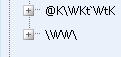 This looks like when biinding the "<a" is getting truncated.
Is there any way around it???
Plz help me with this as I'm stuck with this
regards
Swa
I have problem here. I was trying to fill the tree structure with the DataTable contents. The data i'm going to fill the tree view is a collection of special characters.
As you can see below the node.text which is a RadTreeNode has the value "\WW\<a"
But when it is displayed on the screen it comes as
Is there any way around it???
Plz help me with this as I'm stuck with this
regards
Swa

Plamen
Telerik team
answered
on
12 Aug 2011
3 answers
205 views
Hi,
I have radbutton and icon , like this:
Any ideas ?
thanks .
I have radbutton and icon , like this:
<telerik:RadButton ID="myRadButton" runat="server" Text=""
        CssClass="RadBtn" onclick="some_function">
         <Icon SecondaryIconCssClass="rbAdd" SecondaryIconRight="4" SecondaryIconTop="4"/>
</telerik:RadButton>
when I click on my radbutton "some_function" is fire, but when I click on the icon which is on this button my function doesn't work.
Any ideas ?
thanks .
Slav
Telerik team
answered
on
12 Aug 2011
3 answers
163 views
Hello!
I'm having a problem while trying to get the selected Item from a RadListBox...
When i use the RadListBox1.SelectedItem.Value the value is allways null when i use a dictionary as my datasource, but the RadList has 26 rows....However i have other 2 listboxs whose datasource is an entity..i d'ont have any problem....
Here is my code:
I'm having a problem while trying to get the selected Item from a RadListBox...
When i use the RadListBox1.SelectedItem.Value the value is allways null when i use a dictionary as my datasource, but the RadList has 26 rows....However i have other 2 listboxs whose datasource is an entity..i d'ont have any problem....
Here is my code:
public partial class AssignInvoices : Microsoft.Practices.CompositeWeb.Web.UI.Page, IAssignInvoicesView { private AssignInvoicesPresenter _presenter; //implemantaçao da propriedade public System.Collections.Generic.IList<Data.Users> Users { get; set; } public System.Collections.Generic.IList<Data.Priorities> Priorities { get; set; } public System.Collections.Generic.IList<Data.Staging> Staging { get; set; } protected void Page_Load(object sender, EventArgs e) { if (!this.IsPostBack) { this._presenter.OnViewInitialized(); } this._presenter.OnViewLoaded(); Info x = new Info("xx", "xx", "xx,DC=xx,DC=xx"); Dictionary<string, string> networkUser = new Dictionary<string, string>(); networkUser = x.GetHierarchyTree("xx"); Dictionary<string, string> aux = new Dictionary<string, string>(); foreach (KeyValuePair<string, string> kvp in networkUser) { //kvp.Key = user de rede string userCompName = x.GetUserInfo("cn", kvp.Key); aux.Add(kvp.Key, userCompName);//Dictionary com key = user de rede e Value = nomeCompleto Utilizador } RadListBox1.DataTextField = "Key"; RadListBox1.DataValueField = "Value"; RadListBox1.DataSource = aux; RadListBox1.DataBind(); //Page.User.Identity.Name para ir buscar o login user //Popular dados na listbox users //RadListBox1.DataSource = this.Users; //RadListBox1.DataTextField = "UserName"; //RadListBox1.DataValueField = "UserSap"; //RadListBox1.DataBind(); //Popular dados na listbox grupos RadListBox2.DataSource = this.Priorities; RadListBox2.DataTextField = "Priority"; RadListBox2.DataValueField = "Priority"; RadListBox2.DataBind(); //Popular dados na listbox stagins RadListBox3.DataSource = this.Staging; RadListBox3.DataTextField = "Process"; RadListBox3.DataValueField = "Process"; RadListBox3.DataBind(); } [CreateNew] public AssignInvoicesPresenter Presenter { get { return this._presenter; } set { if (value == null) throw new ArgumentNullException("value"); this._presenter = value; this._presenter.View = this; } } // TODO: Forward events to the presenter and show state to the user. // For examples of this, see the View-Presenter (with Application Controller) QuickStart: // protected void RadButton1_Click(object sender, EventArgs e) { string _UserValue = RadListBox1.SelectedItem.Value; //Gets the value of item in Users. //string _text = RadListBox1.SelectedItem.Text; //Gets the Text of items in the list. List<string> _groups = new List<string>(); //create a list to store selected groups string _stg = RadListBox3.SelectedItem.Value; // create a list to store selected stagings if (RadListBox1.SelectedIndex > -1 && RadListBox2.SelectedIndex > -1 && RadListBox3.SelectedIndex > -1) { iConnect.InvoicesScaling.Data.UsersAssignDAO usrAssgnDAO = new iConnect.InvoicesScaling.Data.UsersAssignDAO(new EscalonamentoFacturasEntities()); UsersAssign user = new UsersAssign(); foreach (var grp in RadListBox2.SelectedItems) { _groups.Add(grp.Value); //store the selectItems on RadListBox2 to list groups //efectuar aqui o insert user.InserDate = DateTime.Now; int j; Int32.TryParse(grp.Value, out j); user.UserName = _UserValue; user.Priority = j; user.Staging = _stg; //passar o objecto a inserir na tabela da bd usrAssgnDAO.Add(user); usrAssgnDAO.SaveChanges(); } } //else if(RadListBox2.SelectedIndex < -1 ) //reportar erro } } }
Peter Filipov
Telerik team
answered
on
12 Aug 2011
1 answer
77 views
Hi Telerik Team,
I use this link and found that this is a very good example of showing something into my product.
http://demos.telerik.com/aspnet-ajax/listbox/examples/functionality/draganddrop/defaultcs.aspx
I open the code and implement the things as discussed in this particular page and found the things proper.
Now the problem is this that I bind the ListBox with the database and try to drag the listbox item from there into the textbox. but now it is giving me that in the function RadListBox_Dropped, e.SourceDragItems.Count become 0 every time.
I am writing my code here.
protected void RadListBox_Dropped(object sender, RadListBoxDroppedEventArgs e)
{
if (txtNoteArea.ClientID == e.HtmlElementID)
{
txtNoteArea.Text = String.Empty;
foreach (RadListBoxItem item in e.SourceDragItems)
{
txtNoteArea.Text += item.Text + ", \n";
}
if (txtNoteArea.Text.Length > 0)
txtNoteArea.Text = txtNoteArea.Text.TrimEnd(new char[] { ',', ' ', '\n' });
}
}
public void BindStandardNotes()
{
DataSet dsMC = new DataSet();
SqlConnection con = new SqlConnection(System.Web.Configuration.WebConfigurationManager.AppSettings["con"]);
SqlDataAdapter adp = new SqlDataAdapter("SPNAME", con);
adp.SelectCommand.CommandType = CommandType.StoredProcedure;
adp.Fill(dsMC);
lstStandardNotes.DataSource = dsMC;
lstStandardNotes.DataValueField = "ID";
lstStandardNotes.DataTextField = "TEXT";
lstStandardNotes.DataBind();
}
<telerik:RadListBox ID="lstStandardNotes" runat="server" Width="90%" Height="200px" SelectionMode="Multiple"
AutoPostBackOnReorder="false" EnableDragAndDrop="true" OnDropped="RadListBox_Dropped" />
<asp:TextBox ID="txtNoteArea" runat="server" Wrap="true" Rows="8" TextMode="MultiLine" Width="90%" Height="200px" ValidationGroup="QAN" />
This code is working fine if I put some static items into the ListBox, but when I bind with the Database, the SourceDragItem count become 0.
Please assist me ASAP.
Regards,
Steve Austin
I use this link and found that this is a very good example of showing something into my product.
http://demos.telerik.com/aspnet-ajax/listbox/examples/functionality/draganddrop/defaultcs.aspx
I open the code and implement the things as discussed in this particular page and found the things proper.
Now the problem is this that I bind the ListBox with the database and try to drag the listbox item from there into the textbox. but now it is giving me that in the function RadListBox_Dropped, e.SourceDragItems.Count become 0 every time.
I am writing my code here.
protected void RadListBox_Dropped(object sender, RadListBoxDroppedEventArgs e)
{
if (txtNoteArea.ClientID == e.HtmlElementID)
{
txtNoteArea.Text = String.Empty;
foreach (RadListBoxItem item in e.SourceDragItems)
{
txtNoteArea.Text += item.Text + ", \n";
}
if (txtNoteArea.Text.Length > 0)
txtNoteArea.Text = txtNoteArea.Text.TrimEnd(new char[] { ',', ' ', '\n' });
}
}
public void BindStandardNotes()
{
DataSet dsMC = new DataSet();
SqlConnection con = new SqlConnection(System.Web.Configuration.WebConfigurationManager.AppSettings["con"]);
SqlDataAdapter adp = new SqlDataAdapter("SPNAME", con);
adp.SelectCommand.CommandType = CommandType.StoredProcedure;
adp.Fill(dsMC);
lstStandardNotes.DataSource = dsMC;
lstStandardNotes.DataValueField = "ID";
lstStandardNotes.DataTextField = "TEXT";
lstStandardNotes.DataBind();
}
<telerik:RadListBox ID="lstStandardNotes" runat="server" Width="90%" Height="200px" SelectionMode="Multiple"
AutoPostBackOnReorder="false" EnableDragAndDrop="true" OnDropped="RadListBox_Dropped" />
<asp:TextBox ID="txtNoteArea" runat="server" Wrap="true" Rows="8" TextMode="MultiLine" Width="90%" Height="200px" ValidationGroup="QAN" />
This code is working fine if I put some static items into the ListBox, but when I bind with the Database, the SourceDragItem count become 0.
Please assist me ASAP.
Regards,
Steve Austin
Peter Filipov
Telerik team
answered
on
12 Aug 2011
1 answer
247 views
Hello people...
I'm having a problem with my RadGrid...Can you show me how can i on my asp.cs file(code behind) set the column value of my grid with a navigation property field?
I'm using Entity, and I have the a table SapDocuments with a foreign Key of the field Process to another Table "Staging",
At this moment my grid comes with Priority and Stagin values at null and the others are fine...
I need to set those two column values with the value of my navigation property....I can access to it like that:
I'm having a problem with my RadGrid...Can you show me how can i on my asp.cs file(code behind) set the column value of my grid with a navigation property field?
RadGrid1.DataSource = this.SapDocuments; RadGrid1. RadGrid1.UniqueID.Equals("Process") = public List<SapDocuments> GetSapDocumentsByUser(string userName) { var documentsQuery = from sd in spDocs.SapDocuments join ua in spDocs.UsersAssign on new { sd.Staging.Process, sd.Priorities.Priority } equals new { ua.Process, ua.Priority } where ua.UserName == userName //ALterar User select sd; return documentsQuery.ToList(); } } }I'm using Entity, and I have the a table SapDocuments with a foreign Key of the field Process to another Table "Staging",
At this moment my grid comes with Priority and Stagin values at null and the others are fine...
<MasterTableView GridLines="None" Width="100%" ViewStateMode="Disabled" CommandItemSettings-ShowExportToCsvButton="True" CommandItemSettings-ShowAddNewRecordButton="false" CommandItemDisplay="Top"> <Columns> <telerik:GridBoundColumn DataField="SequencialNumber" HeaderText="SequencialNumber" UniqueName="SequencialNumber" SortExpression="SequencialNumber"> </telerik:GridBoundColumn> <telerik:GridBoundColumn DataField="Priority" HeaderText="Priority" UniqueName="Priority" FilterControlAltText="Filter Priority column" SortExpression="Priority" DataType="System.Int32"> </telerik:GridBoundColumn> <telerik:GridBoundColumn DataField="Process" HeaderText="Staging" UniqueName="Process" SortExpression="Process" FilterControlAltText="Filter Process column"> </telerik:GridBoundColumn>I need to set those two column values with the value of my navigation property....I can access to it like that:
SapDocuments.Staging.Process;
SapDocuments.Priorities.Priority;
I needed to change my datamodel and know i have the exception for Priority and Process :
{"The ObjectContext instance has been disposed and can no longer be used for operations that require a connection."}
I have already set LazyLoad enabled...
Tsvetina
Telerik team
answered
on
12 Aug 2011
2 answers
289 views
Hi,
I have below code structure. and also note that all my parent elements including body has 100% height defined as you mentioned in http://demos.telerik.com/aspnet-ajax/splitter/examples/resizewithwindow/defaultcs.aspx.
But RadPageView doesn't take the 100% height it only takes fixed heights.
<RadSplitter height="100%" width="100%" orientation="vertical">
<RadPane width="22%" height="100%">
Some contents goes here
</RadPane>
<RadPane width="76%" height="100%">
<telerik:RadMultiPage height="100%">
<telerik:RadPageView height="100%">
Some contents goes here
</telerik:RadPageView>
</telerik:RadMultiPage>
</RadPane>
</RadSplitter>
any special ways that I should use height attribute for the RadPageView ?
Thanks
Malinda
I have below code structure. and also note that all my parent elements including body has 100% height defined as you mentioned in http://demos.telerik.com/aspnet-ajax/splitter/examples/resizewithwindow/defaultcs.aspx.
But RadPageView doesn't take the 100% height it only takes fixed heights.
<RadSplitter height="100%" width="100%" orientation="vertical">
<RadPane width="22%" height="100%">
Some contents goes here
</RadPane>
<RadPane width="76%" height="100%">
<telerik:RadMultiPage height="100%">
<telerik:RadPageView height="100%">
Some contents goes here
</telerik:RadPageView>
</telerik:RadMultiPage>
</RadPane>
</RadSplitter>
any special ways that I should use height attribute for the RadPageView ?
Thanks
Malinda
Kate
Telerik team
answered
on
12 Aug 2011
2 answers
427 views
Hi,
Am using a RadGrid in my application. When I enter data without any space in between(ex: HI_How_Are_You_?) in one of the columns, the data does not wrap. Kindly help me in fixing this issue as early as possible.
Thanks,
Sudha.
Am using a RadGrid in my application. When I enter data without any space in between(ex: HI_How_Are_You_?) in one of the columns, the data does not wrap. Kindly help me in fixing this issue as early as possible.
Thanks,
Sudha.
Sebastian
Telerik team
answered
on
12 Aug 2011
1 answer
106 views
I found GridClientSelectColumn very limited if grid has pages. There are several problems with it.
1. Keeping selected checkboxes while paging. This doesn't work out of the box and I know there are workarounds posted. By the way, I believe Telerik documentation http://www.telerik.com/help/aspnet-ajax/grid-persist-selected-rows-client-sorting-paging-grouping-filtering.html should be updated, since the code simply doesn't work since the array of selected keys needs to be stored in a hidden field.
2. Selecting all checkboxes doesn't affect checkbox at the header. Again the workaround is posted, but I am wondering why isn't it part of the control? Having hundred lines of JavaScript in order to circumvent the limitations of the control, defeats the purpose of even using one.
3. And finaly the biggest roadblock is that checking the box at the header does not check items on all pages and I don't see a way around it since I couldn't find events for the header checkbox.
Maybe it is all by design since the name of the control is GridClientSelectColumn, but it sounds that if grid has pages, I will better off by doing checkboxes manually...
-Stan
1. Keeping selected checkboxes while paging. This doesn't work out of the box and I know there are workarounds posted. By the way, I believe Telerik documentation http://www.telerik.com/help/aspnet-ajax/grid-persist-selected-rows-client-sorting-paging-grouping-filtering.html should be updated, since the code simply doesn't work since the array of selected keys needs to be stored in a hidden field.
2. Selecting all checkboxes doesn't affect checkbox at the header. Again the workaround is posted, but I am wondering why isn't it part of the control? Having hundred lines of JavaScript in order to circumvent the limitations of the control, defeats the purpose of even using one.
3. And finaly the biggest roadblock is that checking the box at the header does not check items on all pages and I don't see a way around it since I couldn't find events for the header checkbox.
Maybe it is all by design since the name of the control is GridClientSelectColumn, but it sounds that if grid has pages, I will better off by doing checkboxes manually...
-Stan
Veli
Telerik team
answered
on
12 Aug 2011





