Telerik Forums
UI for ASP.NET AJAX Forum
3 answers
167 views
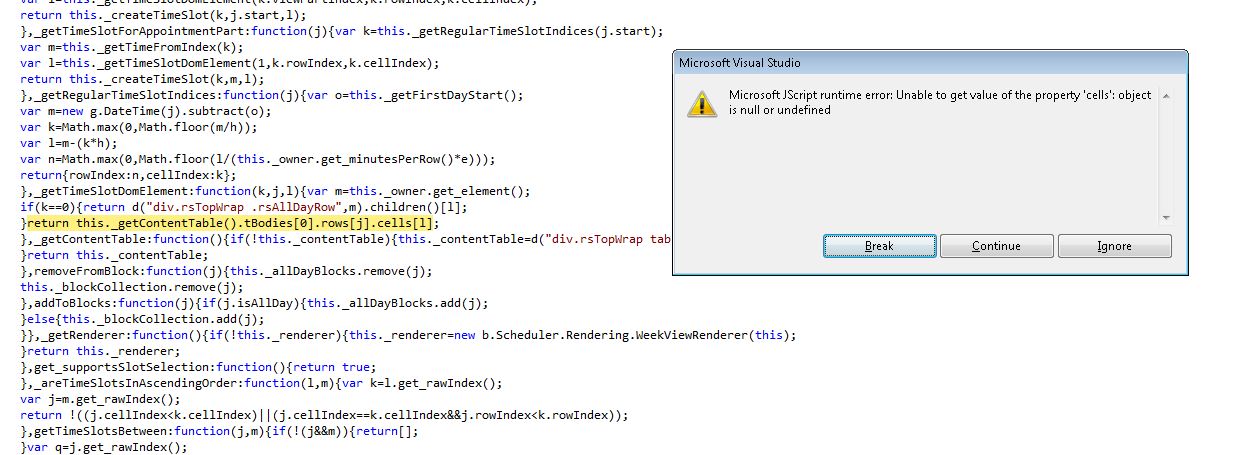
I'm setting RadScheduler.TimeZoneID in Page_Load event and there's some strange behavior in scheduler when comes to date of DayLight Saving Time changing.(28.10.2012)  Any ideas what I'm doing wrong?
RadScheduler1.TimeZoneID = TimeZoneInfo.Local.Id;
Screenshot:

Plamen
Telerik team
 answered on 16 Jan 2013
10 answers
1.6K+ views
I have a grid that I need to have several custom aggregate columns for the footer as it need to calculate the Average Daily Rate by calculating the sum(revenue in each row) / sum(rooms in each row)  this calculation needs to be done on different columns in the same grid and shown in the footer.   As there is very little documentation on Footer custom aggregates any help or samples would be appreciated.
Marin
Telerik team
 answered on 16 Jan 2013
5 answers
1.1K+ views

am using RadAsyncUpload to upload flles to the server and want to check if file name exist on client side then javascript popup to confirm overwrite or change file name by adding +1 to the filename.

I tried to use these script on server side and also didn't goes well for me .


Protected Sub RadAsyncUpload1_FileUploaded(ByVal sender As Object, ByVal e As FileUploadedEventArgs)
       Dim targetFolder As String = "~/Files"
 
       Dim targetFileName As String = Path.Combine(Server.MapPath(targetFolder), e.File.GetName())
       If Not File.Exists(targetFileName) Then
           e.File.SaveAs(targetFileName)
           txtpath.Text = targetFileName
           ' Implement logic
       Else
 
 
           lbresult.Text = "failed to upload"
 
 
       End If
   End Sub


and also this code :

 
Private Sub RadAsyncUpload1_FileUploaded(ByVal sender As Object, ByVal e As FileUploadedEventArgs)
            Dim fullPath As String = Server.MapPath(Path.Combine(RadAsyncUpload1.TargetFolder, e.File.GetName()))
 
            If File.Exists(fullPath) Then
                e.IsValid = False
                e.File.SaveAs(Server.MapPath(Path.Combine(RadAsyncUpload1.TargetFolder, e.File.GetNameWithoutExtension() & "1" & e.File.GetExtension())))
 
            txtpath.Text = "http://www.xxxxx.org/Files/" & e.File.FileName
 
        End If
        End Sub

Peter Filipov
Telerik team
 answered on 16 Jan 2013
3 answers
205 views
Hello, Telerik
I have an RadComboBox:
<telerik:RadComboBox runat="server" IsEditable="True" Width="167px" style="margin-left: 23px;" ID="cbMails" EmptyMessage="Choose a mail text"  OnSelectedIndexChanged="cbMails_SelectedIndexChanged" CssClass="ComboTop" AutoPostBack="True" meta:resourcekey="cbMailsResource1"></telerik:RadComboBox>

And I have a button
 <asp:Button runat="server" ID="AddButton" Text="Add" CssClass="GreenContentButton"<br>                                    Width="60px" OnClick="AddButton_OnClick" meta:resourcekey="AddButtonResource1" />

On button press I add new item in RadComboBox on server side.
I want to be able to edit ComboBot item in it.
I used IsEditable mode set to True but it does not work.
In matter of fact it's not shown in intellitrace in regular Asp.Net.
As far as I understood, it's available with silverlight and wpf versions of control. And by the logic in must be available in here, am I right?

Please say I am)
Nencho
Telerik team
 answered on 16 Jan 2013
5 answers
197 views
Hi All,
I'm using radchart in my application in my asp.net application.
Im binding the serieses with lists<int> from code behind.
If the all the values of list are zero then line horizental plain line showing at the zero postion of y axis.
But In Y axis its showing the negattive values also like 0 -10 -20 .....
I want to show the only positive values starting from 0 to....
And how to increase the height and width of plot area.
Please see the attached pic.
Please help me as early as possible.
<telerik:RadChart ID="trndChrt" runat="server"  SeriesOrientation="Vertical" ChartTitle-Visible="false"
                   SkinsOverrideStyles="true" CreateImageMap="false" width="770px" Height="278px">
           <Series>
           <telerik:ChartSeries Type="Line" Name="PTT">
               <Appearance BarWidthPercent="90" LabelAppearance-Visible="false">
                   <FillStyle FillType="Solid" MainColor="#000099">
                   </FillStyle>
                    <PointMark Visible="True" Border-Width="1" Border-Color="Red" Dimensions-AutoSize="false"
                           Dimensions-Height="3px" Dimensions-Width="4px">
                           <FillStyle MainColor="Yellow" FillType="solid">
                           </FillStyle>
                       </PointMark>
                       <EmptyValue Mode="Zero" Line-Color="Transparent">
                       </EmptyValue>
               </Appearance>
           </telerik:ChartSeries>   
           <telerik:ChartSeries Type="Line" Name="VOX" Appearance-LegendDisplayMode="SeriesName">
               <Appearance BarWidthPercent="90" LabelAppearance-Visible="false">
                   <FillStyle FillType="Solid" MainColor="Black">
                   </FillStyle>
                   <PointMark Visible="True" Border-Width="1" Border-Color="Red" Dimensions-AutoSize="false"
                           Dimensions-Height="3px" Dimensions-Width="4px">
                           <FillStyle MainColor="Yellow" FillType="solid">
                           </FillStyle>
                       </PointMark>
               </Appearance>
           </telerik:ChartSeries>
           <telerik:ChartSeries Type="Line" Name="State Change">
               <Appearance BarWidthPercent="90" LabelAppearance-Visible="false">
                   <FillStyle FillType="Solid" MainColor="#f85007">
                   </FillStyle>
                   <PointMark Visible="True" Border-Width="1" Border-Color="Red" Dimensions-AutoSize="false"
                           Dimensions-Height="3px" Dimensions-Width="4px">
                           <FillStyle MainColor="Yellow" FillType="solid">
                           </FillStyle>
                       </PointMark>
               </Appearance>
           </telerik:ChartSeries>
           <telerik:ChartSeries Type="Line" Name="Active Dispatchers">
               <Appearance BarWidthPercent="90" LabelAppearance-Visible="false">
                   <FillStyle FillType="Solid" MainColor="#cc00ff">
                   </FillStyle>
                   <PointMark Visible="True" Border-Width="1" Border-Color="Red" Dimensions-AutoSize="false"
                           Dimensions-Height="3px" Dimensions-Width="4px">
                           <FillStyle MainColor="Yellow" FillType="solid">
                           </FillStyle>
                       </PointMark>
               </Appearance>
           </telerik:ChartSeries>
           <telerik:ChartSeries Type="Line" Name="Calls">
               <Appearance BarWidthPercent="90" LabelAppearance-Visible="false">
                   <FillStyle FillType="Solid" MainColor="#339933">
                   </FillStyle>
                   <PointMark Visible="True" Border-Width="1" Border-Color="Red" Dimensions-AutoSize="false"
                           Dimensions-Height="3px" Dimensions-Width="4px">
                           <FillStyle MainColor="Yellow" FillType="solid">
                           </FillStyle>
                       </PointMark>
               </Appearance>
           </telerik:ChartSeries>
       </Series>
       <PlotArea Appearance-FillStyle-MainColor="White" XAxis-LayoutMode="Normal" XAxis-Appearance-MajorTick-Visible="false" YAxis-Appearance-MajorTick-Visible="false" YAxis-Appearance-MinorTick-Visible="false" EmptySeriesMessage-Appearance-Visible="false" Appearance-Border-Color="Black"  Appearance-FillStyle-FillType="Solid" DataTable-Appearance-CellWidth="200" EmptySeriesMessage-Visible="false" XAxis-Appearance-MajorGridLines-Color="#d2d2d2" XAxis-Appearance-MajorGridLines-PenStyle="Solid" XAxis-Appearance-MajorGridLines-Width="1">
       </PlotArea>
       <Legend Visible="false">
       </Legend>       
      </telerik:RadChart>
Yavor
Telerik team
 answered on 16 Jan 2013
1 answer
100 views
I have a datatable bound to a radgrid. On Add click of a button. I want to open the radgrid row that I just appended to the table.

Thanks
Thomas
Princy
Top achievements
Rank 2
 answered on 16 Jan 2013
2 answers
351 views
Hi,
We are using RadnumericTextbox to hold numeric value. We have formatText method on Onblur event to format the entered value.
On Form load, we have set  the RadnumericTextbox as readonly (since we do not want enabled=false). Onblur event was not triggering when textbox is readonly and did not show formated text as 0.00 (since textbox is empty) till we upgrade to telerik version 2012.2.912.40
After upgrade, RadnumericTextbox is triggering onblur event even if it is readonly.
Is there any way to check whether RadnumericTextbox is readonly or not in Javascript?
Since we have many RadnumericTextbox in the form we have used generic javascript method to format a text as below


function FormatText(sender, args) {


var num  = sender.get_value();


if (num == "" || num == "undefined") {


num = 0.00

}


var result = num.toFixed(2);


sender.set_value( result);

sender._textBoxElement.value = num.toFixed(2);

}


In this method, is it possible to check whether "Sender" is readonly or not to avoid formating?
Thanks
Vasil
Telerik team
 answered on 16 Jan 2013
1 answer
74 views
HI,

I would like to know if the below scenario is possible with radgrid. ( Looking for code samples).

1) In the radgrid, i need to have a button as "Add new Item", which creates a new row.
2) In the radgrid, while doing the insert operation, i do not want the tick mark(which is used for insert). However, the items should be saved on the click of a button (for example: Submit), available outside the grid.
3) In the radgrid, while doing the edit operation, user should be able to click on "pen icon" (which is used to edit). However, after editing the items, i do not want the user to click on the tick mark. However, the edited items should be updated on the click of a button (for example: Submit), available outside the grid.
4) Have a delete button on each row?

I want to reduce the number of clicks the user does on the operations of the grid. My page layout is: few textboxes, radgrid, submit button.

Thanks.


Shinu
Top achievements
Rank 2
 answered on 16 Jan 2013
1 answer
150 views
Do you have a processor that can convert this to a Rad Grid

<asp:GridView ID="grdViewMtgClass" CssClass="grdMeetingSection" runat="server" AutoGenerateColumns="False" Width="100%" OnRowDataBound="grdViewMtgClass_OnRowDataBound"

OnRowCancelingEdit="grdViewMtgClass_OnRowCanceling" OnRowEditing="grdViewMtgClass_OnRowEditing"

OnRowUpdating="grdViewMtgClass_OnRowUpdating" OnRowDeleting="grdViewMtgClass_OnRowDeleting" CellPadding="4" ForeColor="#333333" GridLines="None">

<AlternatingRowStyle BackColor="White" ForeColor="#284775" />

<Columns>

<asp:TemplateField HeaderText="" HeaderStyle-Width="5%">

<ItemTemplate>

<asp:ImageButton ID="imgIndentOut" runat="server" CausesValidation="false" ImageUrl="~/img/larrow.gif" CommandArgument='<%# Eval("MeetingSectionId") %>' OnClick="imgMoveOut_Click" Text="Indent Out" />

<asp:ImageButton ID="imgIndentIn" runat="server" CausesValidation="false" ImageUrl="~/img/rarrow.gif" CommandArgument='<%# Eval("MeetingSectionId") %>' OnClick="imgMoveIn_Click" Text="Indent In" />

</ItemTemplate>

</asp:TemplateField>

<asp:TemplateField HeaderText="" Visible="False">

<EditItemTemplate>

<asp:Label ID="MeetingSectionId" runat="server" Text='<%# Bind("MeetingSectionID") %>'></asp:Label>

</EditItemTemplate>

<ItemTemplate>

<asp:Label ID="MeetingSectionId" runat="server" Text='<%# Bind("MeetingSectionID") %>'></asp:Label>

</ItemTemplate>

</asp:TemplateField>

<asp:TemplateField HeaderText="" ShowHeader="False" Visible="False">

<EditItemTemplate>

<asp:Label ID="lblIndentations" runat="server" Text='<%# Eval("Indentations") %>'></asp:Label>

</EditItemTemplate>

<ItemTemplate>

<asp:Label ID="lblIndentations" runat="server" Text='<%# Bind("Indentations") %>'></asp:Label>

</ItemTemplate>

</asp:TemplateField>

<asp:TemplateField HeaderText="" HeaderStyle-Width="5%">

<ItemTemplate>

<asp:Label ID="lblNumeral" runat="server" Text=""></asp:Label>

</ItemTemplate>

</asp:TemplateField>

<asp:TemplateField HeaderText="Section Name" HeaderStyle-Width="40%">

<ItemTemplate>

<asp:LinkButton ID="lnkEdit" runat="server" CausesValidation="false" CommandName="Edit" Text='<%# GetIndented(Eval("SectionName").ToString(), Eval("Indentations").ToString()) %>'></asp:LinkButton>

</ItemTemplate>

<EditItemTemplate>

<asp:TextBox ID="txtSectionName" runat="server" Text='<%# Eval("SectionName") %>'></asp:TextBox>

</EditItemTemplate>

</asp:TemplateField>

<asp:TemplateField HeaderText="" ShowHeader="False">

<ItemTemplate>

<asp:ImageButton ID="imgMoveUp" runat="server" CausesValidation="false" ImageUrl="~/img/uarrow.gif" CommandArgument='<%# Eval("SortOrder") %>' OnClick="imgMoveUp_Click" Text="Move UP" />

<br />

<asp:ImageButton ID="imgMoveDn" runat="server" CausesValidation="false" ImageUrl="~/img/darrow.gif" CommandArgument='<%# Eval("SortOrder") %>' OnClick="imgMoveDn_Click" Text="Move Dn" />

</ItemTemplate>

</asp:TemplateField>

<asp:TemplateField HeaderText="" ShowHeader="False">

<ItemTemplate>

<asp:ImageButton ID="imgFiles" runat="server" CausesValidation="false" ImageUrl="~/img/document_pdf.png" CommandArgument='<%# Eval("MeetingSectionId") %>' OnClick="imgFiles_Click" Text="Files" />

</ItemTemplate>

</asp:TemplateField>

<asp:TemplateField ShowHeader="False">

<EditItemTemplate>

<asp:ImageButton ID="imgPermissions" runat="server" CausesValidation="false" ImageUrl="~/img/16_security_lock_open.png" CommandArgument='<%# Eval("MeetingSectionId") %>' OnClick="imgPermissions_Click" Text="Permissions" />

&nbsp;<asp:ImageButton ID="ImageButton1" runat="server" CausesValidation="True" CommandName="Update" ImageUrl="~/img/save.gif" Text="" />

&nbsp;<asp:ImageButton ID="ImageButton2" runat="server" CausesValidation="False" CommandName="Cancel" ImageUrl="~/img/undo.gif" Text="" />

&nbsp;<asp:ImageButton ID="ImageButton3" runat="server" CausesValidation="False" OnClientClick="return confirm('Are you sure you want to delete this line?');" CommandName="Delete" ImageUrl="~/img/x.gif" Text="" />

</EditItemTemplate>

</asp:TemplateField>

</Columns>

<EditRowStyle BackColor="#999999" />

<FooterStyle BackColor="#5D7B9D" Font-Bold="True" ForeColor="White" />

<HeaderStyle BackColor="#5D7B9D" Font-Bold="True" ForeColor="White" />

<PagerStyle BackColor="#284775" ForeColor="White" HorizontalAlign="Center" />

<RowStyle BackColor="#F7F6F3" ForeColor="#333333" />

<SelectedRowStyle BackColor="#E2DED6" Font-Bold="True" ForeColor="#333333" />

<SortedAscendingCellStyle BackColor="#E9E7E2" />

<SortedAscendingHeaderStyle BackColor="#506C8C" />

<SortedDescendingCellStyle BackColor="#FFFDF8" />

<SortedDescendingHeaderStyle BackColor="#6F8DAE" />

</asp:GridView>

Princy
Top achievements
Rank 2
 answered on 16 Jan 2013
0 answers
150 views
Dear All ,
 
my one Radcombobox  is filling according to another radcombobox  value . like on based of Account group  radcombobox i am filling account radcombobox . but my problem is that when i select any account group post back happen . i create a sample application that is working .but in my project its not working i am showing my both files .


my aspx file is

<%@ Page Title="" Language="C#" MasterPageFile="~/Client.Master" AutoEventWireup="true"     CodeBehind="Accounts_Grps.aspx.cs" Inherits="BurningBrightFrontEnd.Accounts.Accounts_Grps"    Theme="Skin1" %>

<%@ MasterType VirtualPath="~/Client.Master" %>
<%@ Register Assembly="AjaxControlToolkit" Namespace="AjaxControlToolkit" TagPrefix="ajax" %>
<%@ Register TagPrefix="telerik" Namespace="Telerik.Web.UI" Assembly="Telerik.Web.UI" %>
<asp:Content ID="Content1" ContentPlaceHolderID="ContentPlaceHolder1" runat="server">
<telerik:RadScriptBlock id="ScriptBlock1" runat="server"><br>
  <script type="text/javascript"><br>
            //global variables for the Parant Account Group ..<br>
             var ParentAccGroupCombo;<br>
<br>
            function pageLoad() {<br>
                // initialize the global variables in this event all client objects  are already created and initialized <br>
                ParentAccGroupCombo = $find("<%= trkcmbParent.ClientID %>");<br>
            }<br>
<br>
            function LoadParentGroups(combo, eventArqs) {<br>
                var item = eventArqs.get_item();<br>
                ParentAccGroupCombo.set_text("Loading...");<br>
                <br>
                // if a continent is selected<br>
                if (item.get_index() > 0) {<br>
                    // this will fire the ItemsRequested event of the <br>
                    // countries combobox passing the continentID as a parameter <br>
                    ParentAccGroupCombo.requestItems(item.get_value(), false);<br>
                }<br>
                else {<br>
                    // the -Select a continent- item was chosen<br>
                    ParentAccGroupCombo.set_text(" ");<br>
                    ParentAccGroupCombo.clearItems();<br>
                    }<br>
            }<br>
<br>
            <br>
            function ItemsLoaded(combo, eventArqs) {<br>
                if (combo.get_items().get_count() > 0) {<br>
                    // pre-select the first item<br>
                    combo.set_text(combo.get_items().getItem(0).get_text());<br>
                    combo.get_items().getItem(0).highlight();<br>
                }<br>
                combo.showDropDown();<br>
            }<br>
<br>
        </script><br>
</telerik:RadScriptBlock><br>

    <table cellpadding="0" cellspacing="10" width="98%" class="border" align="center">
        <tr>
            <td width="28%" valign="top" class="border">
                <div style="overflow: scroll;">
                    <telerik:RadTreeView ID="trvList" runat="server" OnNodeClick="trvList_NodeClick"
                        SingleExpandPath="True">
                    </telerik:RadTreeView>
                </div>
            </td>
            <td width="70%" valign="top">
                <table cellpadding="0" cellspacing="10" width="100%" class="border">
                    <tr>
                        <td align="right" width="20%">
                            <span class="mandatory">*</span>Group Name :
                        </td>
                        <td width="80%">
                            <asp:TextBox ID="txtGroupName" SkinID="medium" runat="server" MaxLength="50"></asp:TextBox>
                        </td>
                    </tr>
                    <tr>
                        <td align="right">
                            <span class="mandatory">*</span>Short Name :
                        </td>
                        <td>
                            <asp:TextBox ID="txtShortname" SkinID="medium" runat="server" MaxLength="25"></asp:TextBox>
                        </td>
                    </tr>
                 
                 
<telerik:RadAjaxPanel ID="RadAjaxPanel1" runat="server" Height="200px" Width="300px"><br>
                        <tr><br>
                            <td align="right"><br>
                                <span class="mandatory">*</span>Primary :<br>
                            </td><br>
                            <td colspan="2"><br>
                          <br>
                              <telerik:RadComboBox ID="trkcmbPrimary" <br>
                                  runat="server" <br>
                                  Width="205px" <br>
                                  OnSelectedIndexChanged="trkcmbPrimary_SelectedIndexChanged"<br>
                                  AutoPostBack="True" <br>
                                  onitemsrequested="trkcmbPrimary_ItemsRequested"><br>
                               </telerik:RadComboBox><br>
                                    <br>
                            </td><br>
                     </tr><br>
                        <tr><br>
                            <td align="right"> <br>
                            <span class="mandatory">*</span>parent :<br>
                            </td><br>
                            <td colspan="2"><br>
                            </td><br>
                            <td><br>
                                <telerik:RadComboBox ID="trkcmbParent" Width="205px" runat="server" <br>
                                   OnClientItemsRequested="ItemsLoaded"<br>
                                   onitemsrequested="trkcmbParent_ItemsRequested" ><br>
                                </telerik:RadComboBox><br>
                          </td><br>
                          <br>
                        </tr><br>
                 </telerik:RadAjaxPanel>

                    <tr>
                        <td>
                            <asp:HiddenField ID="hfAccGrpId" runat="server" />
                        </td>
                        <td>
                            <asp:Button ID="btnReset" runat="server" BorderStyle="None" CssClass="button" Text="Reset"
                                OnClick="btnReset_Click" />
                            <asp:Button ID="btnSave" BorderStyle="None" CssClass="button" runat="server" Text="Save"
                                OnClick="btnSave_Click" OnClientClick="javascript:return fnValidAccountGroup();" />
                            <asp:Button ID="btnDelete" runat="server" Visible="false" Text="Button" />
                        </td>
                    </tr>
                </table>
            </td>
        </tr>
    </table>
</asp:Content>

my aspx.cs file is

using System;
using System.Collections.Generic;
using System.Linq;
using System.Web;
using System.Web.UI;
using System.Web.UI.WebControls;
using System.Data;
using System.Data.SqlClient;
using BurningBrightClassLibrary.clsComm_Connection;
using BurningBrightClassLibrary.clsAccount;
using WebTools;
using Telerik.Web.UI;

namespace BurningBrightFrontEnd.Accounts
{
    #region clsFormAccountGroup
    public partial class Accounts_Grps : System.Web.UI.Page
    {

        clsUser mobjUsr = new BurningBrightClassLibrary.clsComm_Connection.clsUser();
        clsAccountGroup mobjAccountGroup = new BurningBrightClassLibrary.clsAccount.clsAccountGroup();
        modComm mobjModd = new modComm();
        clsCommon mobjComm = new clsCommon();
        clsLocation mobjlocation = new clsLocation();
        String strFrmAction = "INSERT";
        const int Level =30 ;
        Boolean blnTreeFlag;
        int ProviderID = 0;
        
        #region Events
        protected void Page_Load(object sender, EventArgs e)
        {
            clsGsystem Gsystem = (clsGsystem)Session["Gsystem"];
            if (Gsystem == null)
            {
                return;
            }
            if (!Page.IsPostBack)
            {
                Page.Title = Convert.ToString(modComm.stPageTitle.CommonStr) + Convert.ToString(Session["MODULENAME"]) + "Account Group Master";
                string PAGEID = modComm.stPageID.Accounts.Master.GroupMaster;
                Session["PAGEID"] = PAGEID;

                if (Gsystem.ROLE_ID != (Convert.ToInt32(clsGsystem.SuperUser.Super_User)).ToString())
                    mobjModd.fnApplyRights(ref btnSave, ref btnDelete, PAGEID, Gsystem.ROLE_ID);

                strFrmAction = Convert.ToString(ClsGlobal.enumAction.INSERT);
                ViewState["intAccountGroup_Id"] = 0;
                ViewState["intRecord_Modified_Count"] = 0;
                ViewState["AccLevel"] = 0;
                fnLoad_Tree();
                fnGetAccPrimaryGrpDetail();

                if (Request.QueryString != null && Request.QueryString.Count > 0)
                {
                    ProviderID = int.Parse(Request.QueryString["id"].ToString());
                    hfAccGrpId.Value = Convert.ToString(ProviderID);
                    fnLoadAccountGroup_Master(ProviderID);
                    strFrmAction = Convert.ToString(ClsGlobal.enumAction.UPDATE);
                }
                ViewState["strFrmAction"] =strFrmAction ;
                txtGroupName.Focus();

            }
        }


        protected void trvList_NodeClick(object sender, RadTreeNodeEventArgs e)
        {
            try
            {
                fnLoadAccountGroup_Master(Convert.ToInt16( trvList.SelectedNode.Value));
            }
            catch (Exception ex)
            {   
                WebExceptionHandler.HandleException(ex.ToString()) ;
            }
        }

    
<br>
      protected void trkcmbPrimary_SelectedIndexChanged(object sender, RadComboBoxSelectedIndexChangedEventArgs e)<br>
      {<br>
         LoadParentAccGroup(Convert.ToInt16(e.Value));<br>
      }<br>
 protected void trkcmbPrimary_ItemsRequested(object sender, RadComboBoxItemsRequestedEventArgs e)<br>
      {<br>
          try<br>
          {<br>
              fnGetAccPrimaryGrpDetail();<br>
          }<br>
          catch (Exception ex)<br>
          {<br>
              WebExceptionHandler.HandleException(ex.ToString());<br>
          }<br>
      }<br>
<br>
      protected void trkcmbParent_ItemsRequested(object sender, RadComboBoxItemsRequestedEventArgs e)<br>
      {<br>
          try<br>
          {<br>
              LoadParentAccGroup(Convert.ToInt16(e.Text));<br>
          }<br>
          catch (Exception ex)<br>
          {<br>
              WebExceptionHandler.HandleException(ex.ToString());<br>
          }<br>
<br>
      }<br>
<br>
     <br>
      protected void LoadParentAccGroup(int PrimaryAccGroupId)<br>
      {<br>
          if (PrimaryAccGroupId <= 0)<br>
          {<br>
              return;<br>
          }<br>
          int intPriAccGroupID = 0;<br>
          intPriAccGroupID = PrimaryAccGroupId;<br>
          if (Convert.ToString(ViewState["strFrmAction"]) == "INSERT")<br>
          {<br>
              LoadCboParent(intPriAccGroupID, 0);<br>
          }<br>
          else<br>
          {<br>
              if (Convert.ToString(trvList.SelectedValue) == "")<br>
              {<br>
                  LoadCboParent(intPriAccGroupID, 0);<br>
              }<br>
              else<br>
              {<br>
                  LoadCboParent(intPriAccGroupID, Convert.ToInt16(trvList.SelectedValue));<br>
              }<br>
          }<br>
      }<br>

        #endregion

        #endregion

        #region Procedures
        
            private void LoadCboParent(int PriAccGroupId,int AcctId)
        {
            DataTable DtAccGrp ;
            try
            {
                string  strFilter = "";
                strFilter = "";
                strFilter = "PRIMARYACCOUNTGROUPID = " + PriAccGroupId;
                if ((AcctId != 0)) {
                    strFilter = strFilter +  " AND ";
                    strFilter = strFilter +  " AccountGroupId <> " + AcctId;
                }
                if ((Level  != 0))
                {
                    if (Convert.ToInt16(ViewState["AccLevel"]) > 0 )
                    {
                        if (Convert.ToInt16(ViewState["AccLevel"]) == 1)
                        {
                            strFilter = strFilter + " AND ";
                            strFilter = strFilter + "AccountGroupLevel = " + Convert.ToInt16(ViewState["AccLevel"]);
                        }
                        else
                        {
                            strFilter = strFilter + " AND ";
                            strFilter = strFilter + "AccountGroupLevel < " + Convert.ToInt16(ViewState["AccLevel"]);
                        }
                        
                    }
                    else
                    {
                        strFilter = strFilter + " AND ";
                        strFilter = strFilter + "AccountGroupLevel < " + Level;
                    }
                    
                }
                if ((AcctId != 0)) {
                    strFilter = strFilter + " AND ";
                    strFilter = strFilter +  " ISNULL(ParentAccountGroupId,0) <> " + AcctId ;
                }                
                //DtAccGrp = mobjAccountGroup.fnGetParentAccountGroup(AcctId, PriAccGroupId,AcctId,Level );//old
                DataTable DtAccGroups = (DataTable)ViewState["DtAccGroups"];
                DataView Dv = new DataView(DtAccGroups, strFilter, "AccountGroupSortIndex", DataViewRowState.CurrentRows); ;
                DataTable Dttemp = Dv.ToTable();
                mobjModd.fncFillTelDropDownList_Dt(ref trkcmbParent, ref Dttemp, "AccountGroupShortName", "AccountGroupId");
            }

            catch (Exception ex)
            {
                WebExceptionHandler.HandleException(ex.ToString());
            }
        }
     
   private void fnGetAccPrimaryGrpDetail()<br>
        {<br>
            try<br>
            {<br>
                DataTable DtAccGroups = (DataTable)ViewState["DtAccGroups"];<br>
                DataView Dv = new DataView(DtAccGroups,
"AccountGroupLevel = 1", "AccountGroupSortIndex",
DataViewRowState.CurrentRows); ;<br>
                DataTable Dttemp =Dv.ToTable();<br>
                mobjModd.fncFillTelDropDownList_Dt(ref trkcmbPrimary,
ref Dttemp, "PrimaryAccountGroupShortName", "PrimaryAccountGroupId");<br>
            }<br>
            catch (Exception ex)<br>
            {<br>
                WebExceptionHandler.HandleException(ex.ToString());<br>
            }<br>
<br>
        }<br>


#region Fill_Tree

        private void fnLoad_Tree()
        {
            DataTable DtAccGroups;
            try
            {
                blnTreeFlag = true;
                trvList.Nodes.Clear();
                blnTreeFlag = false;
                DtAccGroups = mobjAccountGroup.fnGet_AccountGroup_Data(0, 0, 0, 0, "");
                ViewState["DtAccGroups"] = DtAccGroups;
                trvList.Nodes.Clear();
                trvList.DataTextField = "AccountGroupShortName";
                trvList.DataValueField = "AccountGroupId";
                trvList.DataFieldID = "AccountGroupId";
                trvList.DataFieldParentID = "ParentAccountGroupId";
                trvList.DataSource = DtAccGroups;
                trvList.DataBind();
            }
            catch (Exception ex)
            {
                WebExceptionHandler.HandleException(ex.ToString());
            }
        }

        private void fnGetAccGrpDetail()
        {
            RadTreeNode tvNode = new RadTreeNode();
            string strParent = null;
            DataView objDv = null;
            DataRowView objDrv = null;
            string strName = null;
            DataTable DtAccGroups;
            long AcctGrId = 0;
            long PriAcctGrID = 0;
            try
            {
                blnTreeFlag = true;
               trvList.Nodes.Clear();
                blnTreeFlag = false;

                DtAccGroups = mobjAccountGroup.fnGet_AccountGroup_Data(0, 0, 0, 0, "");
                ViewState["DtAccGroups"] = DtAccGroups;
                objDv = new DataView(DtAccGroups, "AccountGroupLevel = 1", "AccountGroupSortIndex", DataViewRowState.CurrentRows);
                foreach (DataRowView objDrv_loopVariable in objDv)
                {
                    objDrv = objDrv_loopVariable;
                    AcctGrId = Convert.ToInt16(objDrv["AccountGroupId"]);
                    PriAcctGrID = Convert.ToInt16(objDrv["PrimaryAccountGroupId"]);
                    if (AcctGrId == PriAcctGrID)
                    {
                        tvNode = new RadTreeNode();
                        tvNode.Text = Convert.ToString(objDrv["AccountGroupShortName"]);
                        tvNode.Value = Convert.ToString(objDrv["AccountGroupId"]);
                        //if (objDrv["AccountGroupId"] == objDrv["PrimaryAccountGroupId"]) {
                        //    tvNode.ImageIndex = 1;
                        //    tvNode.SelectedImageIndex = 1;
                        //}
                        
                        trvList.Nodes.Add(AddChilds(ref tvNode, ref DtAccGroups));
                        

                    }
                }
            }
            catch (Exception ex)
            {
                WebExceptionHandler.HandleException(ex.ToString());
            }
        }

        private RadTreeNode AddChilds(ref  RadTreeNode parent, ref DataTable DTAccGroup)
        {
            try
            {
                string FilterStr = "ParentAccountGroupId= " + parent.Value + " AND " + "AccountGroupId <> " + parent.Value;
                DataRow[] Dr = DTAccGroup.Select(FilterStr);
                if (Dr.Length == 0)
                {
                    return parent;
                }
                RadTreeNode ChildNode = new RadTreeNode();
                for (int intctr = 0; intctr < Dr.Length; intctr++)
                {
                    ChildNode = new RadTreeNode();
                    if (Dr[intctr]["AcctGroupEditStatus"] == "Y")
                    {
                        //ChildNode.imageindex = 0;
                        //ChildNode.SelectedImageIndex = 0;
                    }
                    else
                    {
                        if (Convert.ToInt16(Dr[intctr]["AccountGroupLevel"]) != 1 & Dr[intctr]["AcctGroupEditStatus"] == "N")
                        {
                            //ChildNode.imageindex = 2;
                            //ChildNode.SelectedImageIndex = 2;
                        }
                    }
                    ChildNode.Text = Convert.ToString(Dr[intctr]["AccountGroupShortName"]);
                    ChildNode.Value = Convert.ToString(Dr[intctr]["AccountGroupId"]);
                    parent.Nodes.Add(AddChilds(ref ChildNode ,ref DTAccGroup));

                }
                return parent;
            }

            catch (Exception ex)
            {
                throw ex;
            }

        }

        private void test()
        {
            RadTreeNode root1 = new RadTreeNode("root1");
            trvList.Nodes.Add(root1);

            RadTreeNode root2 = new RadTreeNode("root2");
            root2.Nodes.Add(new RadTreeNode("child1"));
            root2.Nodes.Add(new RadTreeNode("child2"));
            root2.Nodes.Add(new RadTreeNode("child3"));
            trvList.Nodes.Add(root2);
            RadTreeNode root3 = new RadTreeNode("root3");
            RadTreeNode child3 = new RadTreeNode("child3");
            child3.Nodes.Add(new RadTreeNode("child node under child3"));
            root3.Nodes.Add(child3);
            trvList.Nodes.Add(root3);
        }

        #endregion


    }


}


        #endregion

#endregion


Mahesh
Top achievements
Rank 1
 asked on 16 Jan 2013
Narrow your results
Selected tags
Tags
+? more
Top users last month
Boardy
Top achievements
Rank 2
Veteran
Iron
Benjamin
Top achievements
Rank 3
Bronze
Iron
Veteran
ivory
Top achievements
Rank 1
Iron
Iron
Rob
Top achievements
Rank 3
Bronze
Bronze
Iron
ClausDC
Top achievements
Rank 2
Iron
Iron
Iron
Want to show your ninja superpower to fellow developers?
Top users last month
Boardy
Top achievements
Rank 2
Veteran
Iron
Benjamin
Top achievements
Rank 3
Bronze
Iron
Veteran
ivory
Top achievements
Rank 1
Iron
Iron
Rob
Top achievements
Rank 3
Bronze
Bronze
Iron
ClausDC
Top achievements
Rank 2
Iron
Iron
Iron
Want to show your ninja superpower to fellow developers?