or
1 answer
137 views
Hi all, is there a way to set the radWindow scrolled to a certain position of the content upon load? This is because I am opening a .aspx page which have a master page. I do not want to show user the MasterPage headers. Therefore, I want to set it so that when radWindow loads, it is scrolled to below the headers and disable/hide the scrollbars. Is this possible? or is there a way around if there's a limitation?

Marin Bratanov
Telerik team

answered
on
24 Jan 2013
1 answer
110 views
is there any way to include table inside radchart based on y axis value
Yavor
Telerik team
answered
on
24 Jan 2013
2 answers
99 views
Hi,
I want the chart information left side, not right side,( BUTCE , SATIS , ESATIS) and I need it on the chart, not near.
Can I do it ?
Thanks
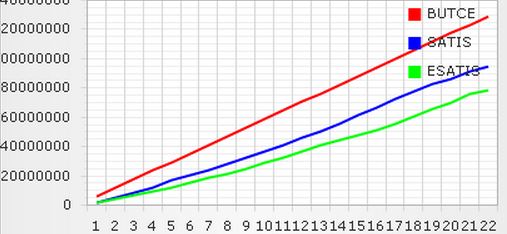
I want the chart information left side, not right side,( BUTCE , SATIS , ESATIS) and I need it on the chart, not near.
Can I do it ?
Thanks
Ali
Top achievements
 Rank 1
Rank 1
answered
on
24 Jan 2013
1 answer
71 views
Hi
I have a grid. Inside that I have added radTooltip inside GridTemplateColumn. I am binding the grid at client side. Everything is working fine. The problem here is based on one condition I need to hide/show the tooltip.
In the RowDatabound event I am doing the following:
But on hover over the image I still see a small box coming as a tooltip.
Your help is greatly appreciated.
Thanks
Sohan Kumar Agarwal
I have a grid. Inside that I have added radTooltip inside GridTemplateColumn. I am binding the grid at client side. Everything is working fine. The problem here is based on one condition I need to hide/show the tooltip.
In the RowDatabound event I am doing the following:
function
RadGrid1_RowDataBound(sender, args) {
// debugger;
var image = args.get_item().get_cell("Barcode").getElementsByTagName('img')[0];
var tooltipDiv = args.get_item().get_cell("Barcode").getElementsByTagName('Div')[0];
var invalidText = args.get_dataItem().InValidText;
$(
'#' + tooltipDiv.id).hide();
} //RadGrid1_RowDataBound
But on hover over the image I still see a small box coming as a tooltip.
Your help is greatly appreciated.
Thanks
Sohan Kumar Agarwal
Marin Bratanov
Telerik team
answered
on
24 Jan 2013
1 answer
111 views
hey, it seems doesn't support Chinese, I tried seaching both English and Chinese Name from MSSQL 2008 DB. Only English name could be listed in dropdownlist. Is that possible to fix it? thanks
<code>
<telerik:RadAutoCompleteBox runat="server" ID="RadAutoCompleteBox1" Width="155" DataSourceID="SqlDataSource1"
AllowCustomEntry="false" DataTextField="txtName" datatextvalue="txtMobileOne" DropDownHeight="100" DropDownWidth="275">
<DropDownItemTemplate>
<table cellpadding="0" cellspacing="0">
<tr>
<td align="left" style="width: 25%; padding-left: 10px;">
<%# DataBinder.Eval(Container.DataItem, "txtName")%>
</td>
<td align="left" style="width: 25%; padding-left: 10px;">
<%# DataBinder.Eval(Container.DataItem, "txtMobileOne")%>
</td>
<td align="left" style="width: 25%; padding-left: 10px;">
<%# DataBinder.Eval(Container.DataItem, "txtMobileTwo")%>
</td>
</tr>
</table>
</DropDownItemTemplate>
</telerik:RadAutoCompleteBox>
<asp:SqlDataSource ID="SqlDataSource1" runat="server" ConnectionString="<%$ ConnectionStrings:sqlConn %>"
ProviderName="System.Data.SqlClient" SelectCommand="SELECT [txtMobileOne], [txtMobileTwo], [txtName] FROM UserProfile">
</asp:SqlDataSource>
</code>
<code>
<telerik:RadAutoCompleteBox runat="server" ID="RadAutoCompleteBox1" Width="155" DataSourceID="SqlDataSource1"
AllowCustomEntry="false" DataTextField="txtName" datatextvalue="txtMobileOne" DropDownHeight="100" DropDownWidth="275">
<DropDownItemTemplate>
<table cellpadding="0" cellspacing="0">
<tr>
<td align="left" style="width: 25%; padding-left: 10px;">
<%# DataBinder.Eval(Container.DataItem, "txtName")%>
</td>
<td align="left" style="width: 25%; padding-left: 10px;">
<%# DataBinder.Eval(Container.DataItem, "txtMobileOne")%>
</td>
<td align="left" style="width: 25%; padding-left: 10px;">
<%# DataBinder.Eval(Container.DataItem, "txtMobileTwo")%>
</td>
</tr>
</table>
</DropDownItemTemplate>
</telerik:RadAutoCompleteBox>
<asp:SqlDataSource ID="SqlDataSource1" runat="server" ConnectionString="<%$ ConnectionStrings:sqlConn %>"
ProviderName="System.Data.SqlClient" SelectCommand="SELECT [txtMobileOne], [txtMobileTwo], [txtName] FROM UserProfile">
</asp:SqlDataSource>
</code>

Nencho
Telerik team
answered
on
24 Jan 2013
1 answer
135 views
hello
while using grid template collumn and the dropdownlist control, i am trying to do update to the grid.
the grid is set to be always in edit mode.
while trying to use this:http://www.telerik.com/help/aspnet-ajax/grid-performing-batch-updates.html
i cannot get the values of the dropdown list.
why is that?
regards maor
while using grid template collumn and the dropdownlist control, i am trying to do update to the grid.
the grid is set to be always in edit mode.
while trying to use this:http://www.telerik.com/help/aspnet-ajax/grid-performing-batch-updates.html
i cannot get the values of the dropdown list.
why is that?
regards maor

Jayesh Goyani
Top achievements
 Rank 2
Rank 2
answered
on
24 Jan 2013
1 answer
126 views
is there any way to Copy radchart and table by using button click event in vb.net
Yavor
Telerik team
answered
on
24 Jan 2013
1 answer
605 views
hi all, i Beginner in RadScheduler control, i want create custom Appointment Template, i write this code
<telerik:RadScheduler ID="RadScheduler1" runat="server" Skin="Office2010Blue" DisplayRecurrenceActionDialogOnMove="True" ShowNavigationPane="True" OnClientTimeSlotContextMenuItemClicked="ClientTimeSlotContextMenuItemClicked" OnClientAppointmentContextMenuItemClicked="ClientAppointmentContextMenuItemClicked"> <TimelineView UserSelectable="False" /> <DayView UserSelectable="False" /> <AppointmentContextMenus> <%--The appointment context menu interaction is handled on the client in this example--%> <telerik:RadSchedulerContextMenu runat="server" ID="SchedulerAppointmentContextMenu"> <Items> <telerik:RadMenuItem Text="Detils" Value="detail"> </telerik:RadMenuItem> <telerik:RadMenuItem Text="MoreStatus" Value="moreStatus"> </telerik:RadMenuItem> </Items> </telerik:RadSchedulerContextMenu> </AppointmentContextMenus> <TimeSlotContextMenus> <telerik:RadSchedulerContextMenu ID="SchedulerTimeSlotContextMenu" runat="server"> <Items> <telerik:RadMenuItem Text="New" Value="createNew" /> </Items> </telerik:RadSchedulerContextMenu> </TimeSlotContextMenus> <AppointmentTemplate> <div class="rsAptSubject"> </div> <hr /> <div style="font-style: italic; background-color: Lime"><%# Eval("FromTime")%></div> </AppointmentTemplate> </telerik:RadScheduler>
and c# code:
RadScheduler1.DataSource = _meetingService.AllMeetings().ToList()
RadScheduler1.DataStartField = "FromTime"
RadScheduler1.DataSubjectField = "Council.CouncilName"
RadScheduler1.DataEndField = "ToTime"
RadScheduler1.DataKeyField = "MeetingId"
RadScheduler1.DataDescriptionField = "FromTime"
' RadScheduler1.SelectedDate = DateTime.Now
RadScheduler1.DataBind()
but when run this page i get this error:
DataBinding: 'Telerik.Web.UI.Appointment' does not contain a property with the name 'FromTime'.
please help me for solve this problem. thanks Expert. 
Plamen
Telerik team
answered
on
24 Jan 2013
2 answers
106 views
I have a RadGrid that I want to implement Row Drag & Drop as well as InPlace editing. If I set ClientSettings.Selecting.AllowRowSelect to True, then the textboxes in the Template Items do not accept input when in Update mode. I cannot place my insert cursor in the textboxes. The TextBoxes work fine when in Insert mode. If I turn off AllowRowSelect, then I can edit the textboxes. Any ideas?
Steve
Steve

Eyup
Telerik team
answered
on
24 Jan 2013
1 answer
105 views
Hello,
if i add a column at runtime in code-behind my layout breaks, i think the attached picture speaks for itself...
EDIT:
only happens with client-side scrolling on!
best regards
if i add a column at runtime in code-behind my layout breaks, i think the attached picture speaks for itself...
EDIT:
only happens with client-side scrolling on!
<ClientSettings>
<Scrolling AllowScroll="True" UseStaticHeaders="True" SaveScrollPosition="False">
</Scrolling>
</ClientSettings>best regards
Eyup
Telerik team
answered
on
24 Jan 2013





