or
7 answers
252 views
Hello
I would like to report a bug. If you put a RadComboBox in a RadWindow, you will not able to see the elements list. The same behaviour if you use a standard combobox with FormDecorator. Anyway you are still able to select items using keyboard.
This is the code:
The element list box is rendered behind the window (if you minimize it you will see the list still opened).
Bye
Fabio
I would like to report a bug. If you put a RadComboBox in a RadWindow, you will not able to see the elements list. The same behaviour if you use a standard combobox with FormDecorator. Anyway you are still able to select items using keyboard.
This is the code:
<asp:ImageButton ID="cmdGraficoIstogramma" runat="server" ImageUrl="istogramma.png" OnClientClick="ApriGraficoIstogramma();return false;" ToolTip="Grafico Istogramma" /><telerik:RadScriptBlock ID="RadScriptBlock2" runat="server"> <script type="text/javascript"> function ApriGraficoIstogramma() { var oWnd = $find("<%= RadWindow1.ClientID %>"); oWnd.show(); oWnd.maximize(); return false; } </script></telerik:RadScriptBlock><telerik:RadWindow ID="RadWindow1" runat="server" Title="Grafico a Torta" Width="800" Height="800" VisibleOnPageLoad="false" Behaviors="Maximize,Close" EnableShadow="true" InitialBehaviors="Maximize"> <ContentTemplate> <telerik:RadComboBox runat="server" ID="cmbGraficoIstogrammaDimensione2" Skin="Office2007"> <Items> <telerik:RadComboBoxItem Text="Standard" Value="950x400" Selected="True" /> <telerik:RadComboBoxItem Text="Grandi" Value="1280x538" /> </Items> </telerik:RadComboBox> </ContentTemplate></telerik:RadWindow>The element list box is rendered behind the window (if you minimize it you will see the list still opened).
Bye
Fabio
12 answers
3.5K+ views
Hi,
I am trying to get all items from radgrid to a data table. While I am using this code, shown below, geting error in "foreach (GridViewRow row in grdShippedOrders.Rows)" Rows is not recognizing in code behind file.
grdShippedOrders is my radgrid in aspx page. I want to get all items in a dataset or data table. So that I can view it in another grid in another page.
protected
DataTable Button1_Click(object sender, EventArgs e)
{
DataTable dtRecords = new DataTable();
foreach (DataControlField col in grdShippedOrders.Columns)
dtRecords.Columns.Add(
new DataColumn(col.HeaderText));
foreach (GridViewRow row in grdShippedOrders.Rows)
{
DataRow dr = dtRecords.NewRow();
foreach (DataControlFieldCell cell in row.Cells)
dr[row.Cells.GetCellIndex(cell)] = cell.Text;
dtRecords.Rows.Add(dr);
}
return dtRecords;
}

5 answers
175 views
Hi Team,
I have created the WebSite by Using Telerik Control.
If I host my website in IIS7 and browse in IE 9. The Combo box control looks good. But the same website if i access in IE10 the design look bad and combo box drop down is not working. see the below image.

Same website if i host it in IIS8 and if i browse in IE 10 its working fine.
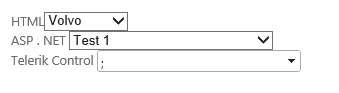
Problem is with only telerik control. ASP.net and HTML controls are working fine. I am facing the problem for Teletik controls for Combo box and telerik menus. Kindly reply as soon as possible.
I have created the WebSite by Using Telerik Control.
If I host my website in IIS7 and browse in IE 9. The Combo box control looks good. But the same website if i access in IE10 the design look bad and combo box drop down is not working. see the below image.
Same website if i host it in IIS8 and if i browse in IE 10 its working fine.
Problem is with only telerik control. ASP.net and HTML controls are working fine. I am facing the problem for Teletik controls for Combo box and telerik menus. Kindly reply as soon as possible.

Hristo Valyavicharski
Telerik team

answered
on
25 Sep 2013
1 answer
136 views
Uncaught TypeError
the code above works,but when i change in into this "
if (menuItemValue == "Edit") { Grid.get_masterTableView().get_dataItems()[document.getElementById("radGridClickedRowIndex").value].get_element().click(); }Grid.get_masterTableView().get_dataItems()[document.getElementById("radGridClickedRowIndex").value].get_element().dblclick();",I get excption that "Uncaught TypeError:Object #<HTMLTableRowElement> has no method 'dblclick'".
Venelin
Telerik team
answered
on
25 Sep 2013
1 answer
100 views
Hi,
I've been using RadEditor for a number of years now and very good it is.
I'm just upgrading our site to use Bootstrap 3 and a fixed top navigation bar. The trouble is that when the full screen mode is selected, the tool bars are lost behind the navigation bar. What's the best way to fix this?
Thanks
Tim Metcalfe
I've been using RadEditor for a number of years now and very good it is.
I'm just upgrading our site to use Bootstrap 3 and a fixed top navigation bar. The trouble is that when the full screen mode is selected, the tool bars are lost behind the navigation bar. What's the best way to fix this?
Thanks
Tim Metcalfe

Ianko
Telerik team
answered
on
25 Sep 2013
3 answers
637 views
I have a radcombobox, Inside the radcombobox, i have a checkbox, datecontrol and a textbox. after the checkbox click and on selecting the date the dropdown closes automatically. I stopped this from happening with OnClientDropDownClosing event. (args.set_cancel(true)).
The problem now is the dropdown only closes on clicking the dropdown triangle, clicking any other place outside doesn't close the dropdown.
I even tried onclientBlur event, that event also fired on date selection only, and the dropdown remains open.
Any help is appreciated.
The problem now is the dropdown only closes on clicking the dropdown triangle, clicking any other place outside doesn't close the dropdown.
I even tried onclientBlur event, that event also fired on date selection only, and the dropdown remains open.
Any help is appreciated.
Hristo Valyavicharski
Telerik team
answered
on
25 Sep 2013
2 answers
231 views
Hi,
I need to change the background color of Radscheduler time slots based on some attribute of a resource.
I was handling it using '"OnTimeSlotCreated" event in data bound scheduler. Now I have a web service bound scheduler, and I do not see this event on client side, how can I implement this logic and change time slot background color ?
protected void OnTimeSlotCreated(object sender, TimeSlotCreatedEventArgs e)
{
....
if( condition1 )
e.TimeSlot.Control.BackColor = Color.Yellow;
else
e.TimeSlot.Control.BackColor = Color.White;
Any idea?
Thanks,
Prava
I need to change the background color of Radscheduler time slots based on some attribute of a resource.
I was handling it using '"OnTimeSlotCreated" event in data bound scheduler. Now I have a web service bound scheduler, and I do not see this event on client side, how can I implement this logic and change time slot background color ?
protected void OnTimeSlotCreated(object sender, TimeSlotCreatedEventArgs e)
{
....
if( condition1 )
e.TimeSlot.Control.BackColor = Color.Yellow;
else
e.TimeSlot.Control.BackColor = Color.White;
Any idea?
Thanks,
Prava

Prava kafle
Top achievements
 Rank 1
Rank 1
answered
on
25 Sep 2013
10 answers
244 views
I need to be able to detect, on the client, when the SearchContext selected item has changed. Is there a client event that fires when the user selects an item from the SearchContext dropdown?

1 answer
130 views
I created a project in VS2012 and targeted .Net 4.0. Added a form, added a Rad script manager and a window manager, clicked run and the follow errors show in the output window.
Exception was thrown at line 4, column 9009 in http://localhost:19613/ScriptResource.axd?d=yg86TPrIfM9jRgrel4x6P1iZbfu-fa3cROoywpu6ucwaO_bk85riyrR2epWADAA0rhAc0WVjgMEpbnYB3UowXVEUWZVRH-vLIncozmzJ5gmhlYI70zc75I04bmQRM030PXQQhUKfigr3trqM_3ulqA2&t=658b77c2
0x800a139e - JavaScript runtime error: SyntaxError
Exception was thrown at line 4, column 9238 in http://localhost:19613/ScriptResource.axd?d=yg86TPrIfM9jRgrel4x6P1iZbfu-fa3cROoywpu6ucwaO_bk85riyrR2epWADAA0rhAc0WVjgMEpbnYB3UowXVEUWZVRH-vLIncozmzJ5gmhlYI70zc75I04bmQRM030PXQQhUKfigr3trqM_3ulqA2&t=658b77c2
0x800a139e - JavaScript runtime error: SyntaxError
I then opened the project in VS2010, clicked run and no errors.
Ianko
Telerik team
answered
on
25 Sep 2013
1 answer
102 views
HI All,
I want to hide the All properties button in Insert Link dialogue and default target to new window in the Insert Link dialogue of radedior.Can you please give me idea how to do this? I can see when I create the is post on the forum I found the Insert Link dialogue doesn't have all properties button.
How can I do this?
I have used below code
<telerik:radeditor runat="server" ID="RadEditor1" >
<Tools>
<telerik:EditorToolGroup>
<telerik:EditorTool Name="InsertLink" Text="Insert Special Link" Enabled="true" />
</telerik:EditorToolGroup>
</Tools>
</telerik:radeditor>
When I use the custom dialogue it show the command hasn't implemented. e.g
<telerik:radeditor runat="server" ID="RadEditor1" >
<Tools>
<telerik:EditorToolGroup>
<telerik:EditorTool Name="InsertSpecialLink" Text="Insert Special Link" Enabled="true" />
</telerik:EditorToolGroup>
</Tools>
</telerik:radeditor>
<style type="text/css">
.reToolbar.Default .InsertSpecialLink
{
background-image: url(http://www.telerik.com/DEMOS/ASPNET/RadControls/Editor/Skins/Default/buttons/Custom.gif);
}
</style>
<script type="text/javascript">
Telerik.Web.UI.Editor.CommandList["InsertSpecialLink"] = function (commandName, editor, args) {
alert("1");
var elem = editor.getSelectedElement(); //returns the selected element.
if (elem.tagName == "A") {
editor.selectElement(elem);
argument = elem;
}
else {
//remove links if present from the current selection - because of JS error thrown in IE
editor.fire("Unlink");
//remove Unlink command from the undo/redo list
var commandsManager = editor.get_commandsManager();
var commandIndex = commandsManager.getCommandsToUndo().length - 1;
commandsManager.removeCommandAt(commandIndex);
var content = editor.getSelectionHtml();
var link = editor.get_document().createElement("A");
link.innerHTML = content;
argument = link;
}
var myCallbackFunction = function (sender, args) {
editor.pasteHtml(String.format("<a href={0} target='{1}' class='{2}'>{3}</a> ", args.href, args.target, args.className, args.name))
}
editor.showExternalDialog(
'InsertLink.aspx',
argument,
270,
300,
myCallbackFunction,
null,
'Insert Link',
true,
Telerik.Web.UI.WindowBehaviors.Close + Telerik.Web.UI.WindowBehaviors.Move,
false,
false);
};
</script>
I want to hide the All properties button in Insert Link dialogue and default target to new window in the Insert Link dialogue of radedior.Can you please give me idea how to do this? I can see when I create the is post on the forum I found the Insert Link dialogue doesn't have all properties button.
How can I do this?
I have used below code
<telerik:radeditor runat="server" ID="RadEditor1" >
<Tools>
<telerik:EditorToolGroup>
<telerik:EditorTool Name="InsertLink" Text="Insert Special Link" Enabled="true" />
</telerik:EditorToolGroup>
</Tools>
</telerik:radeditor>
When I use the custom dialogue it show the command hasn't implemented. e.g
<telerik:radeditor runat="server" ID="RadEditor1" >
<Tools>
<telerik:EditorToolGroup>
<telerik:EditorTool Name="InsertSpecialLink" Text="Insert Special Link" Enabled="true" />
</telerik:EditorToolGroup>
</Tools>
</telerik:radeditor>
<style type="text/css">
.reToolbar.Default .InsertSpecialLink
{
background-image: url(http://www.telerik.com/DEMOS/ASPNET/RadControls/Editor/Skins/Default/buttons/Custom.gif);
}
</style>
<script type="text/javascript">
Telerik.Web.UI.Editor.CommandList["InsertSpecialLink"] = function (commandName, editor, args) {
alert("1");
var elem = editor.getSelectedElement(); //returns the selected element.
if (elem.tagName == "A") {
editor.selectElement(elem);
argument = elem;
}
else {
//remove links if present from the current selection - because of JS error thrown in IE
editor.fire("Unlink");
//remove Unlink command from the undo/redo list
var commandsManager = editor.get_commandsManager();
var commandIndex = commandsManager.getCommandsToUndo().length - 1;
commandsManager.removeCommandAt(commandIndex);
var content = editor.getSelectionHtml();
var link = editor.get_document().createElement("A");
link.innerHTML = content;
argument = link;
}
var myCallbackFunction = function (sender, args) {
editor.pasteHtml(String.format("<a href={0} target='{1}' class='{2}'>{3}</a> ", args.href, args.target, args.className, args.name))
}
editor.showExternalDialog(
'InsertLink.aspx',
argument,
270,
300,
myCallbackFunction,
null,
'Insert Link',
true,
Telerik.Web.UI.WindowBehaviors.Close + Telerik.Web.UI.WindowBehaviors.Move,
false,
false);
};
</script>
Ianko
Telerik team
answered
on
25 Sep 2013





