or
1 answer
119 views
I tried to run the ComboBox ClientSide sample from the AJAX pdf documentation files.
Error 1 Could not load file or assembly 'Telerik.Web.UI' or one of its dependencies. The system cannot find the file specified. C:\Program Files (x86)\Telerik\AJAXDocumentation\Projects\ComboBox\CS\ClientSide\ClientSide\Default.aspx 3
Error 2 Unknown server tag 'telerik:RadComboBox'. C:\Program Files (x86)\Telerik\AJAXDocumentation\Projects\ComboBox\CS\ClientSide\ClientSide\Default.aspx 42
Error 3 Unknown server tag 'telerik:RadTextBox'. C:\Program Files (x86)\Telerik\AJAXDocumentation\Projects\ComboBox\CS\ClientSide\ClientSide\Default.aspx 46
Clearing error 2 and 3 result from the failure of Error 1.
My guess is that I am missing some kind of setup value to point to Telerik in Program Files. I have VS 2013 and VS 2010, I did pick 2013 for the Telerik install.
I just installed the lasted Telerik (Q2 2014) using Visual Studio 2013 on Windows 8 64.
Telerik is all error codes so far, yet to see anything working locally.
Thanks,
George
Error 1 Could not load file or assembly 'Telerik.Web.UI' or one of its dependencies. The system cannot find the file specified. C:\Program Files (x86)\Telerik\AJAXDocumentation\Projects\ComboBox\CS\ClientSide\ClientSide\Default.aspx 3
Error 2 Unknown server tag 'telerik:RadComboBox'. C:\Program Files (x86)\Telerik\AJAXDocumentation\Projects\ComboBox\CS\ClientSide\ClientSide\Default.aspx 42
Error 3 Unknown server tag 'telerik:RadTextBox'. C:\Program Files (x86)\Telerik\AJAXDocumentation\Projects\ComboBox\CS\ClientSide\ClientSide\Default.aspx 46
Clearing error 2 and 3 result from the failure of Error 1.
My guess is that I am missing some kind of setup value to point to Telerik in Program Files. I have VS 2013 and VS 2010, I did pick 2013 for the Telerik install.
I just installed the lasted Telerik (Q2 2014) using Visual Studio 2013 on Windows 8 64.
Telerik is all error codes so far, yet to see anything working locally.
Thanks,
George

Ventsi
Telerik team

answered
on
20 Oct 2014
3 answers
151 views
Do you have sample code to do the skin change and display the color sample like in this screen shot?

Galin
Telerik team
answered
on
20 Oct 2014
1 answer
82 views
I'm using the a password strengthen.
Is there's a way on how to get the TextStrengthDescription of the strengthen of the password ??
Is there's a way on how to get the TextStrengthDescription of the strengthen of the password ??

Maria Ilieva
Telerik team
answered
on
20 Oct 2014
1 answer
93 views
Excuse me if this post somewhat overlaps others I've made recently but I've been reviewing your docs and demos concerning RadAsyncUpload and I am getting more confused by the second.
What I need is the following scenario.
1. A single file is selected with the RadAsyncUpload control. (Usual display of file name with remove option)
2. The page goes through several postbacks involving failed validation of other controls while the RadAsyncUpload control retains its display of file name and the option to remove. (It appears that currently this process wipes the display of the RadAsyncUpload control. This was not a problem as long as all validation was client-side. Is there anyway to retain or restore the visible settings of the RadAsyncUpload control, or do I have to write my own code to keep track of the uploaded file?)
3. Once the final postback process occurs the uploaded file is streamed into a database field using an Uploaded File object. (UploadedFile file = RadUpload1.UploadedFiles[0]; file.InputStream.Read etc...)
I recently replaced the old RadUpload controls with RadAsyncUpload controls so I recognize that I may have plugged them into a scenario that no longer works.
(Furthermore I'd like to say that the behavior of the RadAsyncUpload control with regard to the TargetFolder confuses me as well. What happens if two people upload files with identical names at the same time?)
Boris
Top achievements
 Rank 1
Rank 1
answered
on
20 Oct 2014
4 answers
223 views
I've only recently replaced the RadUpload controls in my web app with RadAsyncUploads. By and large they're working OK.
In the postback event I grab a reference to the uploaded file ( UploadedFile file = RadUpload1.UploadedFiles[0]; ) and process it.
There's one small problem. The page the upload control is on also has several custom validators that do server-side validation. If one of these validators fires the file reference in the RadAsyncUpload control is wiped and it is necessary to select the file again.
Am I forgetting something basic?
In the postback event I grab a reference to the uploaded file ( UploadedFile file = RadUpload1.UploadedFiles[0]; ) and process it.
There's one small problem. The page the upload control is on also has several custom validators that do server-side validation. If one of these validators fires the file reference in the RadAsyncUpload control is wiped and it is necessary to select the file again.
Am I forgetting something basic?
Boris
Top achievements
Rank 1
Rank 1
answered
on
20 Oct 2014
5 answers
273 views
We have an issue where the Rad window is off the top of the screen on the iPad and it cannot be scrolled back into view, thus clients cannot enter into the first few fields on the window. Interestingly enough this only seems to happen when we set the focus on the first (or any) field on the window. We want to do this so the clients can start typing right away and do not have to select the first box themselves.
Please Help!! Big Issue for our clients!
Please Help!! Big Issue for our clients!
Marin Bratanov
Telerik team
answered
on
20 Oct 2014
6 answers
196 views
When I am pasting data with word formatting i get this message , I need to customize this message and change the text on buttons.
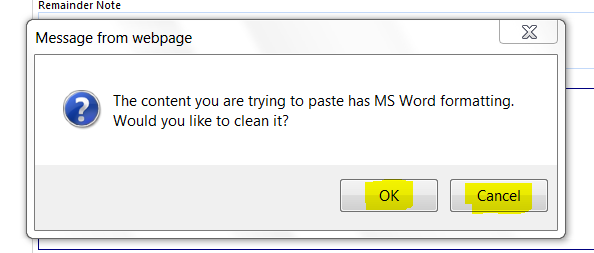
I have visited http://demos.telerik.com/aspnet-ajax/editor/examples/externaldialogspath/defaultcs.aspx , I could not make out how can i modify this particular message.
Can some one address this for me.
Thanks.
I have visited http://demos.telerik.com/aspnet-ajax/editor/examples/externaldialogspath/defaultcs.aspx , I could not make out how can i modify this particular message.
Can some one address this for me.
Thanks.

Ianko
Telerik team
answered
on
20 Oct 2014
1 answer
206 views
In my application, I have a telerik:RadGrid that contains columns of different types. One of the columns is a telerik:GridDateTimeColumn and is dfined as follows:
In my code behind, I do a PreRender on this table so that I can set the DataFormatString according to a system option on how the client would like this data to be displayed in the Grid. That code is as follows:
All of this works great and the data in the Grid displays as it should based on how the system option is configured to display the time.
The issue is when we try to edit or insert a new row for this grid, we are not able to set the format for the values in the TimePicker. We can set the format for the field when the value is picked, but we are unable to set the format for the values in the TimePicker popup that shows times to choose. We set the format of the editable/insertable field as follows in the ItemDataBound for the grid:
The WebDateHelper is as follows:
Doing this formats the field correctly, but the pickable values are ALWAYS in the "hh:mm tt" format.
Any thoughts or suggestions would be greatly appreciated.
<telerik:GridDateTimeColumn PickerType="TimePicker" UniqueName="BreakStartDateTime" HeaderText="<% $Resources:PageControls, StartTime %>" DataField="BreakStartDateTime" DataFormatString="{0:t}"> <HeaderStyle Wrap="false" Width="50px" /> </telerik:GridDateTimeColumn>In my code behind, I do a PreRender on this table so that I can set the DataFormatString according to a system option on how the client would like this data to be displayed in the Grid. That code is as follows:
protected void grdBreaksList_PreRender(object sender, System.EventArgs e){ if (Session[SESSION_BREAK_DATA] != null) { foreach (GridColumn column in grdBreaksList.Columns) { if (column.UniqueName == "BreakStartDateTime" || column.UniqueName == "BreakEndDateTime") { if (SysOption.IsDisplayTime24HourClock) { (column as GridBoundColumn).DataFormatString = "{0:HH:mm}"; } else { (column as GridBoundColumn).DataFormatString = "{0:t}"; } } } grdBreaksList.Rebind(); }}All of this works great and the data in the Grid displays as it should based on how the system option is configured to display the time.
The issue is when we try to edit or insert a new row for this grid, we are not able to set the format for the values in the TimePicker. We can set the format for the field when the value is picked, but we are unable to set the format for the values in the TimePicker popup that shows times to choose. We set the format of the editable/insertable field as follows in the ItemDataBound for the grid:
if (((e.Item is GridDataInsertItem) || (e.Item is GridEditableItem)) && e.Item.IsInEditMode){ GridEditableItem dataItem = (GridEditableItem)e.Item; RadTimePicker picker = (RadTimePicker)dataItem["BreakStartDateTime"].Controls[0]; WebDateHelper.SetTwentyFourHourAttributes(picker);}The WebDateHelper is as follows:
public static void SetTwentyFourHourAttributes(RadTimePicker inControl) { StringBuilder format = new StringBuilder(); CultureInfo culture; if (SysOption.IsDisplayTime24HourClock) { format.Append("HH:mm"); } else { format.Append("hh:mm tt"); } if (PremisePrincipal.Current != null && PremisePrincipal.Current.LocalityCd != null) { culture = new CultureInfo(PremisePrincipal.Current.LocalityCd); } else { culture = new CultureInfo(SysOption.DefaultLocalityCd); } inControl.DateInput.Culture = culture; inControl.TimeView.TimeFormat = format.ToString(); inControl.DateInput.DateFormat = format.ToString(); inControl.DateInput.DisplayDateFormat = format.ToString(); }}Doing this formats the field correctly, but the pickable values are ALWAYS in the "hh:mm tt" format.
Any thoughts or suggestions would be greatly appreciated.
Maria Ilieva
Telerik team
answered
on
20 Oct 2014
3 answers
127 views
Hi,
I have several radgrids on a aspx page that each have a GridDateTimeColumn that has a column labeled 'Signature Date' with the following format below:
<telerik:GridDateTimeColumn HeaderText="Sign Date"
DataField="SignatureDate"
UniqueName="SignatureDate"
EditDataFormatString="MM/dd/yyyy"
MaxLength="10">
<HeaderStyle Width="120px" />
</telerik:GridDateTimeColumn>
On some of these aforementioned grids, when tabbing away from the field or clicking the insert/update button for the edit item, causes the column field to autoparse the date format to it's correct format which is 'MM/dd/yyyy' which is the intent, but on some of the other grids, it does not do this. The only way to get it to fire is to click out of the field and then click back into it which then causes it to fire.
How can I ensure that this function fires every time the user tabs away or clicks the appropriate image button (insert/update) inside of the radgrid edit item?
Thanks,
Joe
I have several radgrids on a aspx page that each have a GridDateTimeColumn that has a column labeled 'Signature Date' with the following format below:
<telerik:GridDateTimeColumn HeaderText="Sign Date"
DataField="SignatureDate"
UniqueName="SignatureDate"
EditDataFormatString="MM/dd/yyyy"
MaxLength="10">
<HeaderStyle Width="120px" />
</telerik:GridDateTimeColumn>
On some of these aforementioned grids, when tabbing away from the field or clicking the insert/update button for the edit item, causes the column field to autoparse the date format to it's correct format which is 'MM/dd/yyyy' which is the intent, but on some of the other grids, it does not do this. The only way to get it to fire is to click out of the field and then click back into it which then causes it to fire.
How can I ensure that this function fires every time the user tabs away or clicks the appropriate image button (insert/update) inside of the radgrid edit item?
Thanks,
Joe

Viktor Tachev
Telerik team
answered
on
20 Oct 2014
2 answers
361 views
Hello,
I am working on a project with a RadMenu.
My project requirement is that when the user clicks on a button, the RadMenuItem will open.
The menu is defined as follows: (ASPX)
Is it possible to achieve this in the code-behind?
I'd love to solve this!
Thank you,
Daniel.
I am working on a project with a RadMenu.
My project requirement is that when the user clicks on a button, the RadMenuItem will open.
The menu is defined as follows: (ASPX)
<telerik:RadCodeBlock ID="RadCodeBlock1" runat="server"> <script type="text/javascript"> function ExternalitemOpened(s, e) { if ($telerik.isIE8) { // Fix an IE 8 bug that causes the list bullets to disappear (standards mode only) $telerik.$("li", e.get_item().get_element()) .each(function () { this.style.cssText = this.style.cssText; }); } } function External_MouseOver(sender, args) { if (args.get_item().get_parent() == sender) { sender.set_clicked(false); } } function ExternalOnClientItemClicking(sender, args) { if (args.get_item().get_isOpen() == true) { args.set_cancel(true); args.get_item().close(); } } </script> </telerik:RadCodeBlock><telerik:RadMenu ID="RadMenu_SpecialReport" runat="server" ClickToOpen="True" EnableShadows="True" OnClientItemOpened="ExternalitemOpened" OnClientItemClicking="ExternalOnClientItemClicking" OnClientMouseOut="External_MouseOver" Style="top: 0px; left: -2px; z-index: 100; height: 35px;" Skin="ExternalGridButtons" EnableEmbeddedSkins="false"> <Items> <telerik:RadMenuItem PostBack="true" Text="Special Reports" Value="Special_Reports" CssClass="btn btn-primary btn-menu-grid-size"> <ContentTemplate> <div id="Special_panel" class="Special_panel" style="width:300px; height:500px; background-color:white;"> <telerik:RadAjaxPanel ID="RadAjaxPanel_SpecialReport" runat="server" Width="80%"></telerik:RadAjaxPanel> <telerik:RadButton ID="btn_ShowSpecialReport" runat="server" Text="Show Special Report" Skin="Web20" CssClass="btn_Sort" OnClick="btn_ShowSpecialReport_Click"></telerik:RadButton> </div> </ContentTemplate> </telerik:RadMenuItem> <telerik:RadMenuItem PostBack="true" Text="zzzz" Value="zzzzz" CssClass="btn btn-primary btn-menu-grid-size"> <ContentTemplate> <div id="Div1" class="Special_panel" style="width:300px; height:500px; background-color:white;"> <telerik:RadAjaxPanel ID="RadAjaxPanel1" runat="server" Width="80%"></telerik:RadAjaxPanel> <telerik:RadButton ID="RadButton2" runat="server" Text="Show Special Report" Skin="Web20" CssClass="btn_Sort" OnClick="btn_ShowSpecialReport_Click"></telerik:RadButton> </div> </ContentTemplate> </telerik:RadMenuItem> <telerik:RadMenuItem IsSeparator="true"></telerik:RadMenuItem> </Items> </telerik:RadMenu>Is it possible to achieve this in the code-behind?
I'd love to solve this!
Thank you,
Daniel.








