or
1 answer
282 views
I would like to have a button with arrow image inside AutoCompleteBox (this control will be created in code behind), so after pressing it the dropdownlist with current text matching items would show up (if no text is present, then the first X number of items). I have the control already made in Winforms (using your Winforms components, attachment shows the winform's control look), so I was wondering if the same can be made in ASP.NET?
(btw: if you want to see the code of my Winform's control then you can see in this thread: https://www.telerik.com/forums/click-event-not-firing-for-autocompletesuggesthelper-popup-of-raddropdownlist )

Doncho
Telerik team

answered
on
14 Dec 2021
1 answer
896 views
Does the library "Telerik UI for ASP.NET AJAX" vulnerable toi the Log4j issue?
On specific, we use:
Telerik UI for ASP.NET AJAX design time - Telerik.Web.Design - Telerik.Web.Design.dll - 2020.2.617.45
Telerik Device Detection for ASP.NET Ajax - Telerik.Web.Device.Detection - 2020.2.617.45 - Telerik.Web.Device.Detection.dll
Progress® Telerik® UI for ASP.NET AJAX - Telerik.Web.UI - 2020.2.617.45 - Telerik.Web.UI.dll
Telerik UI for ASP.NET AJAX Ajax Skins - Telerik.Web.UI.Skins - 2020.2.617.45 - Telerik.Web.UI.Skins.dll

Vessy
Telerik team
answered
on
14 Dec 2021
1 answer
612 views
as far as I understand the tab colors are dictated by an image and can't be changed using css alone, you'll need to change the image, so how would I for example change it from the default black to a blue?
Vessy
Telerik team
answered
on
13 Dec 2021
1 answer
172 views
Hiya,
I have a grid with a template column that contains a RadColorPicker. I would like to read the color values in a postback. However, using the code below, I'm only getting the values from the original data source.
ASPX:
<telerik:RadGrid ID="grdUser" runat="server" AllowMultiRowSelection="true" AutoGenerateColumns="false" ShowStatusBar="true"
            AllowSorting="True" AllowFilteringByColumn="true"
            OnItemDataBound="grdUser_ItemDataBound">
            <MasterTableView DataKeyNames="UserId, UserName, HexCode" CommandItemDisplay="None">
                <Columns>
                    <telerik:GridClientSelectColumn UniqueName="ClientSelectColumn" HeaderStyle-Width="40px"/>

                    <telerik:GridBoundColumn UniqueName="UserName" HeaderText="Name" DataField="UserName" />

                    <telerik:GridTemplateColumn DataField="HexCode" HeaderText="Route Colour" UniqueName="HexCode">
                        <EditItemTemplate>
                            <telerik:RadColorPicker ID="editColor" runat="server" SelectedColor='<%# Bind("HexCode") %>' />
                        </EditItemTemplate>
                         <ItemTemplate>
                             <telerik:RadColorPicker id="RadColorPicker1" runat="server" ShowIcon="true" />
                         </ItemTemplate>
                    </telerik:GridTemplateColumn>
                </Columns>
            </MasterTableView>
            <ClientSettings>
                <Selecting AllowRowSelect="true" />
                <Scrolling AllowScroll="True" UseStaticHeaders="True" />
            </ClientSettings>
        </telerik:RadGrid>

        <telerik:RadButton ID="btnGo" runat="server" Text="Go"  />
C#:
 protected void Page_Load(object sender, EventArgs e)
    {
        if (!this.IsPostBack)
        {
            DataTable dataTable = new DataTable();
            dataTable.Columns.Add("UserId", typeof(long));
            dataTable.Columns.Add("UserName", typeof(string));
            dataTable.Columns.Add("HexCode", typeof(string));

            dataTable.Rows.Add(1, "Bob", "#2E8B57");
            dataTable.Rows.Add(2, "Tim", "#BA55D3");
            dataTable.Rows.Add(3, "Jim", "#FF8C00");
            dataTable.Rows.Add(4, "Rob", "#4682B4");
            dataTable.Rows.Add(5, "Dan", "#B22222");

            grdUser.DataSource = dataTable;
            grdUser.DataBind();
        }
        else
        {
            foreach (Telerik.Web.UI.GridDataItem user in grdUser.SelectedItems)
            {
                // Read new color values from the grid.
                string alteredColor = grdUser.MasterTableView.DataKeyValues[user.ItemIndex]["HexCode"].ToString();
            }
        }
    }

    protected void grdUser_ItemDataBound(object sender, GridItemEventArgs e)
    {
        GridDataItem item = e.Item as GridDataItem;

        if (item != null)
        {
            RadColorPicker rcpDeviceColour = e.Item.FindControl("RadColorPicker1") as RadColorPicker;

            if (rcpDeviceColour != null)
            {
                string hexCode = item.GetDataKeyValue("HexCode").ToString();
                rcpDeviceColour.SelectedColor = System.Drawing.ColorTranslator.FromHtml(hexCode);
            }
        }
    }
How do I read the updated color values in the grid during a postback?
Thanks in advance,
Matt

Matthew
Top achievements
 Rank 1
 Iron
Iron
 Iron
Iron
Rank 1
Iron
Iron
answered
on
13 Dec 2021
1 answer
226 views
My current version - Telerik.Web.UI, Version=2021.1.330.45
I am using RadComboBox control and property EnableCheckAllItemsCheckBox="true". Therefore "Check All" feature enabled.
And other properties are as below
EnableLoadOnDemand = true;
ShowToggleImage = true;
ShowDropDownOnTextboxClick = true;
ShowMoreResultsBox = true;
ItemsPerRequest = 10;
EnableVirtualScrolling = true;
steps are as follows.
1. check "Check All" checkbox. Then first loaded 10 records got checked.
2. Then loaded another set of items clicking arrow icon at the bottom of the record list.
3. Loaded next 10 records and now all together showing 20 records. At this stage all checkboxes are unchecked but still "Check All" checkbox is checked.
4. Unchecked "Check All" check box and and checked again. Now it is checked only last loaded 10 records only instead of 20 records.
I tried to resolve this by following code. But not luck.
Highly appreciate your quick response since this is urgent for me.
Thank You,
Chandi

Attila Antal
Telerik team
updated answer
on
13 Dec 2021
1 answer
196 views
Hello!
I want to be able to edit a radgrid cell in place. When doing as the documentation suggests Telerik Web Forms In Place - RadGrid | Telerik UI for ASP.NET AJAX I encounter an issue. When editing a field and your at the bottom of the page it resets and scrolls back to the top of the page.
Is there any way to do this without updating the page or have it stay on the page where you want to edit?
Thanks in advance
Doncho
Telerik team
answered
on
13 Dec 2021
1 answer
339 views
Hello,
To provide a bit of background, I have a page which refreshes it's data every two seconds but doesn't actually visibly refresh (By using a RadAjaxPanel). I'd like to click a button on a data row and populate the data from that row into a RadWindow (Like an edit dialog), and also have additional buttons in that dialog for various operations.
I have a RadWindow and code attached to a button which should set the RadWindow to be visible, however the RadWindow does not appear.
Example Code:
In Example.aspx -
<telerik:RadAjaxPanel ID="RadAjaxPanel1" runat="server" Style="width: 100%">
//////Some MasterTableViews and RadGrids with various data here with buttons to pop up an edit dialog////
</telerik:RadAjaxPanel>
<telerik:radwindow runat="server" id="RadWindow1" Visible="False">
<ContentTemplate>
<asp:UpdatePanel ID="Updatepanel1" runat="server" UpdateMode="Conditional">
<ContentTemplate>
<asp:Label ID="Label1" Text="I am an example" runat="server" />
</ContentTemplate>
</asp:UpdatePanel>
</ContentTemplate>
</telerik:radwindow>
In Example.aspx.cs
protected void RadGrid_ItemCommand(object sender, GridCommandEventArgs e)
{
this.RadWindow1.Visible= true;
}
When I click the button in the RadGrid to set the RadWindow to be visible, the .cs code executes but the RadWindow does not appear on the page.
Any help will be much appreciated.
Thanks,
Jack
0 answers
230 views
Hello, I used a RadScheduler in timeline view in my ASP.NET project to manage the work schedule of employees. The problem is that the rows are way too tall :
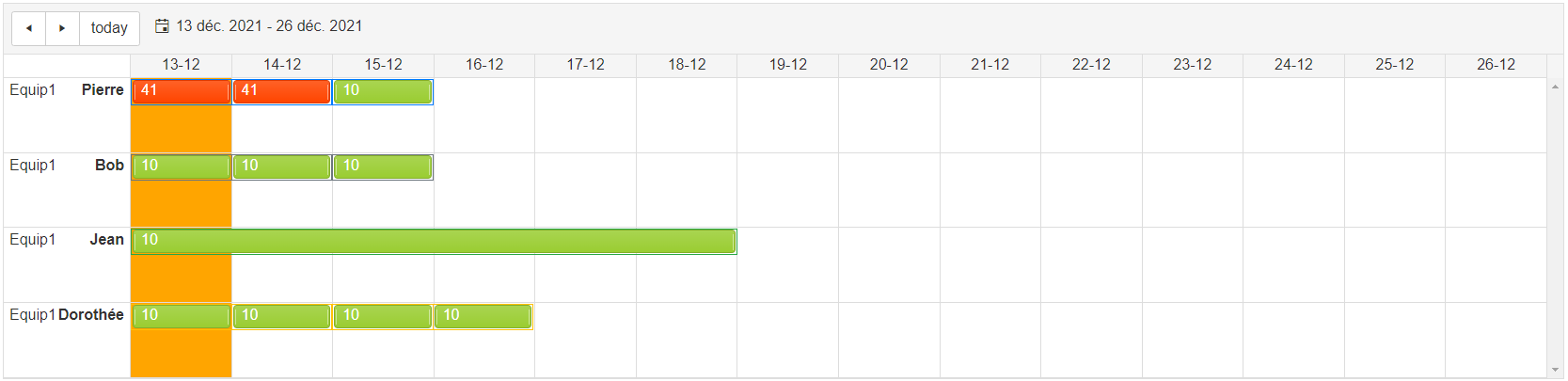
Ideally, the height of the rows would be the same height as the activities in it but I can't find how to resize them.
Thanks, Loïc.
Ideally, the height of the rows would be the same height as the activities in it but I can't find how to resize them.
Thanks, Loïc.
0 answers
119 views
when i try use 2 Horizontal mode timeline in one page
first timeline i can click renders buttons to navigate between periods
but second timeline buttons don't work
is there any solution to solve it ?
0 answers
125 views
In Old Telerik Version, RangeValidator triggers server side validation on Keypress.
But, in the latest Telerik version RangeValidator triggers server side validation on Lostfocus (onBlur).
My Requirement is to trigger server side validation on KeyPress
Can you guide me how I can accomplish this with the latest Telerik Version.
This is the current code:
RangeValidator rng = new RangeValidator();
rng.ControlToValidate = sControlID;
rng.CssClass = "val";
rng.Display = ValidatorDisplay.Dynamic;
rng.EnableClientScript = true;
rng.ErrorMessage = RangeErrorMessage;
rng.MaximumValue = RangeMaxVal;
rng.MinimumValue = RangeMinVal;
rng.EnableClientScript = true;//Add the validator
TextControl.Parent.Controls.Add(rng);
Page.Validators.Add(rng);
Thanks in Advance.
Dinesh
Top achievements
Rank 1
Rank 1
asked
on
10 Dec 2021



