Overview
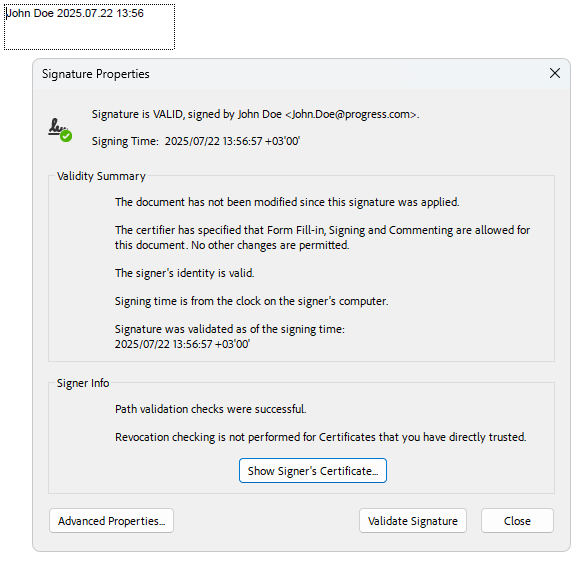
The digital signature feature in RadPdfProcessing, part of Telerik Document Processing, lets you sign and validate PDF documents. A digital signature confirms that the document content came from the signer and has not been modified. A signed document remains valid when the content stays unchanged after signing and the certificate chain resolves to a trusted root certificate.
In a public key infrastructure (PKI) workflow, RadPdfProcessing uses X.509 certificates, certificate chains, trusted roots, and revocation checks for PDF signing and validation. Certificate issuance and certificate-authority management are outside the library scope.
With RadPdfProcessing, you can:
-
Create a PDF document from scratch and add a signature field.
-
Sign PDF documents that contain a predefined signature field.
-
Multiple Digital Signing with PdfStreamSigner.
Online Demos
The following demos show common signing scenarios:
| Demo | Description |
|---|---|
| PdfProcessing Digitally Sign Document | Demonstrates how to digitally sign a PDF. |
| PdfProcessing Validate Digital Signature | Demonstrates how to validate a digitally signed PDF. |
| PdfProcessing Multiple Digital Signatures | Demonstrates how to digitally sign a PDF without invalidating existing signatures. |
See Also
- Form
- Form Fields
- AcroForm
- SignatureField
- Signing a document with a digital signature
- Widgets Types
- How to Create Invisible Signatures for PDF Documents
- Signing a PDF Document with a SignatureWidget
- Verifying If Digital Signatures Exist in PDF Documents
- Signing an Unsigned PDF Document that Contains a Digital Signature with RadPdfProcessing