New to Telerik Document Processing? Start a free 30-day trial
How to Create Invisible Signatures for PDF Documents
Updated on Jun 9, 2026
Environment
| Version | Product | Author |
|---|---|---|
| 2024.1.124 | RadPdfProcessing | Desislava Yordanova |
Description
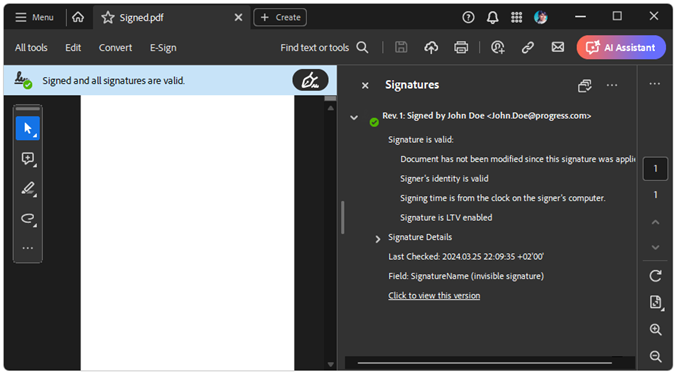
This article shows how to sign PDF documents with invisible signatures.
Solution
Create an invisible signature by not setting the size of the signature widget. You can achieve this with signature flags.
RadPdfProcessing offers the ability to set the signature flags. The possible values are as specified in the PDF Standard:
| Value | Description |
|---|---|
None | The document does not contain signatures. |
SignaturesExist | If set, the document contains at least one signature field. |
AppendOnly | The document contains signatures that may be invalidated if the file is saved in a way that alters its previous contents. |
With this functionality, you can specify that a signature exists even if the signature itself does not have a visual representation. For example, create a signature without visible content (empty widget) and set the flags with the following code:
csharp
X509Certificate2 certificate = new X509Certificate2("Certificate.pfx", "Password");
string signatureName = "SignatureName";
SignatureField signatureField = new SignatureField(signatureName)
{
    Signature = new Signature(certificate)
};
SignatureWidget widget = signatureField.Widgets.AddWidget();

PdfFormatProvider provider = new PdfFormatProvider();
RadFixedDocument document = new RadFixedDocument();
RadFixedPage page = document.Pages.AddPage();
page.Annotations.Add(widget);
document.AcroForm.FormFields.Add(signatureField);
document.AcroForm.SignatureFlags = SignatureFlags.SignaturesExist | SignatureFlags.AppendOnly;

string signedDocumentFilePath = "Signed.pdf";
File.Delete(signedDocumentFilePath);
using (System.IO.Stream output = new System.IO.FileStream(signedDocumentFilePath,
    System.IO.FileMode.OpenOrCreate, System.IO.FileAccess.ReadWrite))
{
    provider.Export(document, output);
}