New to Telerik UI for ASP.NET Core? Start a free 30-day trial
Multi-Column Headers
Updated on Oct 27, 2026
The Grid multi-column headers create a tree-like header structure. You can group one or more columns under a shared parent header.
For a runnable example, refer to the demo on implementing multi-column headers in the Grid.
The parent header can be a child of another MultiColumn header that spans both columns and other headers.
Razor
    .Columns(columns =>
    {
        columns.Group(colGroup =>
        {
            colGroup.Title("Ship Information");
            colGroup.Columns(cols =>
            {
                cols.Bound(f => f.OrderID).Width(200);
                cols.Bound(f => f.ShipCountry).Width(200);
            });
        });
})The previous example produces the following output.
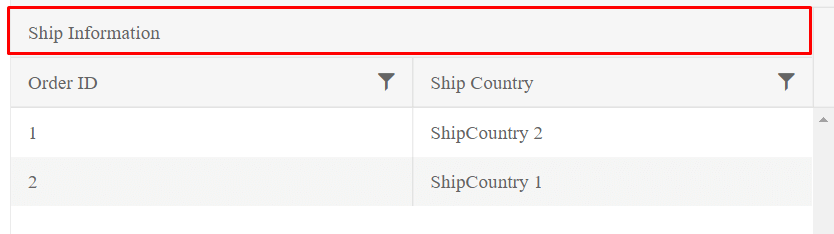
The following example shows a complete Grid configuration with multi-column headers.
Razor
    @(Html.Kendo().Grid<Kendo.Mvc.Examples.Models.CustomerViewModel>()
    .Name("grid")
    .Columns(columns =>
    {
        columns.Bound(c => c.CompanyName).Width(420);
        columns.Group(group => group
            .Title("Contact Info")
            .Columns(info => {
                info.Bound(x => x.ContactTitle).Width(200);
                info.Bound(x => x.ContactName).Width(200);
                info.Group(g => g.Title("Location")
                    .Columns(location =>
                    {
                        location.Bound(c => c.Country).Width(200);
                        location.Bound(c => c.City).Width(200);
                    })
                );
                info.Bound(x => x.Phone);
            })
        );
    })
    .ColumnMenu()
    .Resizable(resizable => resizable.Columns(true))
    .Reorderable(reorderable => reorderable.Columns(true))
    .HtmlAttributes(new { style = "height: 550px;" })
    .Scrollable()
    .Groupable()
    .Sortable()
    .Pageable()
    .DataSource(dataSource => dataSource
        .Ajax()
        .PageSize(20)
        .Read(read => read.Action("MultiColumn_Customers_Read", "Grid"))
    )
)