Troubleshooting
This article provides solutions to common issues you may encounter when working with the Telerik UI for ASP.NET Core AI tools.
Permission Denied (No Valid License)
The Telerik MCP server may exit unexpectedly with the following error:
gRPC error in ValidateUserLicenseAsync: PermissionDenied - no valid license found for the requested product
The error means one of the following:
- You have a legacy Perpetual license, while the Telerik AI tools require a Subscription license.
- Your Telerik UI for ASP.NET Core Subscription license has expired.
- Your Telerik UI for ASP.NET Core trial or AI Tools trial has expired.
- The Telerik license key on your computer needs updating.
Telerik Subscription licenses were introduced in 2025 and explicitly contain the word "Subscription" in their name. Examples include:
- DevCraft Ultimate Subscription
- DevCraft Complete Subscription
- DevCraft UI Subscription
- Telerik UI for Blazor Subscription
An automatically renewing license is not necessarily a Subscription license.
For detailed information about license requirements and tool capabilities, see License Requirements.
I Started a Trial License but Cannot Activate the MCP Server
When you activate a trial license, download and install the updated license key to enable access to the AI tools. To resolve this issue:
- Follow the steps in the License Key Updates section.
- Restart your IDE to ensure the changes take effect.
The MCP server validates your license during initialization. Without a properly activated license key, the server cannot authenticate your access to the AI Tools.
MCP Assistants Not Recognized by Visual Studio
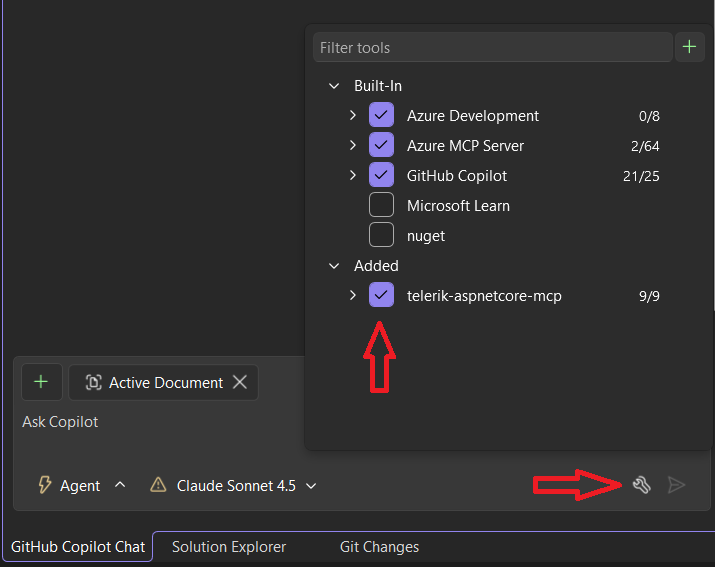
If the Telerik ASP.NET Core MCP server tools are not available or recognized by GitHub Copilot in Visual Studio, you may need to manually enable them:
- Click the Select Tools button in the lower-right corner of the Copilot chat window.
- In the pop-up window, select telerik-aspnetcore-mcp from the list to enable the server that matches your project.
Hanging Tool Calls in Visual Studio
When using Telerik AI tools in Visual Studio, GitHub Copilot may:
- Hang during tool invocation.
- Show UI for a successful tool response, but actually fail silently.
- Continue generation without waiting for parallel tool calls.
This is a known issue in older Visual Studio versions that has been fixed in Visual Studio 2026 Insiders 18.3.0 (11426.168).
Unable to Establish HTTP/2 Connection
The Telerik ASP.NET Core AI tools depend on gRPC, which requires HTTP/2. If the client device does not support HTTP/2 or the protocol is disabled, the following exception occurs:
HttpRequestException: Requesting HTTP version 2.0 with version policy RequestVersionExact while unable to establish HTTP/2 connection.In this case, enable HTTP/2 on the client device and any related firewalls or proxy servers in the network.