Failed to Decrypt Data Connection
Environment
| Product | Progress® Telerik® Report Server for .NET |
| Product Version | 11.0.25.211 and later |
Description
After upgrading or reinstalling the Report Server for .NET with a different Windows user account, navigating to the Data Connections page results in a Failed to decrypt error. The administrator is not redirected to the Override Encryption Keys page, even after performing an IIS reset.
The issue occurs when stale encryption key environment variables (RS_NET_MainPrivateKey and RS_NET_BackupPrivateKey) remain in the default user registry hive (HKEY_USERS\.DEFAULT\Environment) from a previous installation.
Error Message
Failed to decryptCause
When the Report Server for .NET is first installed under one Windows user account (for example, LocalSystem) and later reinstalled or upgraded under a different user account (for example, a dedicated ReportServerUser), the encryption key environment variables from the original installation persist in the registry under Computer\HKEY_USERS\.DEFAULT\Environment.
The Report Server application inherits environment variables from the parent process. Because the stale keys from the previous installation exist at the .DEFAULT registry level, the application detects them instead of recognizing that the current user is missing valid keys. As a result, the Report Server attempts to decrypt data connections with the outdated keys and fails. The expected redirect to the Override Encryption Keys page does not occur because the application does not identify the keys as missing.
The Report Server application runs with limited permissions and cannot delete the stale environment variables from the .DEFAULT registry hive on its own. An application pool recycle does not resolve the issue because the stale variables continue to be inherited.
Solution
To resolve this issue, manually delete the stale encryption key environment variables from the default user registry hive:
-
Open Registry Editor (
regedit) on the server machine with administrator privileges. -
Navigate to the following registry path:
Computer\HKEY_USERS\.DEFAULT\Environment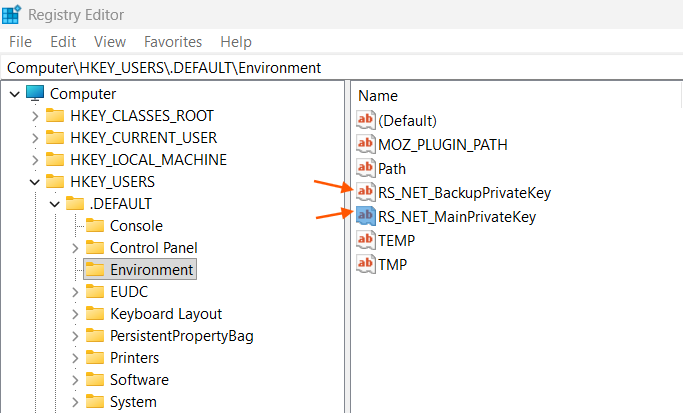
-
Locate and delete the following environment variables:
RS_NET_MainPrivateKeyRS_NET_BackupPrivateKey
-
Run an IIS reset by opening an command prompt with administrator privileges and executing:
bashiisreset -
Open the Report Server in a browser and log in. The application navigates you to the Override Encryption Keys page.
-
Follow the on-screen instructions to overwrite the encryption keys.
After overwriting the encryption keys, all previously encrypted data connections must be re-entered because the old encrypted values cannot be decrypted with the new keys.
Notes
This issue is specific to IIS-hosted (Windows) installations of the Report Server for .NET. It does not affect Report Server for .NET Framework installations.
A permanent fix that ensures the installer cleans up stale encryption keys from previous installations is planned for a future release.