New to Telerik UI for WPF? Start a free 30-day trial
Styling Editor Presenter
Updated on Nov 25, 2026
If you want to change the appearance of a cell when it enters edit mode, you should modify the style of the GridViewEditorPresenter. This element is a plain presenter used to display the editors for the cells.
To modify the default style, see Editing Control Templates.
Example 1: Styling the GridViewEditorPresenter
XAML
<Style TargetType="{x:Type telerik:GridViewEditorPresenter}">
	<Setter Property="Template" Value="{StaticResource GridViewEditorPresenterTemplate}"/>
	<Setter Property="Padding" Value="5"/>
</Style>
If you're using Implicit Styles, you should base your style on the GridViewEditorPresenterStyle.
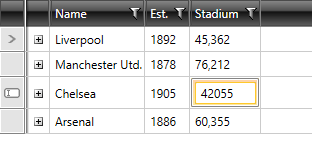
RadGridView with styled GridViewEditorPresenter
If you would like to change the appearance of the editor itself, then you should create a simple style targeted at the corresponding editor. You can have a look at the Styling Column Editor article for more information.