How to Respect Application's CurrentCulture in Custom Format Strings
Currently the culture used for formattng the data in RadGridView is the one specified as a Language for it (or for the containing Window/UserControl). We have changed this behaviour with version Q2 2012 SP2, so now it is compatible with the behaviour of the MS DataGrid.
Still, there is a way to set the CurrentCulture and apply the format you would like to. With Q1 2013 we have introduced a new property of RadGridView - IsLocalizationLanguageRespected. You can use it to control whether CurrentCulture or Language is respected. Please note that by default the Language will be respected, so you will need to set it to False so that your custom format can take effect.
Example 1 demonstrates how you can define custom formatting with the help of the CurrentCulture.
Example 1: Defining custom formatting
System.Globalization.CultureInfo cultureInfo = new System.Globalization.CultureInfo("en-US");
System.Globalization.DateTimeFormatInfo dateTimeInfo =
new System.Globalization.DateTimeFormatInfo();
dateTimeInfo.LongDatePattern = "dd--MMM--yyyy";
dateTimeInfo.ShortDatePattern = "dd--MMM--yy";
cultureInfo.DateTimeFormat = dateTimeInfo;
cultureInfo.NumberFormat.NumberGroupSeparator = "/";
cultureInfo.NumberFormat.NegativeSign = "/";

Thread.CurrentThread.CurrentCulture = cultureInfo;
Thread.CurrentThread.CurrentUICulture = cultureInfo;Dim cultureInfo As New System.Globalization.CultureInfo("en-US")
Dim dateTimeInfo As New System.Globalization.DateTimeFormatInfo()
dateTimeInfo.LongDatePattern = "dd--MMM--yyyy"
dateTimeInfo.ShortDatePattern = "dd--MMM--yy"
cultureInfo.DateTimeFormat = dateTimeInfo
cultureInfo.NumberFormat.NumberGroupSeparator = "/"
cultureInfo.NumberFormat.NegativeSign = "/"
Thread.CurrentThread.CurrentCulture = cultureInfo
Thread.CurrentThread.CurrentUICulture = cultureInfoFigure 1: RadGridView displaying data with IsLocalizationLanguageRespected set to True
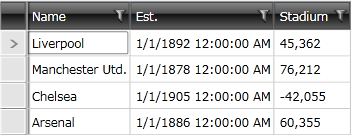
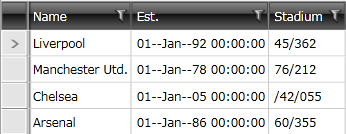
Figure 2: RadGridView displaying data with IsLocalizationLanguageRespected set to False
Apply a Different Culture to a Column
The built-in DataFormatString formatter uses the culture from the RadGridView (or its containing element). Setting Language directly on a GridViewDataColumn is not the formatter path used for generated cells.
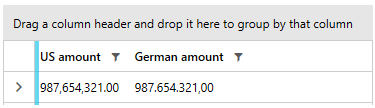
To use a different culture for an individual column, define a CellTemplate and set the xml:lang attribute on the element that displays the value. The following example uses the same Amount property with two different cultures:
	<telerik:RadGridView ItemsSource="{Binding Items}"
	                     AutoGenerateColumns="False">
	    <telerik:RadGridView.Columns>
	        <telerik:GridViewDataColumn Header="US amount"
	                                    DataMemberBinding="{Binding Amount}">
	            <telerik:GridViewDataColumn.CellTemplate>
	                <DataTemplate>
	                    <TextBlock Text="{Binding Amount, StringFormat={}{0:N2}}"
	                               xml:lang="en-US" />
	                </DataTemplate>
	            </telerik:GridViewDataColumn.CellTemplate>
	        </telerik:GridViewDataColumn>
	        <telerik:GridViewDataColumn Header="German amount"
	                                    DataMemberBinding="{Binding Amount}">
	            <telerik:GridViewDataColumn.CellTemplate>
	                <DataTemplate>
	                    <TextBlock Text="{Binding Amount, StringFormat={}{0:N2}}"
	                               xml:lang="de-DE" />
	                </DataTemplate>
	            </telerik:GridViewDataColumn.CellTemplate>
	        </telerik:GridViewDataColumn>
	    </telerik:RadGridView.Columns>
	</telerik:RadGridView>
Use the format string and xml:lang value that correspond to the required output for each column. If a required separator pattern is not provided by a culture, format the value with a converter and bind the resulting text in the CellTemplate.
Figure 3: RadGridView displaying the same amount with US and German culture-specific formatting