Visual Structure
This topic defines terms and concepts related to RadFilePathPicker that you have to get familiar with before you continue reading this help.
Figure 1: RadFilePathPicker Visual Stucture
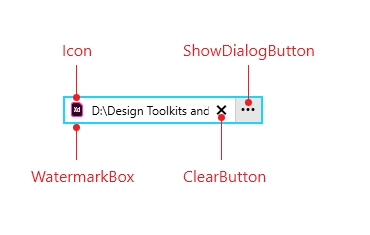
The following table lists the elements that make up a RadFilePathPicker:
-
Icon: It changes dynamically depending on the current FilePath. In order to learn how to customize the shown icon, visit the IconTemplateSelector article.
-
WatermarkBox: The RadWatermarkTextBox that visualizes the Text. Check the WatermarkTextBox Properties article to learn about the API that the RadFilePathPicker exposes for modifying it.
-
ClearButton: This button is shown only when some Text is inputted and allows the user to clear it.
-
ShowDialogButton: This button opens a RadFileDialog. The type of the dialog is controlled through the DialogType property.