New to Telerik UI for WPF? Start a free 30-day trial
DataForm Message
Updated on Sep 29, 2026
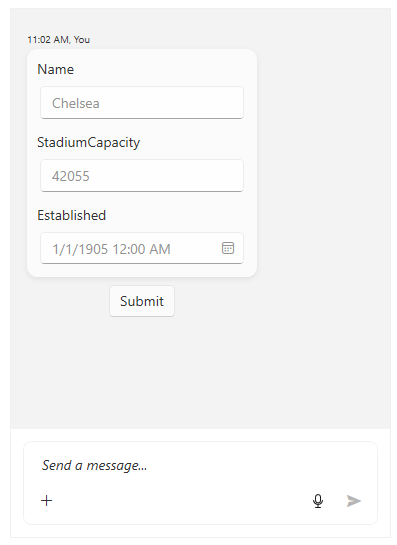
The DataFormMessage mimics the RadDataForm control for displaying its data. The constructor of this message and its parameters are illustrated below.
- MessageDisplayPosition displayPosition
- Author author, object item: the item parameter has to be the reference of the item that is to be edited.
- IEnumerable
propertyNames : the properties of the item have to be passed as collection of strings. - DateTime creationDate: the creationDate parameter is optional.
Defining a DataFormMessage
C#
Club chelsea = new Club()
{
    Name = "Chelsea",
    StadiumCapacity = 42055,
    Established = new DateTime(1905, 1, 1)
};

List<string> listProperties = new List<string>();

listProperties.Add("Name");
listProperties.Add("StadiumCapacity");
listProperties.Add("Established");

DataFormMessage dataFormMessage
        = new DataFormMessage(MessageDisplayPosition.Inline, this.currentAuthor, chelsea, listProperties);
this.chat.AddMessage(dataFormMessage);
Defining DataFormMessage