Message Attachments
The attachments feature allows you to add files in the chat messages.
To enable the attachments, set the IsMoreButtonVisible property of RadChat to true.
<telerik:RadChat x:Name="chat" IsMoreButtonVisible="True" />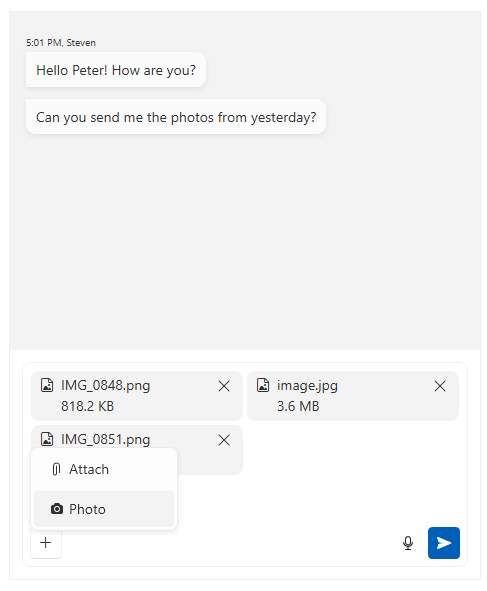
Handling Attachment Actions
The action that happens when you download or share attachments can be handled via the AttachmentActionRequested event of RadChat. The event is invoked when the user click onto the Download or Share button in the attachment.
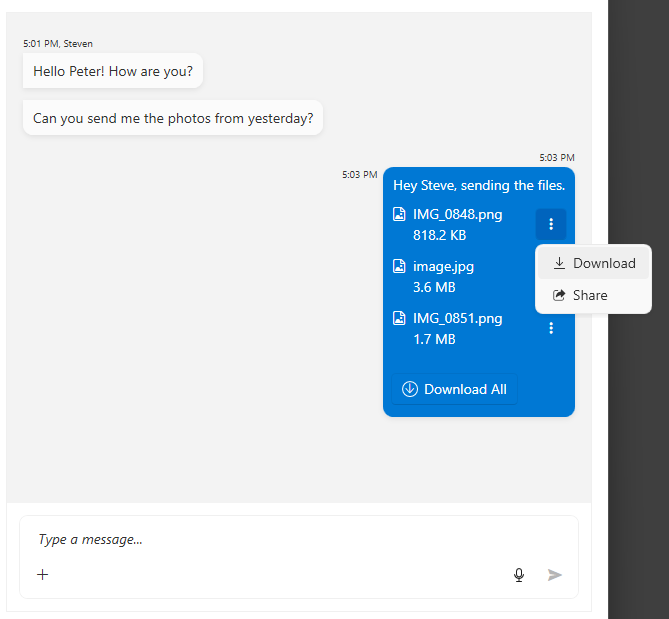
private void RadChat_AttachmentActionRequested(object sender, AttachmentActionEventArgs e)
{
    IReadOnlyList<PromptInputAttachedFile> attachments = e.AttachedFiles;
    if (e.Action == AttachmentAction.Download)
    {
        foreach (var attachment in attachments)
        {
            var fileName = attachment.FileName;
            Stream fileStream = attachment.GetFileStream.Invoke();

            // implement file download
        }
    }
    else if (e.Action == AttachmentAction.Share)
    {
        foreach (var attachment in attachments)
        {
            var fileName = attachment.FileName;
            Stream fileStream = attachment.GetFileStream.Invoke();

            // implement file share
        }
    }
}
Maximum Visible Attachments
The number of attachments that will be displayed by default without showing an expand button can be adjusted via the MaxVisibleAttachments property of RadChat.
<telerik:RadChat x:Name="chat" IsMoreButtonVisible="True" MaxVisibleAttachments="2" />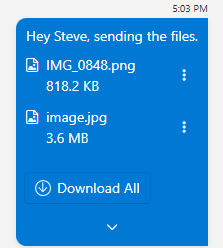
Managing Message Attachments Programmatically
The attachments of a message can be accessed via its AttachedFiles collection property.
Setting message attachments programmatically
var textMessage = new TextMessage(this.chat.CurrentAuthor, "Sure, attaching the photos.");
var attachedFiles = new List<PromptInputAttachedFile>();
attachedFiles.Add(new PromptInputAttachedFile(new FileInfo("file-path-here")));
textMessage.AttachedFiles = attachedFiles.AsReadOnly();
Getting message attachments
IReadOnlyList<PromptInputAttachedFile> attachments = textMessage.AttachedFiles;The content of a attached file can be accessed via the GetFileStream function of the corresponding PromptInputAttachedFile object.
Stream fileStream = textMessage.AttachedFiles.ElementAt(0).GetFileStream.Invoke();Customizing Input Box Attachment Appearance
The visual elements showing the attachments in the input text box can be adjusted via the AttachmentTemplate property of the RadPromptInput element.
 <!-- xmlns:chat="clr-namespace:Telerik.Windows.Controls.ConversationalUI;assembly=Telerik.Windows.Controls" -->

 <Window.Resources>
     <chat:FileExtensionToGlyphConverter x:Key="FileExtensionToGlyphConverter" />
     <chat:FileSizeConverter x:Key="FileSizeConverter" />
     <DataTemplate x:Key="CustomAttachmentTemplate">
         <Border Background="Bisque" CornerRadius="4" Padding="5">
             <Grid>
                 <Grid.ColumnDefinitions>
                     <ColumnDefinition Width="Auto" />
                     <ColumnDefinition Width="*" />
                     <ColumnDefinition Width="Auto" />
                 </Grid.ColumnDefinitions>

                 <telerik:RadGlyph Glyph="{Binding FileName, Converter={StaticResource FileExtensionToGlyphConverter}}"
                                   VerticalAlignment="Top"/>

                 <StackPanel Grid.Column="1" Margin="5 0 0 0">
                     <TextBlock Text="{Binding FileName}" TextTrimming="CharacterEllipsis" />
                     <TextBlock Text="{Binding FileSize, Converter={StaticResource FileSizeConverter}}"/>
                 </StackPanel>

                 <telerik:RadButton Grid.Column="2"
                                    Command="{Binding RelativeSource={RelativeSource AncestorType={x:Type telerik:RadPromptInput}}, Path=RemoveAttachedFileCommand}"
                                    CommandParameter="{Binding}">
                     <telerik:RadGlyph Glyph="Close" />
                 </telerik:RadButton>
             </Grid>
         </Border>
     </DataTemplate>
</Window.Resources>private void RadChat_Loaded(object sender, RoutedEventArgs e)
{
var chat = (RadChat)sender;
var promptInput = chat.FindChildByType<RadPromptInput>();
promptInput.AttachmentTemplate = (DataTemplate)this.Resources["CustomAttachmentTemplate"];
}The data context passed to the AttachmentTemplate is an object of type PromptInputAttachedFile.
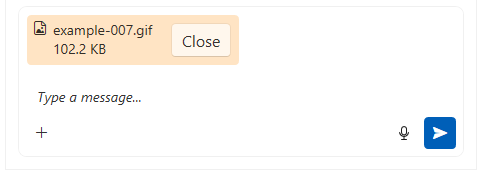
For conditional appearance customization, use the AttachmentTemplateSelector (DataTemplateSelector) property.