Snapping per Day in RadGanttView
Environment
| Product Version | 2018.1 220 |
| Product | RadGanttView for WinForms |
Description
RadGanttView paints the task elements according the exact mouse location during a drag-and-drop or a resize operation. This way a task`s Start and End properties are updated gradually and the step can be even less than a second. The solution in this KB article will suggest a custom implementation showing how the tasks can snap to a full day and update with a single day at a time.
Solution
The animation below demonstrates the end result with the snapping tasks.
Figure 1: Snapping Task Element
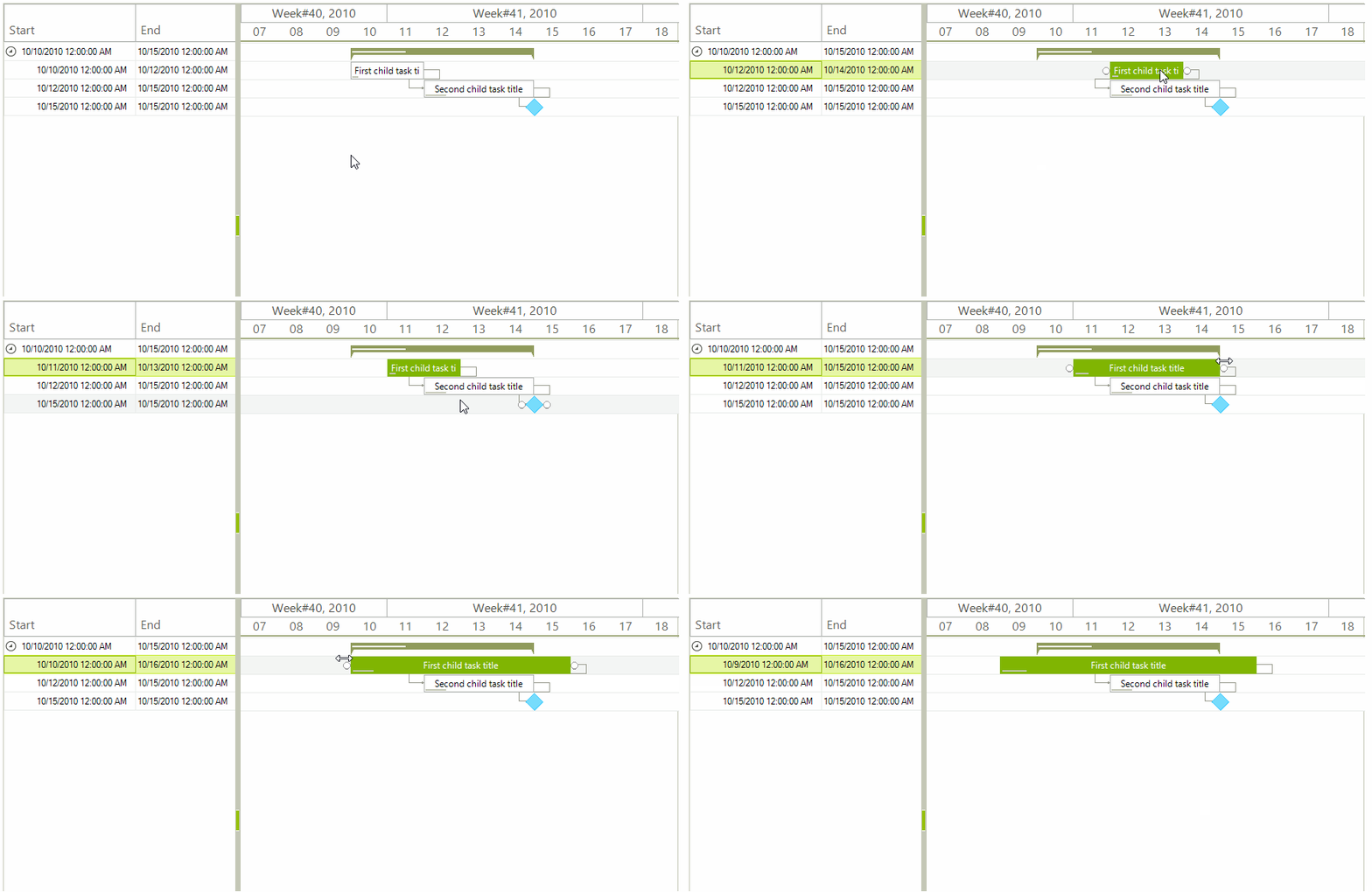
The custom functionality will be achieved with the help of special drag-and-drop and mouse behavior classes.
1. Inherit the GanttViewDragDropService class.
- Add two fields which will be used to save the drag start point and the currently snapped date.
- Override the OnPreviewDragStart and OnStopped methods. These methods will be used to set and reset the initial drag start point.
- Override the SetHintWindowPosition method. Here we need to implement our custom logic for calculating the snapped date and the bounds for the hint window. This window is painted under the mouse while dragging the task.
- Override the OnPreviewDragDrop method. The Start and End properties of the task will be updated here.
Custom Drag-and-Drop Implementation
public class MyGanttViewDragDropService : GanttViewDragDropService
{
    private Point dragStartPoint;
    private DateTime snappedDate;
    public MyGanttViewDragDropService(RadGanttViewElement owner)
        : base(owner)
    { }
    protected override void SetHintWindowPosition(Point mousePt)
    {
        int dragDistance = mousePt.X - this.dragStartPoint.X;
        GanttViewDataItem dataItem = (((GanttGraphicalViewBaseTaskElement)this.Context).Parent as GanttGraphicalViewBaseItemElement).Data;
        DateTime startDate = dataItem.Start;
        DateTime newDate = startDate.AddTicks(this.Owner.GraphicalViewElement.OnePixelTime.Ticks * dragDistance);
        this.snappedDate = new DateTime((long)Math.Floor((decimal)(newDate.Ticks / TimeSpan.TicksPerDay)) * TimeSpan.TicksPerDay);
        RectangleF rectF = this.Owner.GraphicalViewElement.GetDrawRectangle(dataItem, snappedDate);
        Point rectLocation = Point.Round(rectF.Location);
        Point snapToDatePoint = this.Owner.GraphicalViewElement.PointToScreen(rectLocation);
        int mouseOffset = this.dragStartPoint.X - ((GanttGraphicalViewBaseTaskElement)this.Context).PointToScreen(new Point(0, 0)).X;
        Point newMousePt = new Point(snapToDatePoint.X + mouseOffset, mousePt.Y);
        base.SetHintWindowPosition(newMousePt);
    }
    protected override void OnPreviewDragDrop(RadDropEventArgs e)
    {
        GanttViewTaskElement taskElement = e.DragInstance as GanttViewTaskElement;
        if (taskElement != null)
        {
            GanttViewTaskItemElement taskItemElement = taskElement.Parent as GanttViewTaskItemElement;
            if (taskItemElement.Data.Start == this.snappedDate)
            {
                return;
            }
            TimeSpan duration = taskItemElement.Data.End - taskItemElement.Data.Start;
            taskItemElement.Data.Start = snappedDate;
            taskItemElement.Data.End = snappedDate + duration;
            this.CalculateLinkLines(taskItemElement.GraphicalViewElement, taskItemElement.Data);
            e.Handled = true;
        }
        base.OnPreviewDragDrop(e);
    }
    protected override void OnPreviewDragStart(PreviewDragStartEventArgs e)
    {
        this.dragStartPoint = Cursor.Position;
        base.OnPreviewDragStart(e);
    }
    protected override void OnStopped()
    {
        this.dragStartPoint = Point.Empty;
        base.OnStopped();
    }
    protected internal virtual void CalculateLinkLines(GanttViewGraphicalViewElement viewElement, GanttViewDataItem item)
    {
        foreach (GanttViewLinkDataItem link in viewElement.GanttViewElement.Links)
        {
            if (link.StartItem == item || link.EndItem == item)
            {
                viewElement.CalculateLinkLines(link, null);
            }
        }
    }
}
2. Inherit the BaseGanttViewBehavior class.
- Override its ProcessMouseMoveWhenResizingTask method. Our custom logic responsible for calculating the tasks` new Start and End values will be executed in this method.
Custom Mouse Behavior Implementation
public class CustomGanttViewBehavior : BaseGanttViewBehavior
{
    protected override void ProcessMouseMoveWhenResizingTask(GanttGraphicalViewBaseTaskElement element, MouseEventArgs e)
    {
        GanttViewDataItem data = ((GanttGraphicalViewBaseItemElement)element.Parent).Data;
        DateTime baseDate = this.IsResizingStart ? data.Start : data.End;
        Point mousePosition = this.GanttViewElement.GraphicalViewElement.PointFromControl(e.Location);
        int distanceFromLeftBorder = this.GanttViewElement.GraphicalViewElement.HorizontalScrollBarElement.Value + mousePosition.X;
        DateTime newDate = this.GanttViewElement.GraphicalViewElement.TimelineBehavior.AdjustedTimelineStart.AddSeconds(distanceFromLeftBorder * this.GanttViewElement.GraphicalViewElement.OnePixelTime.TotalSeconds).AddSeconds(1);
        if (newDate.Hour == 0 && newDate.Minute == 0 && newDate.Second == 0)
        {
            if (this.IsResizingStart)
            {
                DateTime maxStart = data.End.Subtract(new TimeSpan(this.GanttViewElement.GraphicalViewElement.OnePixelTime.Ticks * this.GanttViewElement.MinimumTaskWidth));
                if (newDate > maxStart)
                {
                    newDate = maxStart;
                }
                data.Start = newDate;
            }
            else if (this.IsResizingEnd)
            {
                DateTime minEnd = data.Start.Add(new TimeSpan(this.GanttViewElement.GraphicalViewElement.OnePixelTime.Ticks * this.GanttViewElement.MinimumTaskWidth));
                if (newDate < minEnd)
                {
                    newDate = minEnd;
                }
                data.End = newDate;
            }
        }
        this.ProcessScrolling(this.GanttViewElement.ElementTree.Control.PointToScreen(e.Location), false);
        foreach (GanttViewLinkDataItem link in this.GanttViewElement.Links)
        {
            if (link.StartItem == data || link.EndItem == data)
            {
                this.GanttViewElement.GraphicalViewElement.CalculateLinkLines(link, null);
            }
        }
        element.Parent.InvalidateMeasure(true);
        this.GanttViewElement.GraphicalViewElement.Invalidate();
    }
}
3. Instantiate the custom drag-drop service and mouse behavior classes and use them with your RadGanttView control.
Use the Custom Solution
public partial class RadGanttViewTimelineSnapping : Telerik.WinControls.UI.RadForm
{
    public RadGanttViewTimelineSnapping()
    {
        InitializeComponent();
        this.radGanttView1.GanttViewElement.GraphicalViewElement.TimelineStart = new DateTime(2010, 10, 7);
        this.radGanttView1.GanttViewElement.GraphicalViewElement.TimelineEnd = new DateTime(2010, 12, 10);
        DataTable tasks = new DataTable("Tasks");
        tasks.Columns.Add("Id", typeof(int));
        tasks.Columns.Add("ParentId", typeof(int));
        tasks.Columns.Add("Title", typeof(string));
        tasks.Columns.Add("Start", typeof(DateTime));
        tasks.Columns.Add("End", typeof(DateTime));
        tasks.Columns.Add("Progress", typeof(decimal));
        DataTable links = new DataTable("Links");
        links.Columns.Add("StartId", typeof(int));
        links.Columns.Add("EndId", typeof(int));
        links.Columns.Add("LinkType", typeof(int));
        DataSet data = new DataSet();
        data.Tables.Add(tasks);
        data.Tables.Add(links);
        tasks.Rows.Add(1, 0, "Summary task title", new DateTime(2010, 10, 10), new DateTime(2010, 10, 15), 30m);
        tasks.Rows.Add(2, 1, "First child task title", new DateTime(2010, 10, 10), new DateTime(2010, 10, 12), 10);
        tasks.Rows.Add(3, 1, "Second child task title", new DateTime(2010, 10, 12), new DateTime(2010, 10, 15), 20m);
        tasks.Rows.Add(4, 1, "Milestone", new DateTime(2010, 10, 15), new DateTime(2010, 10, 15), 0m);
        links.Rows.Add(2, 3, 1);
        links.Rows.Add(3, 4, 1);
        this.radGanttView1.GanttViewElement.TaskDataMember = "Tasks";
        this.radGanttView1.GanttViewElement.ChildMember = "Id";
        this.radGanttView1.GanttViewElement.ParentMember = "ParentId";
        this.radGanttView1.GanttViewElement.TitleMember = "Title";
        this.radGanttView1.GanttViewElement.StartMember = "Start";
        this.radGanttView1.GanttViewElement.EndMember = "End";
        this.radGanttView1.GanttViewElement.ProgressMember = "Progress";
        this.radGanttView1.GanttViewElement.LinkDataMember = "Links";
        this.radGanttView1.GanttViewElement.LinkStartMember = "StartId";
        this.radGanttView1.GanttViewElement.LinkEndMember = "EndId";
        this.radGanttView1.GanttViewElement.LinkTypeMember = "LinkType";
        this.radGanttView1.GanttViewElement.DataSource = data;
        this.radGanttView1.Columns.Add("Start");
        this.radGanttView1.Columns.Add("End");
        this.radGanttView1.GanttViewBehavior = new CustomGanttViewBehavior();
        this.radGanttView1.GanttViewElement.DragDropService = new MyGanttViewDragDropService(this.radGanttView1.GanttViewElement);
    }
}
A complete solution providing a C# and VB.NET project is available here.