Custom Data Items
The data items displayed in RadGanttView have a predefined set of properties allowing each of the items to have defined Start, End, and Title values. In certain cases, one may need to display an additional column in the Gantt control and map this column to a custom field defined in the data item class. This can be easily achieved by extending the GanttViewDataItem class with additional properties.
The new properties added to an inherited GanttViewDataItem class must have property setters.
The example in this article will handle a scenario of a Duration column displaying how many days each of the tasks takes.
Figure 1: Custom Data Item
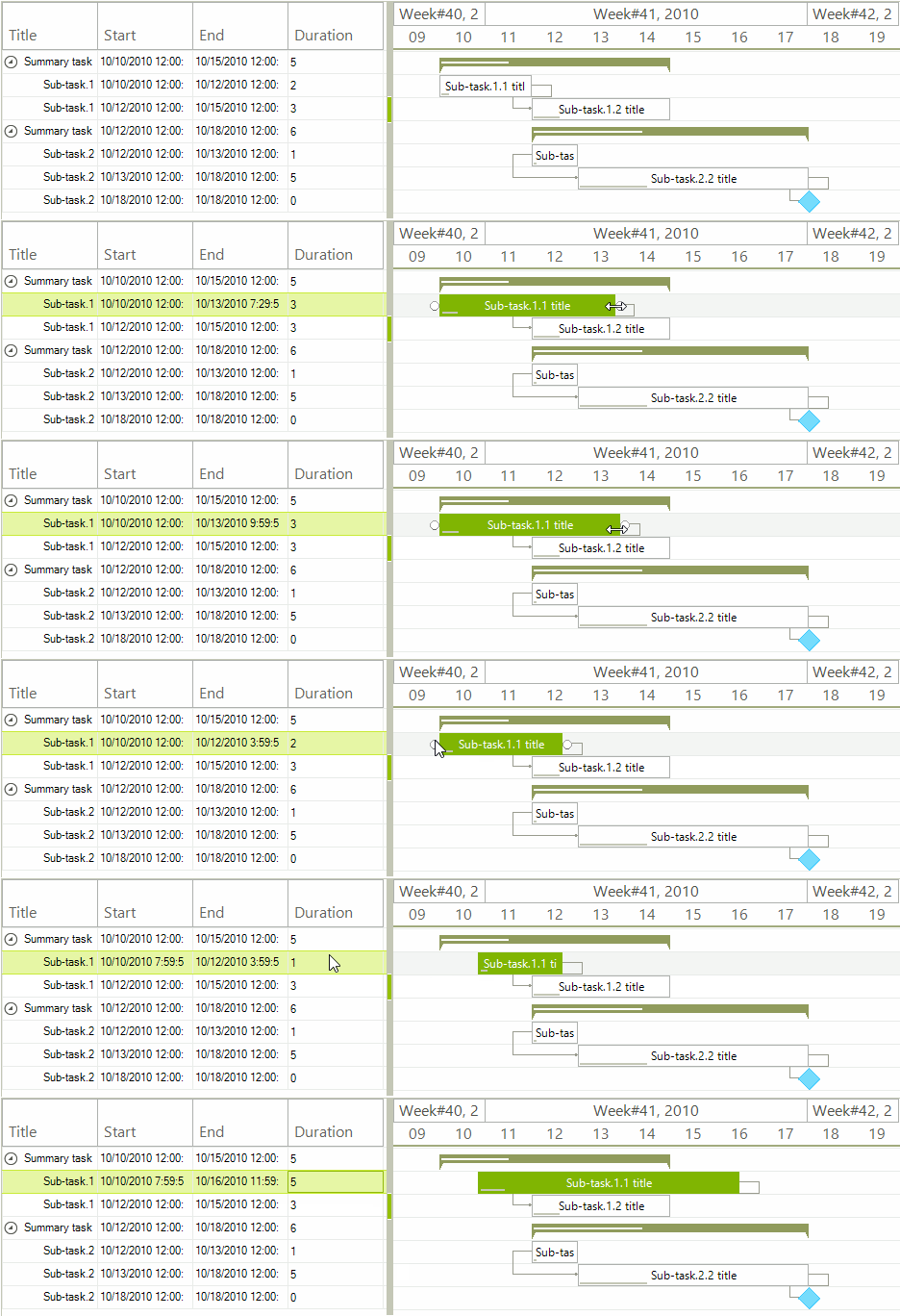
Setup the Control and Add Data
public GanttDataItemForm()
{
    InitializeComponent();
    this.radGanttView1.GanttViewElement.GraphicalViewElement.TimelineStart = new DateTime(2010, 10, 9);
    this.radGanttView1.GanttViewElement.GraphicalViewElement.TimelineEnd = new DateTime(2010, 10, 19);

    //setup data items
    MyGanttViewDataItem item1 = new MyGanttViewDataItem();
    item1.Start = new DateTime(2010, 10, 10);
    item1.End = new DateTime(2010, 10, 15);
    item1.Progress = 30m;
    item1.Title = "Summary task.1. title";

    MyGanttViewDataItem subitem11 = new MyGanttViewDataItem();
    subitem11.Start = new DateTime(2010, 10, 10);
    subitem11.End = new DateTime(2010, 10, 12);
    subitem11.Progress = 10m;
    subitem11.Title = "Sub-task.1.1 title";

    MyGanttViewDataItem subitem12 = new MyGanttViewDataItem();
    subitem12.Start = new DateTime(2010, 10, 12);
    subitem12.End = new DateTime(2010, 10, 15);
    subitem12.Progress = 20m;
    subitem12.Title = "Sub-task.1.2 title";

    //add subitems
    item1.Items.Add(subitem11);
    item1.Items.Add(subitem12);

    this.radGanttView1.Items.Add(item1);

    MyGanttViewDataItem item2 = new MyGanttViewDataItem();
    item2.Start = new DateTime(2010, 10, 12);
    item2.End = new DateTime(2010, 10, 18);
    item2.Progress = 40m;
    item2.Title = "Summary task.2. title";

    MyGanttViewDataItem subitem21 = new MyGanttViewDataItem();
    subitem21.Start = new DateTime(2010, 10, 12);
    subitem21.End = new DateTime(2010, 10, 13);
    subitem21.Progress = 10m;
    subitem21.Title = "Sub-task.2.1 title";

    MyGanttViewDataItem subitem22 = new MyGanttViewDataItem();
    subitem22.Start = new DateTime(2010, 10, 13);
    subitem22.End = new DateTime(2010, 10, 18);
    subitem22.Progress = 30m;
    subitem22.Title = "Sub-task.2.2 title";

    MyGanttViewDataItem subitem23 = new MyGanttViewDataItem();
    subitem23.Start = new DateTime(2010, 10, 18);
    subitem23.End = new DateTime(2010, 10, 18);
    subitem23.Title = "Sub-task.2.3 title";

    //add subitems
    item2.Items.Add(subitem21);
    item2.Items.Add(subitem22);
    item2.Items.Add(subitem23);

    this.radGanttView1.Items.Add(item2);

    //add links between items
    GanttViewLinkDataItem link1 = new GanttViewLinkDataItem();
    link1.StartItem = subitem11;
    link1.EndItem = subitem12;
    link1.LinkType = TasksLinkType.FinishToStart;
    this.radGanttView1.Links.Add(link1);

    GanttViewLinkDataItem link2 = new GanttViewLinkDataItem();
    link2.StartItem = subitem21;
    link2.EndItem = subitem22;
    link2.LinkType = TasksLinkType.StartToStart;
    this.radGanttView1.Links.Add(link2);

    GanttViewLinkDataItem link3 = new GanttViewLinkDataItem();
    link3.StartItem = subitem22;
    link3.EndItem = subitem23;
    link3.LinkType = TasksLinkType.FinishToStart;
    this.radGanttView1.Links.Add(link3);

    GanttViewTextViewColumn titleColumn = new GanttViewTextViewColumn("Title");
    GanttViewTextViewColumn startColumn = new GanttViewTextViewColumn("Start");
    GanttViewTextViewColumn endColumn = new GanttViewTextViewColumn("End");
    GanttViewTextViewColumn durationColumn = new GanttViewTextViewColumn("Duration");

    this.radGanttView1.GanttViewElement.Columns.Add(titleColumn);
    this.radGanttView1.GanttViewElement.Columns.Add(startColumn);
    this.radGanttView1.GanttViewElement.Columns.Add(endColumn);
    this.radGanttView1.GanttViewElement.Columns.Add(durationColumn);

    this.radGanttView1.GanttViewElement.EditorInitialized += GanttViewElement_EditorInitialized;
}Our implementation of the custom GanttViewDataItem class will add an integer Duration property. This property will be calculated whenever the Start or the End of a task changes.
Custom Data Item Implementation
public class MyGanttViewDataItem : GanttViewDataItem
{
    private int duration;
    private bool shouldUpdate;

    public MyGanttViewDataItem()
    { }

    public int Duration
    {
        get
        {
            return this.duration;
        }

        private set
        {
            if (this.duration != value)
            {
                this.duration = value;
                this.OnNotifyPropertyChanged("Duration");
            }
        }
    }

    protected override void OnNotifyPropertyChanged(string propertyName)
    {
        base.OnNotifyPropertyChanged(propertyName);

        if (propertyName == "Duration" && this.shouldUpdate)
        {
            TimeSpan span = this.End - this.End.Date;
            this.End = this.Start.AddDays(this.Duration).Add(span);
        }

        if (propertyName == "Start" || propertyName == "End")
        {
            this.shouldUpdate = false;
            this.Duration = (this.End - this.Start).Days;
        }

        this.shouldUpdate = true;
    }
}The Duration column will be working with a GanttViewSpinEditor and considering our scenario, we will need to change the MaxValue property of the editor. This can be accomplished by handling the RadGanttView.GanttViewElement.EditorInitialized event.
Handling the EditorInitialized event
private void GanttViewElement_EditorInitialized(object sender, GanttViewItemEditorInitializedEventArgs e)
{
    GanttViewSpinEditor editor = e.Editor as GanttViewSpinEditor;
    decimal totalDays = (decimal)(this.radGanttView1.GanttViewElement.GraphicalViewElement.TimelineEnd - this.radGanttView1.GanttViewElement.GraphicalViewElement.TimelineStart).TotalDays;
    if (editor != null && editor.MaxValue != totalDays)
    {
        editor.MaxValue = totalDays;
    }
}