New to Telerik UI for WinForms? Start a free 30-day trial
Show a Tooltip for the RadGridView's Editor
Updated over 1 year ago
Environment
| Product Version | Product | Author |
|---|---|---|
| 2020.3.915 | RadGridView for WinForms | Desislava Yordanova |
Description
RadGridView offers a convenient way for showing tool tips for the cell elements when they are not being edited. However, once an editor is activated, it handles the keyboard and mouse input. That is why the cell's tool tip is not shown in this case.
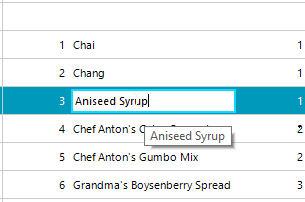
This article demonstrates a sample approach how to show a tool tip for the cell's editor:
Solution
Subscribe to the CellEditorInitialized event which is fired when the editor is activated. Then, handle the MouseHover event for the hosted text box in the editor and show programmatically a RadToolTip at the cursor's position:
C#
RadToolTip toolTip;

public RadForm1()
{
    InitializeComponent();

    this.radGridView1.CellEditorInitialized += radGridView1_CellEditorInitialized;
    this.radGridView1.CellEndEdit += radGridView1_CellEndEdit;
}

private void radGridView1_CellEndEdit(object sender, GridViewCellEventArgs e)
{
    if (toolTip != null)
    {
        toolTip.Hide();
    }
}

private void radGridView1_CellEditorInitialized(object sender, GridViewCellEventArgs e)
{
    RadTextBoxEditor tbEditor = e.ActiveEditor as RadTextBoxEditor;
    if (tbEditor != null)
    {

        RadTextBoxEditorElement elementUnderMouse = tbEditor.EditorElement as RadTextBoxEditorElement;
        if (elementUnderMouse != null)
        {
            elementUnderMouse.TextBoxItem.TextBoxControl.MouseHover -= ElementUnderMouse_MouseHover;
            elementUnderMouse.TextBoxItem.TextBoxControl.MouseHover += ElementUnderMouse_MouseHover;
        }
    }
}

private void ElementUnderMouse_MouseHover(object sender, EventArgs e)
{
    HostedTextBoxBase elementUnderMouse = sender as HostedTextBoxBase;
    if (toolTip == null)
    {
        toolTip = new RadToolTip();
        toolTip.InitialDelay = 1000;
    }
    toolTip.Show(elementUnderMouse.Text, Cursor.Position);
}