New to Telerik UI for WinForms? Start a free 30-day trial
Show Screen Tips above the Controls
Updated over 1 year ago
Environment
| Product Version | Product | Author |
|---|---|---|
| 2019.2.917 | Screentips for WinForms | Desislava Yordanova |
Description
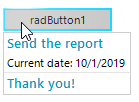
Telerik Presentation Framework offers a suitable approach for showing screen tips when hovering a control. Usually, the screen tip is displayed below the control:
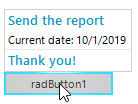
A common requirement is to show the screen tip above the control.
Solution
In the ScreenTipNeeded event you can move the position of the screen tip by specifying the ScreenTipNeededEventArgs.Offset property. However, for this purpose you need to calculate what would be the size of the screen tip. The MeasurementControl.ThreadInstance.GetDesiredSize method would do that work.
Showing a screen tip above the control
C#
RadOffice2007ScreenTipElement screenTip = new RadOffice2007ScreenTipElement();

private void radButton1_ScreenTipNeeded(object sender, ScreenTipNeededEventArgs e)
{
    RadButtonElement buttonElement = e.Item as RadButtonElement;
    if (buttonElement != null)
    {
        screenTip.CaptionLabel.Text = "Send the report";
        screenTip.MainTextLabel.Text = "Current date: " + DateTime.Now.ToShortDateString();
        screenTip.FooterTextLabel.Text = "Thank you!";
        screenTip.FooterVisible = true;
        buttonElement.ScreenTip = screenTip;

        SizeF s = MeasurementControl.ThreadInstance.GetDesiredSize(screenTip, new SizeF(int.MaxValue, int.MaxValue));
        e.Offset = new Size(0, -(int)s.Height);
    }
}