New to Telerik UI for WinForms? Start a free 30-day trial
Updating the Header Text of RadScheduler in Timeline View
Updated over 1 year ago
Environment
| Product Version | 2018.2.621 |
| Product | RadScheduler for WinForms |
Description
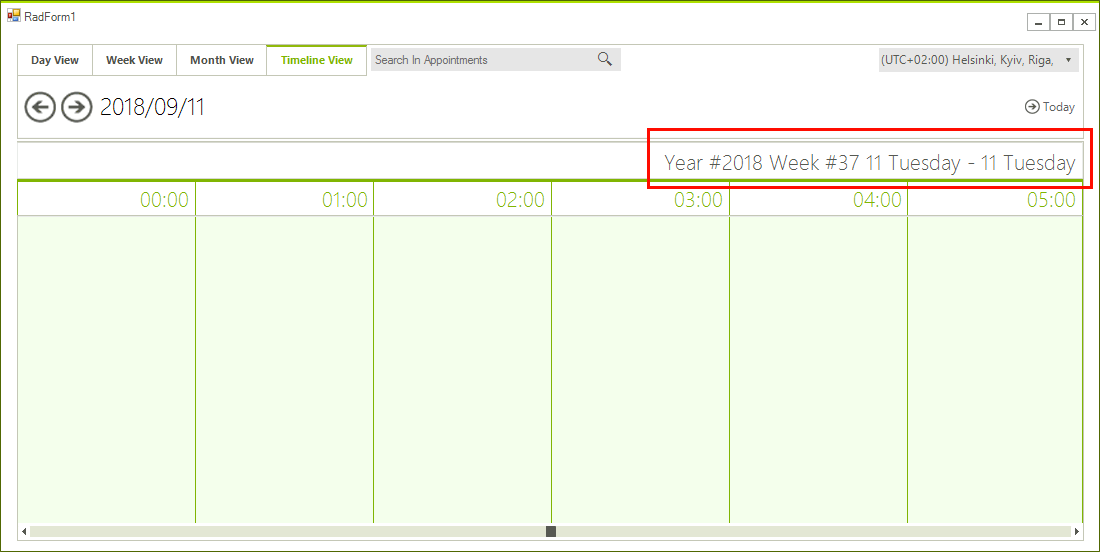
An example demonstrating how the header text of the RadScheduler can be updated when the control is setup in Timeline View.
Solution
The text of the header cells can be customized by accessing the header row. The actual cell element will be also updated in the formatting events changing its Text so it will be necessary to cancel the TextChanging event in those cases and to update it with the custom implementation.
Figure 1: Custom Header Text
Updating Header Implementation
C#
public partial class RadForm1 : RadForm
{
    public RadForm1()
    {
        InitializeComponent();

        this.radScheduler1.ActiveViewChanged += radScheduler1_ActiveViewChanged;

        this.radScheduler1.ActiveViewType = Telerik.WinControls.UI.SchedulerViewType.Timeline;
        SchedulerTimelineView timelineView = this.radScheduler1.GetTimelineView();
        Timescales scale = Timescales.Hours;
        timelineView.ShowTimescale(scale);
    }

    private void UpdateHeader()
    {
        SchedulerTimelineView timelineView = this.radScheduler1.GetTimelineView();
        SchedulerTimelineViewElement viewElement = (SchedulerTimelineViewElement)this.radScheduler1.ViewElement;
        System.Globalization.DateTimeFormatInfo dfi = DateTimeFormatInfo.CurrentInfo;
        Calendar cal = dfi.Calendar;

        int weekNumber = cal.GetWeekOfYear(timelineView.StartDate, dfi.CalendarWeekRule, dfi.FirstDayOfWeek);
        int yearNumber = cal.GetYear(timelineView.StartDate);
        viewElement.Header.HeaderRow.TextChanging -= HeaderRow_TextChanging;
        viewElement.Header.HeaderRow.Text = string.Format("Year #{0} Week #{1} {2}", yearNumber, weekNumber, viewElement.Header.HeaderRow.Text);
        viewElement.Header.HeaderRow.TextChanging += HeaderRow_TextChanging;
    }

    private void HeaderRow_TextChanging(object sender, Telerik.WinControls.TextChangingEventArgs e)
    {
        e.Cancel = true;
        this.UpdateHeader();
    }

    private void radScheduler1_ActiveViewChanged(object sender, SchedulerViewChangedEventArgs e)
    {
        if (e.NewView is SchedulerTimelineView)
        {
            this.UpdateHeader();
        }
    }

    protected override void OnShown(EventArgs e)
    {
        base.OnShown(e);

        this.UpdateHeader();
    }
}