Show Author Messages on the Left in RadChat
Environment
| Version | Product | Author |
|---|---|---|
| 2026.3.1007 | RadChat | Desislava Yordanova |
Description
RadChat aligns messages according to their authors. When ShowMessagesOnOneSide is false, messages from RadChat.Author ("Nancy") appear on the right and messages from other authors ("Andrew") appear on the left.
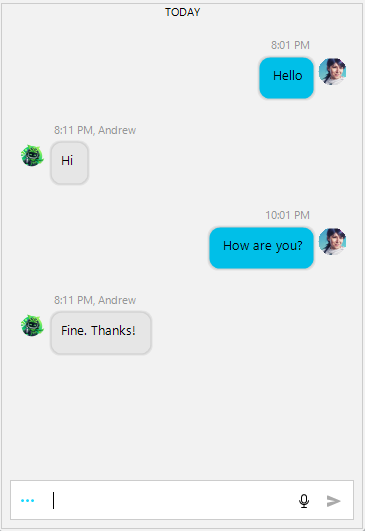
To display Nancy's messages on the left and Andrew's on the right, set Andrew as RadChat.Author, as the example does. In RadChat's built-in two-sided layout, the author assigned to RadChat.Author appears on the right and the other author appears on the left. In general, set the author you want on the right—not the opposite author—as RadChat.Author. Use the ItemFormatting event to show an author name and timestamp for each text message. It does not change alignment.
Solution
Place this code in the form constructor after InitializeComponent(). Add two authors, assign the author you want on the right to RadChat.Author, and add the text messages. Here, author2 (Andrew) is on the right and author1 (Nancy) is on the left. The ItemFormatting handler makes each text-message name label visible and sets its text to the author name and message time.
            Author author1 = new Author(Properties.Resources.dess, "Nancy");
            Author author2 = new Author(Properties.Resources.samurai, "Andrew");
            this.radChat1.Author = author2;
            ChatTextMessage message1 = new ChatTextMessage("Hello", author1, DateTime.Now.AddHours(1));
            this.radChat1.AddMessage(message1);

            ChatTextMessage message2 = new ChatTextMessage("Hi", author2, DateTime.Now.AddHours(1).AddMinutes(10));
            this.radChat1.AddMessage(message2);

            ChatTextMessage message3 = new ChatTextMessage("How are you?", author1, DateTime.Now.AddHours(3));
            this.radChat1.AddMessage(message3);

            ChatTextMessage message4 = new ChatTextMessage("Fine. Thanks!", author2, DateTime.Now.AddHours(3).AddMinutes(10));
            this.radChat1.AddMessage(message4);
            this.radChat1.ItemFormatting += (s, e) =>
            {
                var textItem = e.ItemElement as TextMessageItemElement;
                if (textItem != null)
                {
                    textItem.NameLabelElement.Visibility = Telerik.WinControls.ElementVisibility.Visible;

                    ChatMessage message = textItem.Data?.Message;
                    if (message != null)
                    {
                        textItem.NameLabelElement.Text = $"{message.Author?.Name} - {message.TimeStamp:HH:mm}";
                    }
                }
            };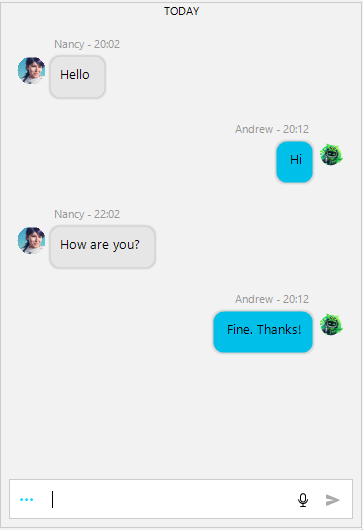
The images use different current-author settings. They illustrate the built-in two-sided layout and the author labels, not a reversal of the alignment direction.
The author assigned to RadChat.Author remains aligned on the right in the built-in two-sided layout. Set ShowMessagesOnOneSide to true only when you want all messages on one side. It does not reverse the author-based alignment. If you need the current author's messages on the left and other messages on the right, switch the author set to RadChat.Author.
Replace Properties.Resources.dess and Properties.Resources.samurai with avatar resources available in your application.