Keep a GridViewMultiComboBoxColumn Cell Empty When Its Value Is Cleared
Environment
| Version | Product | Author |
|---|---|---|
| 2026.3.1007 | RadGridView | Desislava Yordanova |
Description
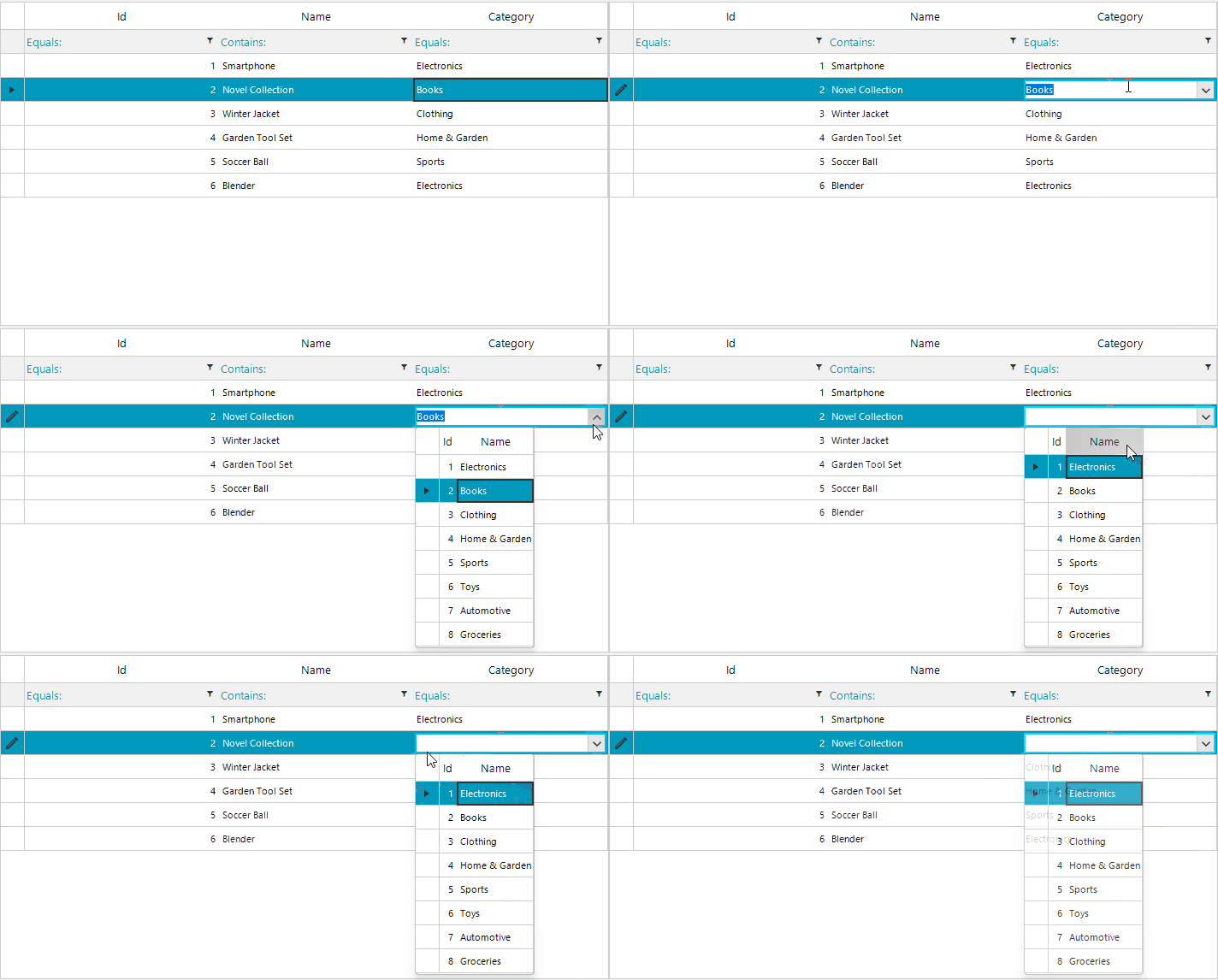
When you clear the text in an editable GridViewMultiComboBoxColumn cell while filtering is enabled, the editor can select the first filtered result. This example uses a custom RadMultiColumnComboBoxElement editor to keep the cell empty until you select a row with the mouse or press Enter.
The data model must allow an empty value. This example uses a nullable int? for Product.CategoryId.
Figure 1: Default selection returns after the filter text is cleared.
Solution
The following example replaces the generated CategoryId column with a GridViewMultiComboBoxColumn and uses a custom editor to handle empty text. The NullableMultiColumnComboBoxElement clears the current row when its text becomes empty. While the text remains empty, its CurrentRowChanging handler cancels row changes unless the user explicitly selects a data row with the mouse or presses Enter. The event handlers are removed when editing ends so they do not remain attached after the edit session.
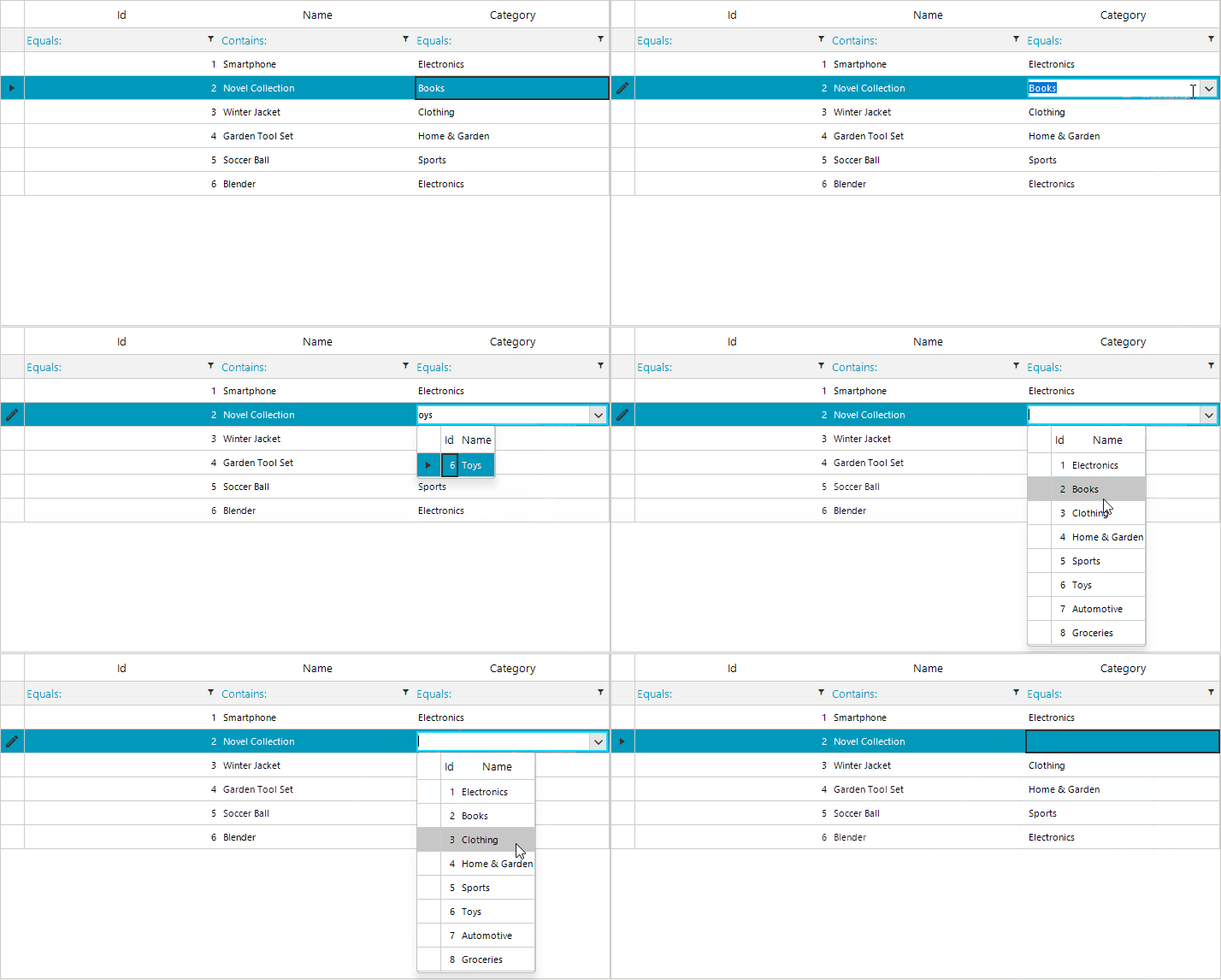
After applying the example, clear a category cell and commit the edit. The cell must remain empty. Selecting a category from the popup with the mouse or pressing Enter sets its value.
using System;
using System.Collections.Generic;
using System.ComponentModel;
using System.Windows.Forms;
using Telerik.WinControls;
using Telerik.WinControls.Data;
using Telerik.WinControls.UI;

public partial class MultiComboGridForm : RadForm
{
    private readonly List<Category> categories;
    private readonly BindingList<Product> products;

    public MultiComboGridForm()
    {
        InitializeComponent();

        this.categories = GetCategories();
        this.products = GetProducts();

        this.radGridView1.DataSource = this.products;
        this.ConfigureGridColumns();
    }

    private List<Category> GetCategories()
    {
        return new List<Category>
        {
            new Category(1, "Electronics"),
            new Category(2, "Books"),
            new Category(3, "Clothing"),
            new Category(4, "Home & Garden"),
            new Category(5, "Sports"),
            new Category(6, "Toys"),
            new Category(7, "Automotive"),
            new Category(8, "Groceries")
        };
    }

    private BindingList<Product> GetProducts()
    {
        return new BindingList<Product>
        {
            new Product(1, "Smartphone", 1),
            new Product(2, "Novel Collection", 2),
            new Product(3, "Winter Jacket", 3),
            new Product(4, "Garden Tool Set", 4),
            new Product(5, "Soccer Ball", 5),
            new Product(6, "Blender", 1)
        };
    }

    private void ConfigureGridColumns()
    {
        this.radGridView1.Columns["Id"].HeaderText = "Id";
        this.radGridView1.Columns["Name"].HeaderText = "Name";

        if (this.radGridView1.Columns["CategoryId"] != null)
        {
            this.radGridView1.Columns.Remove(this.radGridView1.Columns["CategoryId"]);
        }

        GridViewMultiComboBoxColumn categoriesColumn = new GridViewMultiComboBoxColumn
        {
            HeaderText = "Category",
            FieldName = "CategoryId",
            DataSource = this.categories,
            ValueMember = "Id",
            DisplayMember = "Name",
            AutoSizeMode = BestFitColumnMode.AllCells,
            DropDownStyle = RadDropDownStyle.DropDown
        };

        this.radGridView1.Columns.Add(categoriesColumn);
        this.radGridView1.EditorRequired += this.RadGridView1_EditorRequired;
        this.radGridView1.CellEditorInitialized += this.RadGridView1_CellEditorInitialized;
    }

    private void RadGridView1_EditorRequired(object sender, EditorRequiredEventArgs e)
    {
        if (this.radGridView1.CurrentColumn is GridViewMultiComboBoxColumn)
        {
            e.Editor = new NullableMultiColumnComboBoxElement();
        }
    }

    private void RadGridView1_CellEditorInitialized(object sender, GridViewCellEventArgs e)
    {
        if (!(this.radGridView1.CurrentColumn is GridViewMultiComboBoxColumn))
        {
            return;
        }

        RadMultiColumnComboBoxElement editor = this.radGridView1.ActiveEditor as RadMultiColumnComboBoxElement;
        if (editor == null)
        {
            return;
        }

        editor.AutoSizeDropDownToBestFit = true;
        editor.AutoFilter = true;
        editor.AutoFilterDelay = 100;

        editor.EditorControl.EnableFiltering = true;
        editor.EditorControl.ShowFilteringRow = false;
        editor.EditorControl.MasterTemplate.FilterDescriptors.Clear();
        editor.EditorControl.MasterTemplate.FilterDescriptors.Add(
            new FilterDescriptor("Name", FilterOperator.Contains, string.Empty));
    }
}

public class NullableMultiColumnComboBoxElement : RadMultiColumnComboBoxElement
{
    public bool ClosedByRowSelection { get; private set; }

    protected override Type ThemeEffectiveType
    {
        get { return typeof(RadMultiColumnComboBoxElement); }
    }

    public override void BeginEdit()
    {
        this.EditorControl.CurrentRowChanging -= this.EditorControl_CurrentRowChanging;
        base.BeginEdit();

        this.TextChanged -= this.NullableMultiColumnComboBoxElement_TextChanged;
        this.TextChanged += this.NullableMultiColumnComboBoxElement_TextChanged;
    }

    protected override void OnPopupOpening(System.ComponentModel.CancelEventArgs e)
    {
        base.OnPopupOpening(e);

        this.ClosedByRowSelection = false;
        this.EditorControl.MouseDown -= this.EditorControl_RowSelected;
        this.EditorControl.MouseDown += this.EditorControl_RowSelected;
        this.EditorControl.KeyDown -= this.EditorControl_KeyDown;
        this.EditorControl.KeyDown += this.EditorControl_KeyDown;
    }

    protected override void OnPopupClosing(RadPopupClosingEventArgs e)
    {
        this.EditorControl.MouseDown -= this.EditorControl_RowSelected;
        this.EditorControl.KeyDown -= this.EditorControl_KeyDown;

        base.OnPopupClosing(e);
    }

    private void EditorControl_RowSelected(object sender, MouseEventArgs e)
    {
        RadGridView grid = sender as RadGridView;
        if (grid == null || e.Button != MouseButtons.Left)
        {
            return;
        }

        RadElement element = grid.ElementTree.GetElementAtPoint(e.Location);
        GridDataCellElement cell = element as GridDataCellElement;
        if (cell == null && element != null)
        {
            cell = element.FindAncestor<GridDataCellElement>();
        }

        if (cell != null && cell.RowInfo is GridViewDataRowInfo)
        {
            this.ClosedByRowSelection = true;
        }
    }

    private void EditorControl_KeyDown(object sender, KeyEventArgs e)
    {
        if (e.KeyCode == Keys.Enter)
        {
            RadGridView grid = sender as RadGridView;
            if (grid != null && grid.CurrentRow is GridViewDataRowInfo)
            {
                this.ClosedByRowSelection = true;
            }
        }
    }

    private void NullableMultiColumnComboBoxElement_TextChanged(object sender, EventArgs e)
    {
        if (!string.IsNullOrEmpty(this.Text))
        {
            return;
        }

        // Clear any prior handler before resetting the current row, then block
        // automatic row changes while the editor text remains empty.
        this.EditorControl.CurrentRowChanging -= this.EditorControl_CurrentRowChanging;
        this.SelectedIndex = -1;
        this.EditorControl.ClearSelection();
        this.EditorControl.CurrentRow = null;
        this.EditorControl.CurrentRowChanging += this.EditorControl_CurrentRowChanging;
    }

    private void EditorControl_CurrentRowChanging(object sender, CurrentRowChangingEventArgs e)
    {
        if (string.IsNullOrEmpty(this.Text))
        {
            e.Cancel = !this.ClosedByRowSelection;
        }
    }

    public override bool EndEdit()
    {
        this.TextChanged -= this.NullableMultiColumnComboBoxElement_TextChanged;
        this.EditorControl.CurrentRowChanging -= this.EditorControl_CurrentRowChanging;
        this.EditorControl.MouseDown -= this.EditorControl_RowSelected;
        this.EditorControl.KeyDown -= this.EditorControl_KeyDown;

        return base.EndEdit();
    }
}

public class Category
{
    public int Id { get; set; }
    public string Name { get; set; }

    public Category(int id, string name)
    {
        this.Id = id;
        this.Name = name;
    }
}

public class Product
{
    public int Id { get; set; }
    public string Name { get; set; }
    public int? CategoryId { get; set; }

    public Product(int id, string name, int? categoryId)
    {
        this.Id = id;
        this.Name = name;
        this.CategoryId = categoryId;
    }
}
Figure 2: The category cell remains empty after its filter text is cleared.
The
CategoryandProductmodel classes are top-level types in this example.Product.CategoryIdmust be nullable (or otherwise acceptnull) for an empty cell value to be stored.