Application Deployment
When you use Telerik controls in your WinForms application, your application must have references to several of Telerik assemblies. These references are automatically added to your project when you drag and drop controls or component on your form. There are three assemblies required in general and the rest are added only if you are using a specific control that requires some other assembly. In summary, most of the time you will not have to add references to all Telerik assemblies. Also in general, the assembly references will be added automatically and they will refer to the assemblies installed in the GAC by Telerik WinForms installer.
RadMarkupEditor and RadMarkupDialog require a reference to Microsoft.mshtml assembly and if you need to use them at Run Time you will need to distribute this assembly to the end user computers as well. You do not need to do anything on your developer machine, because Visual Studio provides the required assembly. Also if your application does not use the editor or the dialog, you do not need a reference to this assembly.
Deployment Strategies
X-Copy
This is the simplest strategy. For each Telerik assembly reference in the Solution Explorer, open its context menu, click on properties and in the property grid set the Copy Local property of the reference to True.
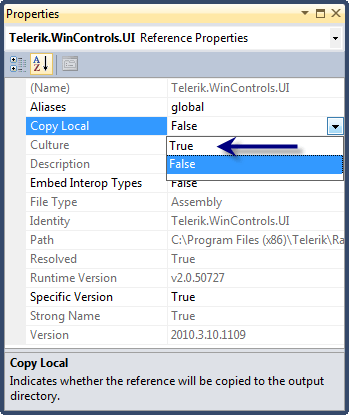
Thus these Telerik assemblies will be copied to your Release/Bin, Debug/Bin folders. Your application deployment consists of copying the exe, dlls, xmls files to your client machines which in the simpler case will be manual copy and in the more advanced scenario will be a copy by your installer.
GAC
As noted above, Telerik assemblies are installed in the GAC by Telerik installer on the developer machines. You may choose to insert Telerik assemblies in the GAC of your client machines too by following the instructions in the Add/Remove RadControls to the Global Assembly Cache (GAC) section.
Please do not use Telerik installer to install Telerik assemblies in the GACs of your clients' machines. Telerik installer should be used only for the developers' machines.
ClickOnce
By default, when preparing a ClickOnce distribution of a Windows Forms Application, VS uses its default settings, which assume that all project assemblies located in the GAC of the local machine are also available on the remote server. By default, the CopyLocal property for assemblies located in the GAC is set to false, and they are marked as prerequisites in the application manifest (meaning that ClickOnce expects these to already be present in the remote machine's GAC. As a result, the application does not pack them). This may cause problems if the assemblies are not registered in the remote server's GAC.
Here are several simple steps on how to deploy a Windows Forms Application using ClickOnce:
-
Open your project in Visual Studio.
-
Go to your project's Properties.
-
Go to the Publish item.
-
Click on the Application Files... button - it will open a list of files that are required by the distribution.
-
There is a small checkbox at the bottom left corner of the opened Application Files form. If it is not checked, tick it to see all files required by the distribution.
-
You will see all the required assemblies (that are registered in the GAC) probably with a publish status of Prerequisite(Auto) - this means that the installation assumes the assemblies will be available in the target machine GAC before the installation takes place.
-
Change the Publish Status field of the required assemblies from Prerequisite to Include and accept all changes.
-
Republish the project to check that all is OK.
Running an Application from a Network Drive
If your WinForms application is using Telerik controls and is located on a network drive and Telerik assemblies are also located on the network drive you will not be able to run your application because of security attributes set to TelerikCommon assembly. In such a case, you need to copy the whole program locally and run it. Please note that this does not apply to publishing your application with ClickOnce on a network drive - there should be no problem publishing your application on a network drive.
Assemblies that you should redistribute in all scenarios
-
TelerikCommon.dll
-
Telerik.WinControls.dll
Assemblies that you need to redistribute depending on which controls you use in your application
| Control Name | Assembly |
|---|---|
|
CustomShape |
Telerik.WinControls.dll |
|
RadApplicationMenu |
Telerik.WinControls.UI.dll |
|
RadBarcode |
Telerik.WinControls.UI.dll |
|
RadBreadCrumb |
Telerik.WinControls.UI.dll |
|
RadBulletGraph |
Telerik.WinControls.UI.dll |
|
RadButton |
Telerik.WinControls.UI.dll |
|
RadButtonTextBox |
Telerik.WinControls.UI.dll |
|
RadCalendar |
Telerik.WinControls.UI.dll |
|
RadCarousel |
Telerik.WinControls.UI.dll |
|
RadCheckBox |
Telerik.WinControls.UI.dll |
|
RadCheckedListBox |
Telerik.WinControls.UI.dll |
|
RadColorDialog |
Telerik.WinControls.dll |
|
RadContextMenu |
Telerik.WinControls.UI.dll |
|
RadContextMenuManager |
Telerik.WinControls.UI.dll |
|
RadChart |
Telerik.WinControls.RadChart.dll |
|
RadDataFilter |
Telerik.WinControls.UI.dll |
|
RadDateTimePicker |
Telerik.WinControls.UI.dll |
|
RadDiagram |
Telerik.WinControls.RadDiagram.dll |
|
RadDock |
Telerik.WinControls.RadDock.dll |
|
RadDropDownButton |
Telerik.WinControls.UI.dll |
|
RadFontDropDownList |
Telerik.WinControls.UI.dll |
|
RadForm |
Telerik.WinControls.UI.dll |
|
RadGridView |
Telerik.WinControls.GridView.dll |
|
RadHScrollBar |
Telerik.WinControls.UI.dll |
|
RadLabel |
Telerik.WinControls.UI.dll |
|
RadLinearGauge |
Telerik.WinControls.UI.dll |
|
RadMaskedEditBox |
Telerik.WinControls.UI.dll |
|
RadMenu |
Telerik.WinControls.UI.dll |
|
RadMultiColumnComboBox |
Telerik.WinControls.GridView.dll |
|
RadPanel |
Telerik.WinControls.UI.dll |
|
RadProgressBar |
Telerik.WinControls.UI.dll |
|
RadRadioButton |
Telerik.WinControls.UI.dll |
|
RadRepeatButton |
Telerik.WinControls.UI.dll |
|
RadRibbonBar |
Telerik.WinControls.UI.dll |
|
RadRibbonForm |
Telerik.WinControls.UI.dll |
|
RadTabbedForm |
Telerik.WinControls.UI.dll |
|
RadRotator |
Telerik.WinControls.UI.dll |
|
RadScheduler |
Telerik.WinControls.Scheduler.dll |
|
RadSpinEditor |
Telerik.WinControls.UI.dll |
|
RadSplitButton |
Telerik.WinControls.UI.dll |
|
RadStatusStrip |
Telerik.WinControls.UI.dll |
|
RadTextBox |
Telerik.WinControls.UI.dll |
|
RadThemeManager |
Telerik.WinControls.dll |
|
RadTitleBar |
Telerik.WinControls.UI.dll |
|
RadToggleButton |
Telerik.WinControls.UI.dll |
|
RadTrackBar |
Telerik.WinControls.UI.dll |
|
RadVScrollBar |
Telerik.WinControls.UI.dll |
|
RadWaitingBar |
Telerik.WinControls.UI.dll |
|
RadRating |
Telerik.WinControls.UI.dll |
|
ShapedForm |
Telerik.WinControls.UI.dll |
|
SchedulerBindingDataSource |
Telerik.WinControls.Scheduler.dll |
|
RadShortcuts |
Telerik.WinControls.dll |
|
AquaTheme |
Telerik.WinControls.Themes.Aqua.dll |
|
FluentTheme |
Telerik.WinControls.Themes.Fluent.dll |
|
FluentDarkTheme |
Telerik.WinControls.Themes.FluentDark.dll |
|
CrystalTheme |
Telerik.WinControls.Themes.Crystal.dll |
|
CrystalDarkTheme |
Telerik.WinControls.Themes.CrystalDark.dll |
|
DesertTheme |
Telerik.WinControls.Themes.Desert.dll |
|
Office2007Black |
Telerik.WinControls.Themes.Office2007Black.dll |
|
Office2007Silver |
Telerik.WinControls.Themes.Office2007Silver.dll |
|
TelerikMetroTheme |
Telerik.WinControls.Themes.TelerikMetro.dll |
|
BreezeTheme |
Telerik.WinControls.Themes.Breeze.dll |
|
HighContrastBlackTheme |
Telerik.WinControls.Themes.HighContrastBlack.dll |
|
Office2010Black |
Telerik.WinControls.Themes.Office2010BlackTheme.dll |
|
Office2010Blue |
Telerik.WinControls.Themes.Office2010BlueTheme.dll |
|
Office2010Silver |
Telerik.WinControls.Themes.Office2010SilverTheme.dll |
|
Office2010Black |
Telerik.WinControls.Themes.Office2010BlackTheme.dll |
|
Windows7 |
Telerik.WinControls.Themes.Windows7.dll |
|
RadMarkupDialog |
Telerik.WinControls.UI.RadMarkupDialog.dll |
|
RadDropDownList |
Telerik.WinControls.UI.dll |
|
RadListControl |
Telerik.WinControls.UI.dll |
|
RadListView |
Telerik.WinControls.UI.dll |
|
RadTreeView |
Telerik.WinControls.UI.dll |
|
RadDesktopAlert |
Telerik.WinControls.UI.dll |
|
RadSeparator |
Telerik.WinControls.UI.dll |
|
RadWizard |
Telerik.WinControls.UI.dll |
|
RadProgressBar |
Telerik.WinControls.UI.dll |
|
RadOageView |
Telerik.WinControls.UI.dll |
|
RadSplitContainer |
Telerik.WinControls.UI.dll |
|
RadGroupBox |
Telerik.WinControls.UI.dll |
|
RadPanel |
Telerik.WinControls.UI.dll |
|
RadScrollablePanel |
Telerik.WinControls.UI.dll |
|
RadRichTextBox |
Telerik.WinControls.RichTextBox.dll |
|
RadRichTextEditor |
Telerik.WinControls.RichTextEditor.dll |
|
RadSpellChecker |
Telerik.WinControls.SpellChecker.dll |
|
RadPropertyGrid |
Telerik.WinControls.UI.dll |
|
RadRangeSelector |
Telerik.WinControls.UI.dll |
|
RadReminder |
Telerik.WinControls.Scheduler.dll |
|
RadSchedulerReminder |
Telerik.WinControls.Scheduler.dll |
|
RadSchedulerNavigator |
Telerik.WinControls.Scheduler.dll |
|
RadTimeSpanPicker |
Telerik.WinControls.UI.dll |
|
RadCommandBar |
Telerik.WinControls.UI.dll |
|
RadMessageBox |
Telerik.WinControls.UI.dll |
|
RadAutoCompleteBox |
Telerik.WinControls.UI.dll |
|
RadTextBoxControl |
Telerik.WinControls.UI.dll |
|
RadChartView |
Telerik.WinControls.ChartView.dll |
|
RadPivotGrid |
Telerik.WinControls.RadPivotGrid.dll |
|
RadPivotFieldList |
Telerik.WinControls.RadPivotGrid.dll |
|
RadPdfViewer |
Telerik.WinControls.PdfViewer.dll |
|
RadGanttView |
Telerik.WinControls.UI.dll |
|
RadBindingNavigator |
Telerik.WinControls.UI.dll |
|
RadCollapsiblePanel |
Telerik.WinControls.UI.dll |
|
RadDataEntry |
Telerik.WinControls.UI.dll |
|
RadRadialGauge |
Telerik.WinControls.UI.dll |
|
RadCheckedDropDownList |
Telerik.WinControls.UI.dll |
|
Office2013Dark |
Telerik.WinControls.Themes.Office2013Dark.dll |
|
Office2013Light |
Telerik.WinControls.Themes.Office2013Light.dll |
|
TelerikMetroBlue |
Telerik.WinControls.Themes.TelerikMetroBlue.dll |
|
TelerikMetroTouch |
Telerik.WinControls.Themes.TelerikMetroTouch.dll |
| Material |
Telerik.WinControls.Themes.Material.dll |
| MaterialPink | Telerik.WinControls.Themes.MaterialPink.dll |
| MaterialTeal | Telerik.WinControls.Themes.MaterialTeal.dll |
| MaterialBlueGray | Telerik.WinControls.Themes.MaterialBlueGray.dll |
| VisualStudio2012Dark |
Telerik.WinControls.Themes.VisualStudio2012Dark.dll |
|
VisualStudio2012Light |
Telerik.WinControls.Themes.VisualStudio2012Light.dll |
|
Windows8 |
Telerik.WinControls.Themes.Windows8.dll |
| RadToggleSwitch | Telerik.WinControls.UI.dll |
| RadLayoutControl | Telerik.WinControls.UI.dll |
| RadPopupEditor | Telerik.WinControls.UI.dll |
| RadDataLayout | Telerik.WinControls.UI.dll |
| RadVirtualGrid | Telerik.WinControls.GridView.dll |
| RadPanorama | Telerik.WinControls.UI.dll |
| RadBrowseEditor | Telerik.WinControls.UI.dll |
| RadCalculatorDropDown | Telerik.WinControls.UI.dll |
| RadColorBox | Telerik.WinControls.UI.dll |
| RadTimePicker | Telerik.WinControls.UI.dll |
| RadClock | Telerik.WinControls.UI.dll |
| RadPdfViewerNavigator | Telerik.WinControls.PdfViewer.dll |
| RadCardView | Telerik.WinControls.UI.dll |
| RadMap | Telerik.WinControls.RadMap.dll |
| RadSpreadsheet | Telerik.WinControls.RadSpreadsheet.dll |
| RadDomainUpDown | Telerik.WinControls.UI.dll |
| ExplorerControl | Telerik.WinControls.UI.dll |
| RadOpenFileDialog | Telerik.WinControls.UI.dll |
| RadOpenFolderDialog | Telerik.WinControls.UI.dll |
| RadSaveFileDialog | Telerik.WinControls.UI.dll |
| RadVirtualKeyboard | Telerik.WinControls.UI.dll |
| RadSyntaxEditor | Telerik.WinControls.SyntaxEditor.dll |