Design Time
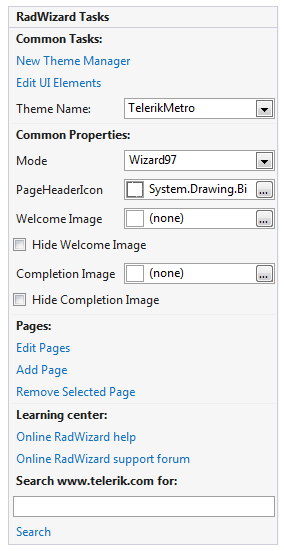
RadWizard provides handful Smart Tag and Pages Collection Editor at design time. There is a set of properties listed below:
Figure 1: Smart Tag
-
New Theme Manager: Adds a new RadThemeManager.
-
Edit UI Elements: Opens a dialog that displays the Element Hierarchy Editor. This editor lets you browse all the elements in the control.
-
Theme Name: Select a theme name from the drop down list of themes available for that control. Selecting a theme allows you to change all aspects of the controls visual style at one time.
-
Mode: Gets or sets the mode of the control.
-
PageHeaderIcon: Gets or sets the icon of the page header.
-
WelcomeImage: Gets or sets the image of the welcome pages.
-
Hide Welcome Image: Gets or sets a value indicating whether the image of the welcome pages should be visible.
-
CompletionImage: Gets or sets the image of the completion pages.
-
Hide Completion Image: Gets or sets a value indicating whether the image of the completion pages should be visible.
-
Edit Pages: Opens the Pages Collection Editor. It allows you to:
-
Add Internal, Welcome and Completion pages
-
Remove pages
-
Rearrange pages
-
Customize page properties
Figure 2: Pages Collection Editor

-
-
Add Pages: Adds a new WizardPage.
-
Remove Selected Page: Removes the selected page.
-
Learning Center: Navigate to the Telerik help, code library projects or support forum.
-
Search: Search the Telerik site for a given string.